
Visual Studio and TFS 2013 List of Product Updates (Part 1)
This post is continued here!
Looking for List of VS 2013 Extensions (Part 2)
Updated April 12th 2014: Visual Studio 2013 Update 2 RC & TFS Server 2013 Update 2
Looking for the VS 2012 product info and extensions? Go to Visual Studio 2012 Product and updates (Part 1) and Visual Studio 2012 extensions (Part 2)
Looking for the VS 2010 extensions? Go to Visual Studio 2010 - List of Product Updates (Part 1) + Extensions (Part 2).
Looking for links to the test adapters, go to this blog post.
The information contains the download links to all versions and updates where applicable, links to information about each version, the version number for each and the release dates. I have also added prerequisites, like the SQL server version necessary.
This is the major download link for all official Visual Studio products.
Product Notes Version number Date Applicable to Visual Studio 2013 Update 2 RC & TFS Server 2013 Update 2 See info: Release notes, Brian Harry blog on General Availability, Brian Harry on TFS 2013 U2, KB 2927432 12.0.30324.0 Apr 3rd, 2014 Visual Studio & TFS Visual Studio 2013 Update 1 See info: KB 2911573, 12.0.30110.0 Jan 20th 2014 Visual Studio Visual Studio and TFS 2013 download link The RTM version of Visual Studio 2013 (Note 3)
12.0.21005.1
Nov 18th 2013 Visual Studio and TFS SQL Server 2012 SP1 The TFS 2013 require the SQL 2012 server, SP1 Also see Manually Install SQL Server for TFS 2013 SQL Server 2012 SP1
Updated March 5th 2014: Visual Studio 2013 Update 2 CTP 2 Updated Feb 8th 2014: Visual Studio 2031 Update 1, Visual Studio 2013 Update 2 CTP 1
| Product | Notes | Version number | Date | Applicable to |
| Visual Studio 2013 Update 2 CTP 2 | See Info: KB 2927432, and Brian Harry’s blogpost. | 12.0.30219.0 | Feb 24th, 2014 | Visual Studio & TFS |
| Visual Studio 2013 Update 2 CTP 1 | See info: KB 2927432 | 12.0.30129.0 | Feb 5th, 2014 | Visual Studio & TFS |
| Visual Studio 2013 Update 1 RC | See info: Brian Harry’s blog, and KB 2911573 (Note 2) | 12.0.21126.0 | Dec 9th 2013 | Visual Studio |
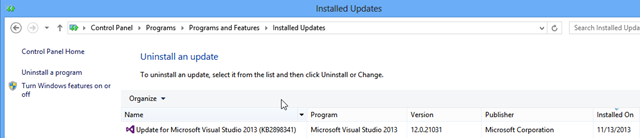
| Visual Studio Patch | A patch for fixing the Queue Build dialog, see KB 2898341 and Buck Hodges post. | 12.0.21031 (Note 1) | Nov 13th 2013 | Visual Studio |
Note 1
The version number of Visual Studio is not changed when installing this patch. The only place you see it is in the Installed Updates list
Note 2
The Update 1 RC doesn’t include the Queue Build patch.
Note 3
There was a rerelease of TFS 2013. The first release had a bug which appeared in the Web UI, Code section, History. If you get a red cross there, you got the first release. You then need to reinstall.
Unsure which version and update you have ?
Visual Studio:
Go to the top menu, choose Help | About
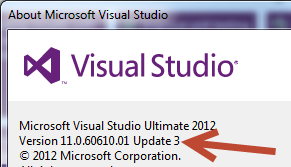
Note that both the name of the update and the corresponding version number is given.
Go to the top menu, select Tools | Extensions and Updates. Under the Updates | Product Updates section you will see if there is a new update ready for you. Note that pre-releases and hotfixes don’t arrive here.
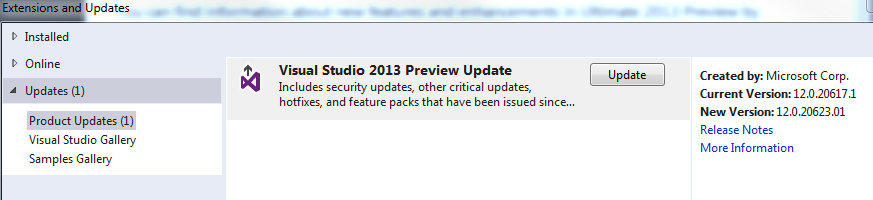
(Image from VS 2013 preview, but it is the same in VS 2013)
To the far right you see the version number you have, and what version to update to. Since the updates are cumulative, you don’t need to worry about those in between.
Team Foundation Server (on premise):
Use the web access for the TFS. Go to the Help Icon to the far right, and choose “About” from the menu:
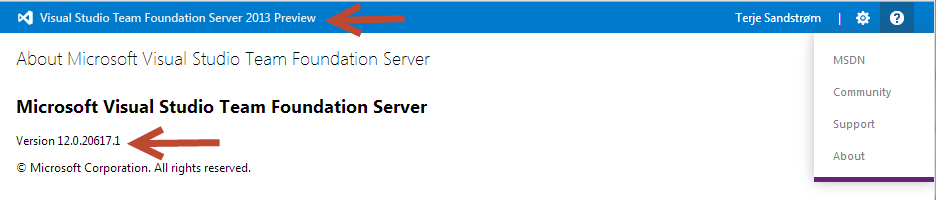
In this case I have a TFS 2013 preview server.
Team Foundation Service:
If you are connected to the Team Foundation Service you will not find any version number. It is also always updated to the latest version. You could check the to see if all is working, and to see what has been done at the.
Thanks
Thanks to Adam Cogan for valuable help in structuring these posts