
How to fix an annoying ReSharper – NuGet error

How to fix an annoying ReSharper – NuGet error

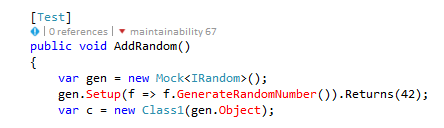
Using in Visual Studio together with ReSharper may sometimes lead you into an annoying error where ReSharper indicates your code has an error, but the solution builds just fine. This may happen if you have a set of NuGet packages, and you either just restore them, or delete them on disk and then restore again.  Your code ends up looking like this, note the red missing functions, which comes from the Moq library - which is downloaded from NuGet:
image

while the Build is still fine, it compiles without any errors:

image

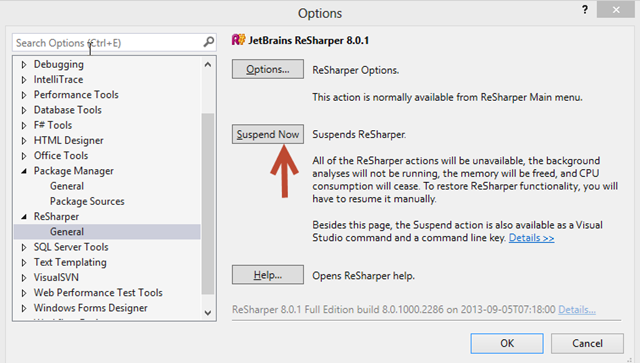
This stackoverflow question gives some different approaches to solve this, but my experience have been that the Resharper Suspend-Resume trick most often solves the issue: In Visual Studio:  Go to Tools/Options/Resharper

Press Suspend:
image

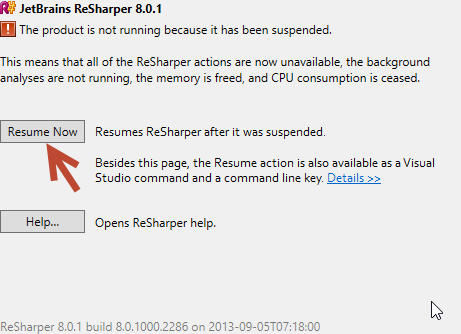
When this is done the error markers disappear, since ReSharper now is inactive.

Then just press Resume again:
image

This has been submitted to Jetbrains support,  here http://youtrack.jetbrains.com/issue/RSRP-396411 – Comment and votes please.

This article is part of the GWB Archives. Original Author: terje

New on Geeks with Blogs

  • We Won The One Award I Actually Care About

    Full Scale made the Inc. 5000 for the fifth year straight, the 12th listing across my three companies. Here is why the one award you cannot buy is worth stopping for.

  • Your Customers Build the Features Now

    I let a tool I liked sit dead for a year rather than build the features I wanted. An MCP server meant I never had to, and your customers can do the same to your product.

  • Get the Size of a Directory in Linux the Easy Way

    du -sh for the quick answer, ncdu for the cleanup, df for the disk itself: every command for checking directory size in Linux, plus why du and df never agree.

  • Vim Search and Replace: The Ultimate Guide

    One :%s command replaces every match in a file before a find dialog would even open. The Vim substitute patterns worth the muscle memory: flags, ranges, capture groups, and multi-file edits.