
Issues with mixed C++ and C# projects in Visual Studio 2012 running Code Analysis
If you have projects created under Visual Studio 2010 (SP1), and mixed C++ and C# projects in the solution, and you are using other configurations than Debug/Release x86 you may hit a very strange situation when you run the Static Code Analysis, either alone, or as part of the build.
You may get into a situation which seems like things go in circles. One error points to a place where it simply points back to the first one. This is in fact, two kind of errors causing this behavior.
Now, what you see is this:

The new Code Analysis window tells you it has issues around the platform toolset, pointing you to the Error list, which just tells you that Code Analysis has detected errors, and points you back to the Code Analysis Window, or ask you to look up the log, which whereabouts is not known…….
This situation is caused by two different errors working in (dis)harmony.
The first issue is the platform issue. The Code Analysis window will only show warnings/errors from a C++ project if the platform toolset is set to VS 2012. If you have created this solution/project in VS 2010, it will be set to VS 2010. All errors from the VS 2010 C++ code analysis will then be shown in the Error list window, and not in the new Code Analysis window.
If you look in the project properties for a C++ project you find this setting under Configuration Properties/General – Platform Toolset, and the possible values are either Visual Studio 2010 (v100) or Visual Studio 2012 (v110) (or VS2008 which is v90).
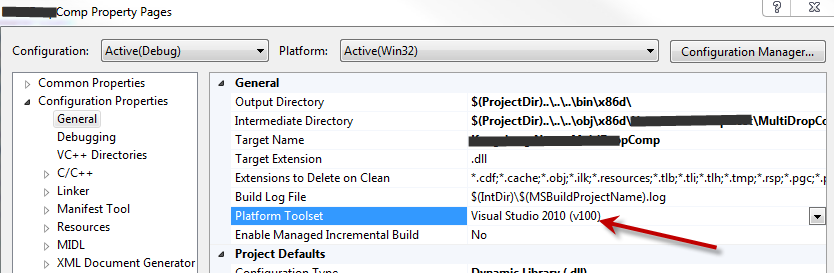
If this is set to anything but v110, the list of Code Analysis errors will go to the Error Window.
Now, this is fine, except, it doesn’t get there….
Which is caused by another error which is not shown now, it would have been shown in the Code Analysis window, if it hadn't been covered by this error. This is the CA00053 error, an error in the csproj project file caused by a VS 2010 SP1 error. It has been fixed in VS 2012, but is still in VS 2010, so any project you move over from VS2010 is suspect to have this issue. See this blog post for more information on how to handle this error, there is even a tool to fix the project file. https://geekswithblogs.net/terje/archive/2012/08/18/how-to-fix-the-ca0053-error-in-code-analysis-in.aspx
So, fix your project files, using the tool at http://visualstudiogallery.msdn.microsoft.com/471da13b-d415-4a44-a4e9-a8222316b902, then you will see the analysis errors/warnings in the error windows, your build will not be broken, and in the Code Analysis window you will just get the warning above.