
Memory for managed code is handled by the garbage collector, but if you use any kind of unmanaged code, like native resources of any kind, open files, streams and window handles, your application may leak memory if these are not properly handled. To handle such resources the classes that own these in your application should implement the IDisposable interface, and preferably implement it according to the pattern described for that interface.
When you suspect a memory leak, the immediate impulse would be to start up a memory profiler and start digging into that. However, before you follow that impulse, do a Static Code Analysis run with a ruleset tuned to finding possible memory leaks in your code. If you get any warnings from this, fix them before you go on with the profiling.
How to use a ruleset
In Visual Studio 2010 (Premium and Ultimate editions) you can define your own rulesets containing a list of Static Code Analysis checks. I have defined the memory checks as shown in the lists below as ruleset files, which can be downloaded – see bottom of this post. When you get them, you can easily attach them to every project in your solution using the Solution Properties dialog. Right click the solution, and choose Properties at the bottom, or use the Analyze menu and choose “Configure Code Analysis for Solution”:
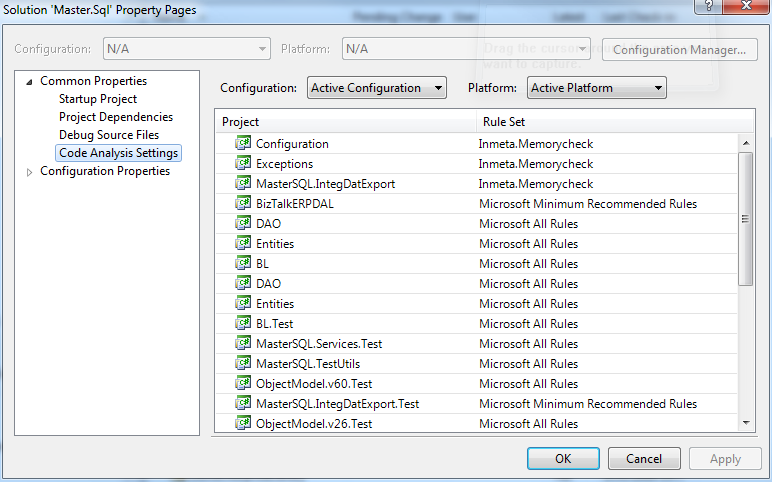
In this dialog you can now choose the Memorycheck ruleset for every project you want to investigate. Pressing Apply or Ok opens every project file and changes the projects code analysis ruleset to the one we have specified here.
How to define your own ruleset (skip this if you just download my predefined rulesets)
If you want to define the ruleset yourself, open the properties on any project, choose Code Analysis tab near the bottom, choose any ruleset in the drop box and press Open
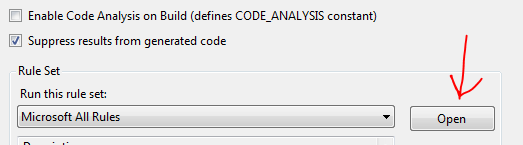
Clear out all the rules by selecting “Source Rule Sets” in the Group By box, and unselect the box
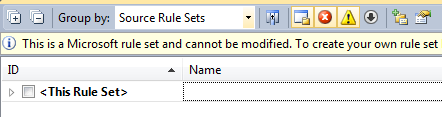
Change the Group By box to ID, and select the checks you want to include from the lists below.
Note that you can change the action for each check to either warning, error or none, none being the same as unchecking the check.

Now go to the properties window and set a new name and description for your ruleset.
Then save (File/Save as) the ruleset using the new name as its name, and use it for your projects as detailed above.
It can also be wise to add the ruleset to your solution as a solution item. That way it’s there if you want to enable Code Analysis in some of your TFS builds.
Running the code analysis
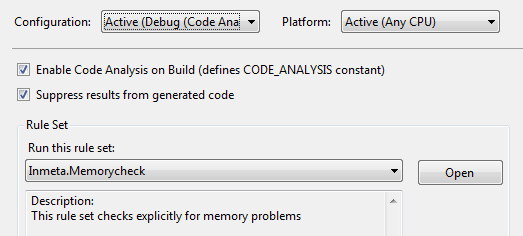
In Visual Studio 2010 you can either do your code analysis project by project using the context menu in the solution explorer and choose “Run Code Analysis”, you can define a new solution configuration, call it for example Debug (Code Analysis), in for each project here enable the Enable Code Analysis on Build
In Visual Studio Dev-11 it is all much simpler, just go to the Solution root in the Solution explorer, right click and choose “Run code analysis on solution”.
The ruleset checks
The following list is the essential and critical memory checks.
| CheckID | Message | Can be ignored? | Link to description with fix suggestions |
| CA1001 | Types that own disposable fields should be disposable | No | http://msdn.microsoft.com/en-us/library/ms182172.aspx |
| CA1049 | Types that own native resources should be disposable | Only if the pointers assumed to point to unmanaged resources point to something else | http://msdn.microsoft.com/en-us/library/ms182173.aspx |
| CA1063 | Implement IDisposable correctly | No | http://msdn.microsoft.com/en-us/library/ms244737.aspx |
| CA2000 | Dispose objects before losing scope | No | http://msdn.microsoft.com/en-us/library/ms182289.aspx |
| CA2115 1 | Call GC.KeepAlive when using native resources | See description | http://msdn.microsoft.com/en-us/library/ms182300.aspx |
| CA2213 | Disposable fields should be disposed | If you are not responsible for release, of if Dispose occurs at deeper level | http://msdn.microsoft.com/en-us/library/ms182328.aspx |
| CA2215 | Dispose methods should call base class dispose | Only if call to base happens at deeper calling level | http://msdn.microsoft.com/en-us/library/ms182330.aspx |
| CA2216 | Disposable types should declare a finalizer | Only if type does not implement IDisposable for the purpose of releasing unmanaged resources | http://msdn.microsoft.com/en-us/library/ms182329.aspx |
| CA2220 | Finalizers should call base class finalizers | No | http://msdn.microsoft.com/en-us/library/ms182341.aspx |
Notes:
1) Does not result in memory leak, but may cause the application to crash
The list below is a set of optional checks that may be enabled for your ruleset, because the issues these points too often happen as a result of attempting to fix up the warnings from the first set.
| ID | Message | Type of fault | Can be ignored? | Link to description with fix suggestions |
| CA1060 | Move P/invokes to NativeMethods class | Security | No | http://msdn.microsoft.com/en-us/library/ms182161.aspx |
| CA1816 | Call GC.SuppressFinalize correctly | Performance | Sometimes, see description | http://msdn.microsoft.com/en-us/library/ms182269.aspx |
| CA1821 | Remove empty finalizers | Performance | No | http://msdn.microsoft.com/en-us/library/bb264476.aspx |
| CA2004 | Remove calls to GC.KeepAlive | Performance and maintainability | Only if not technically correct to convert to SafeHandle | http://msdn.microsoft.com/en-us/library/ms182293.aspx |
| CA2006 | Use SafeHandle to encapsulate native resources | Security | No | http://msdn.microsoft.com/en-us/library/ms182294.aspx |
| CA2202 | Do not dispose of objects multiple times | Exception (System.ObjectDisposedException) | No | http://msdn.microsoft.com/en-us/library/ms182334.aspx |
| CA2205 | Use managed equivalents of Win32 API | Maintainability and complexity | Only if the replace doesn’t provide needed functionality | http://msdn.microsoft.com/en-us/library/ms182365.aspx |
| CA2221 | Finalizers should be protected | Incorrect implementation, only possible in MSIL coding | No | http://msdn.microsoft.com/en-us/library/ms182340.aspx |
Downloadable ruleset definitions
I have defined three rulesets, one called Inmeta.Memorycheck with the rules in the first list above, and Inmeta.Memorycheck.Optionals containing the rules in the second list, and the last one called Inmeta.Memorycheck.All containing the sum of the two first ones.
All three rulesets can be found in the .
Links to some other resources relevant to Static Code Analysis
MSDN Magazine Article by Mickey Gousset on Static Code Analysis in VS2010
MSDN: Analyzing Managed Code Quality by Using Code Analysis, root of the documentation for this
Preventing generated code from being analyzed using attributes
Online training course on Using Code Analysis with VS2010
Blogpost by Tatham Oddie on custom code analysis rules
How to write custom rules, from Microsoft Code Analysis Team Blog