
New version of the Inmeta Build Folder Extension
The 1.0.1 version of the Build Folder Extension is now out and can be downloaded from the Visual Studio Code Gallery at http://visualstudiogallery.msdn.microsoft.com/35daa606-4917-43c4-98ab-38632d9dbd45
Source code, discussions and issue tracking can be found at the codeplex site at
Context menu
The context menu has been extended with the following commands, shown below:
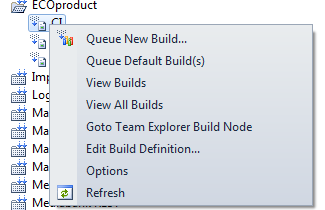
Queue New Build…: This pops up the traditional queue build dialog
Queue Default Build(s): This starts the default build directly, no dialog pops up. Less clicks! Another cute thing here is that if you select a folder, it will start all the builds in that folder directly.
View Builds: View the builds for the particular select build definition
View All Builds: Use this instead of the All Build Definitions to see the builds for all build definitions.
Goto Team Explorer Build Node: Some functionality is still in the original build tree. Use this to go directly to that node from the node in the Inmeta Build Folders.
******************
Change in 1.0.1 regarding build folders named equal to a build.
In some cases one defines builds which has the same name as a folder, like the picture below shows:
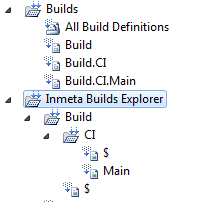
In those cases we add a “fake” node, named just ‘$’ to represent this build definition. This also makes it easier to see these specially named build definitions. In the earlier versions (pre 1.0) builds named like this was “lost”.
**************
Other
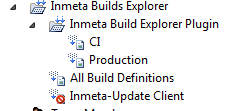
Disabled builds are shown properly with the correct icon.
Credentials problem
The pre 1.0 version assumed that you were logged in to the domain, or had the credentials in the credentials manager. The extension threw a TF30063 error if it could not authenticate properly. This has been changed so that it pops up the login dialog.
This means that one may have to log in twice, once for the Team Explorer connection and once for the Build Explorer connection. To avoid this, it’s recommended to add your credentials for that TFS connection to the Credential Manager.