
How to Create Multilingual Webpart in SharePoint 2010?
What is Localization/Multilingual and Globalization?
The term "Localization" defined as "Process of translating resources for a specific culture/languages", where "Globalization" defined "Process of designing applications that can adapt to different cultures/languages". When we publish a site for different regions then it'll be great if the site content is displayed in that regional language. SharePoint provides Language Packs which can be downloaded and installed from Microsoft Site. but the limitation in this is only the SharePoint site labels/text will be displayed in selected language and the user defined contents won't be translated by SharePoint.
How to enable Localization in SharePoint 2010?
Assume we develop a webpart that has a registration form. A user from German wish to register and he needs the form in German/Dutch language. Even though Dutch language pack installed and enabled in SharePoint, the webpart text won't be translated/displayed in German. So how to make webpart that can adapt different languages. For those working in .Net platform knows it can be done with Resource files (.resx). Resource files are nothing but Key/Value Pair defined XML format files.
Here the steps to create a Webpart that detects the selected language in SharePoint and display contents that fetched from Resource Files.
-
Open Visual Studio 2010 -> File -> New -> Project
-
Select [Template] Visual C# -> SharePoint -> 2010 [Framework] .Net Framework 3.5 [Project] -> Empty SharePoint 2010 Project. Name of the Project : vsProject
New Empty SharePoint Project
-
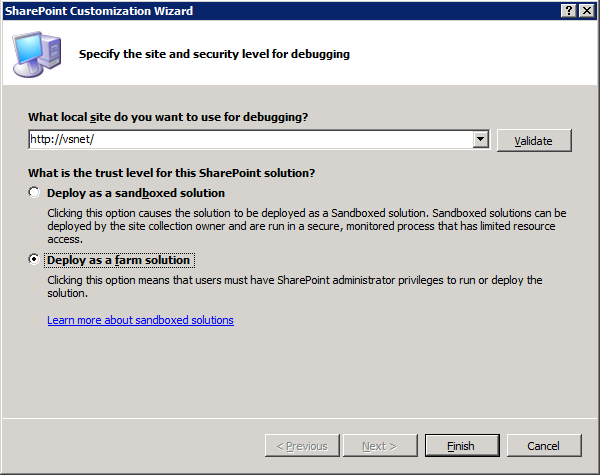
In the SharePoint Customization Wizard, enter the URL of the local site (http://vsnet/) and select Deploy as a farm solution.
-
Create Resource Files
-
Resource files should be present in SharePoint Root "Resources" folder. In Solution Explorer select project "vsProject", right click and select Add -> SharePoint Mapped Folder.
Add SharePoint Mapped Folders
-
In the Window select "Resources" Folder.
Add "Resources" Folder
-
Now an empty "Resources" folder is created inside SharePoint project. Any files placed inside this folder will be copied to SharePoint Root (14)\Resources Folder while deploying.
-
Right click on Resources folder and select Add -> New Folder -> vsProject [Folder Name]. Always create folder and place files. This will avoid the files getting deleted when any SharePoint service pack installed.
-
Right click on Newly created folder [vsProject] and select New -> New Item.
-
In the New Item window select [Template] Visual C# -> General -> Resources File -> Name the files as "vsProject.resx". This is for default language which in English (LCID : 1033).
New Resource File
-
Select vsProject.resx file, right click and Open.
-
Add Name and Value pairs as required.
Add Name/Value Pairs
-
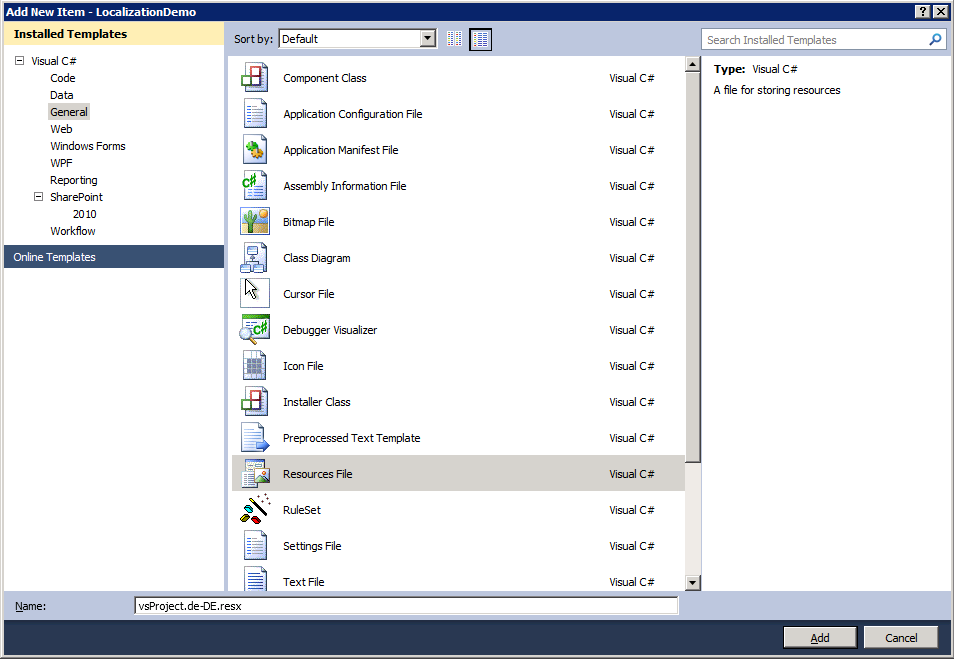
Repeat Step "f." and provide name "vsProject.de-DE.resx". This file is for Dutch language. Refer the end of the article to get full list.
-
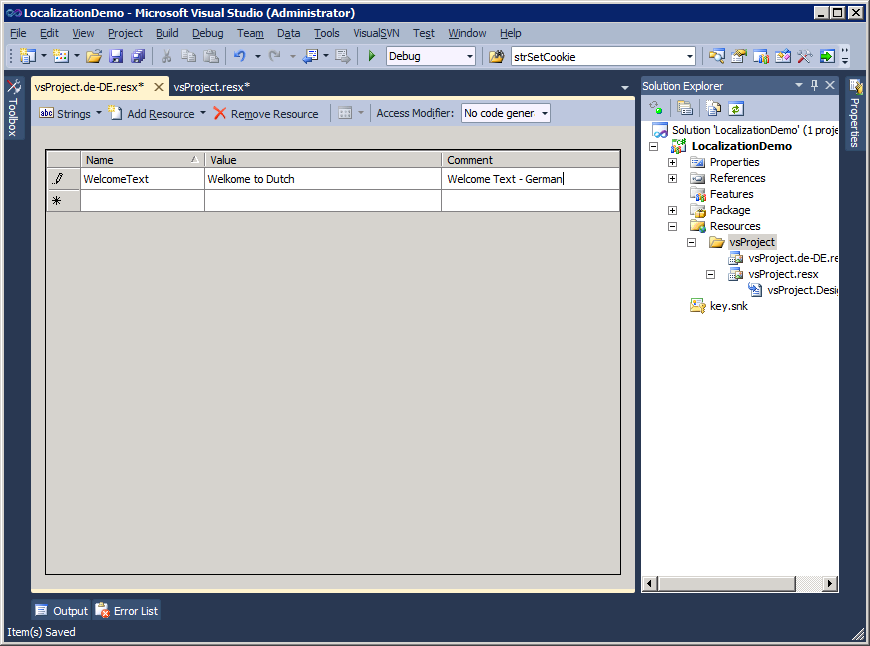
Open "vsProject.de-DE.resx" and enter the same Name as in vsProject.resx and provide value in German Language. Here "Comment" Field is optional.
-
-
Create Webpart
The Resource file is ready to use and now need to create Web part that get value from those resource files.-
Right Click on the Project "vsProject" and "Add -> New Item"
-
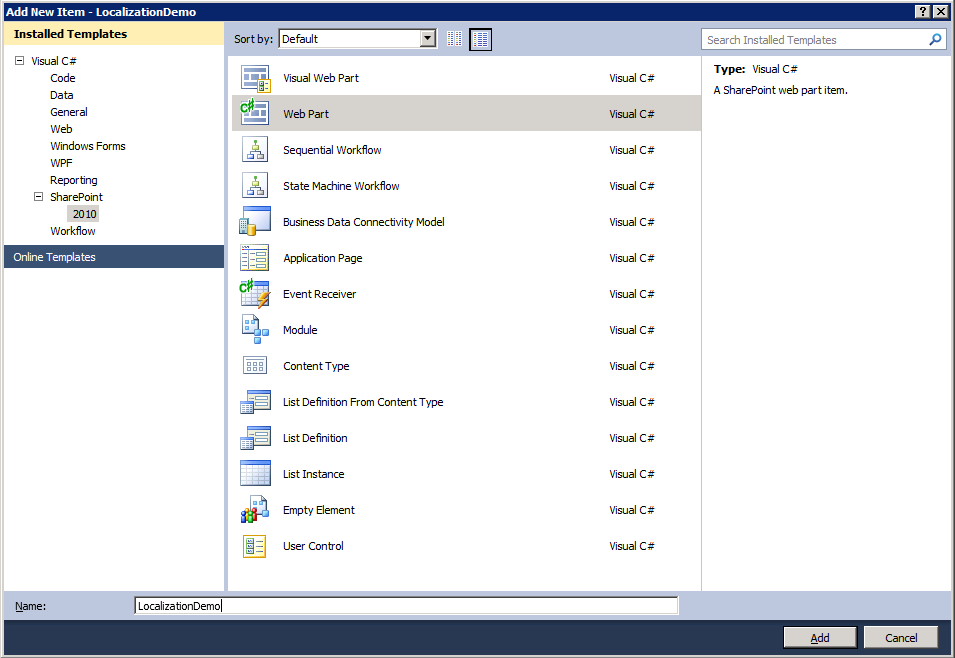
Select "Visual C# -> SharePoint -> 2010 -> Web Part". Name : "LocalizationDemo".
-
Copy paste the below code inside LocalizationDemo class or just refer it.
protected override void CreateChildControls()
{ int intLCID = System.Threading.Thread.CurrentThread.CurrentUICulture.LCID;
Label lblWelcomeText = new Label();
lblWelcomeText.Text = "Value : " + getLocalizedValue("WelcomeText", intLCID);
this.Controls.Add(lblWelcomeText);
}public string getLocalizedValue(string strInput, int intLCID)
{ // Function to retreive specified Language Variation Value string strLocalizedValue = "";strLocalizedValue = Microsoft.SharePoint.Utilities.SPUtility.GetLocalizedString("$Resources: " + strInput, "vsProject\\vsProject", (uint)intLCID);
return strLocalizedValue;
}
-
Save all files, Build and Deploy. The solution will be deployed in SharePoint and ready to use.
-
Open the SharePoint site any page and click "Edit" Icon on top (or Site Actions -> Edit page).
-
Select "Editing Tools [Tab] -> Insert [Tab] -> Web Part -> Custom [Categories] -> LocalizationDemo -> Add [Button]".
Add the Web Part to SharePoint Page
-
Once the webpart added to the page select "Save and close" Icon.
-
-
Now it'll show the content in default language (English - 1033). Select "User Menu" at top right and select "Select Display Language -> Deutsch".
-
The page will be refreshed the Web Part will show the German Content which specified in the resource file.
Localization English and After changing language to Deutsch
Reference List - Locale ID (LCID) and Language
HTTP
LCID
Language
1033
Default
af
1078
Afrikaans
sq
1052
Albanian
ar-sa
1025
Arabic(Saudi Arabia)
ar-iq
2049
Arabic(Iraq)
ar-eg
3073
Arabic(Egypt)
ar-ly
4097
Arabic(Libya)
ar-dz
5121
Arabic(Algeria)
ar-ma
6145
Arabic(Morocco)
ar-tn
7169
Arabic(Tunisia)
ar-om
8193
Arabic(Oman)
ar-ye
9217
Arabic(Yemen)
ar-sy
10241
Arabic(Syria)
ar-jo
11265
Arabic(Jordan)
ar-lb
12289
Arabic(Lebanon)
ar-kw
13313
Arabic(Kuwait)
ar-ae
14337
Arabic(U.A.E.)
ar-bh
15361
Arabic(Bahrain)
ar-qa
16385
Arabic(Qatar)
eu
1069
Basque
bg
1026
Bulgarian
be
1059
Belarusian
ca
1027
Catalan
zh-tw
1028
Chinese(Taiwan)
zh-cn
2052
Chinese(PRC)
zh-hk
3076
Chinese(Hong Kong)
zh-sg
4100
Chinese(Singapore)
hr
1050
Croatian
cs
1029
Czech
da
1030
Danish
n
1043
Dutch(Standard)
nl-be
2067
Dutch(Belgian)
en
9
English
en-us
1033
English(United States)
en-gb
2057
English(British)
en-au
3081
English(Australian)
en-ca
4105
English(Canadian)
en-nz
5129
English(New Zealand)
en-ie
6153
English(Ireland)
en-za
7177
English(South Africa)
en-jm
8201
English(Jamaica)
en
9225
English(Caribbean)
en-bz
10249
English(Belize)
en-tt
11273
English(Trinidad)
et
1061
Estonian
fo
1080
Faeroese
fa
1065
Farsi
fi
1035
Finnish
fr
1036
French(Standard)
fr-be
2060
French(Belgian)
fr-ca
3084
French(Canadian)
fr-ch
4108
French(Swiss)
fr-lu
5132
French(Luxembourg)
mk
1071
FYRO Macedonian
gd
1084
Gaelic(Scots)
gd-ie
2108
Gaelic(Irish)
de
1031
German(Standard)
de-ch
2055
German(Swiss)
de-at
3079
German(Austrian)
de-lu
4103
German(Luxembourg)
de-li
5127
German(Liechtenstein)
e
1032
Greek
he
1037
Hebrew
hi
1081
Hindi
hu
1038
Hungarian
is
1039
Icelandic
in
1057
Indonesian
it
1040
Italian(Standard)
it-ch
2064
Italian(Swiss)
ja
1041
Japanese
ko
1042
Korean
ko
2066
Korean(Johab)
lv
1062
Latvian
lt
1063
Lithuanian
ms
1086
Malaysian
mt
1082
Maltese
no
1044
Norwegian(Bokmal)
no
2068
Norwegian(Nynorsk)
p
1045
Polish
pt-br
1046
Portuguese(Brazil)
pt
2070
Portuguese(Portugal)
rm
1047
Rhaeto-Romanic
ro
1048
Romanian
ro-mo
2072
Romanian(Moldavia)
ru
1049
Russian
ru-mo
2073
Russian(Moldavia)
sz
1083
Sami(Lappish)
sr
3098
Serbian(Cyrillic)
sr
2074
Serbian(Latin)
sk
1051
Slovak
s
1060
Slovenian
sb
1070
Sorbian
es
1034
Spanish(Spain - Traditional Sort)
es-mx
2058
Spanish(Mexican)
es
3082
Spanish(Spain - Modern Sort)
es-gt
4106
Spanish(Guatemala)
es-cr
5130
Spanish(Costa Rica)
es-pa
6154
Spanish(Panama)
es-do
7178
Spanish(Dominican Republic)
es-ve
8202
Spanish(Venezuela)
es-co
9226
Spanish(Colombia)
es-pe
10250
Spanish(Peru)
es-ar
11274
Spanish(Argentina)
es-ec
12298
Spanish(Ecuador)
es-c
13322
Spanish(Chile)
es-uy
14346
Spanish(Uruguay)
es-py
15370
Spanish(Paraguay)
es-bo
16394
Spanish(Bolivia)
es-sv
17418
Spanish(El Salvador)
es-hn
18442
Spanish(Honduras)
es-ni
19466
Spanish(Nicaragua)
es-pr
20490
Spanish(Puerto Rico)
sx
1072
Sutu
sv
1053
Swedish
sv-fi
2077
Swedish(Finland)
th
1054
Thai
ts
1073
Tsonga
tn
1074
Tswana
tr
1055
Turkish
uk
1058
Ukrainian
ur
1056
Urdu
ve
1075
Venda
vi
1066
Vietnamese
xh
1076
Xhosa
ji
1085
Yiddish
zu
1077
Zulu