
RESTful WCF Services with No svc file and No config
While Microsoft continues to add features to WCF with each version, they are also adding features that simplify working with WCF services as well. Historically WCF has been somewhat intimidating to the uninitiated because of the non-trivial configuration for endpoints including behaviors, bindings, and much more. For this reason, a lot of people stayed with “old school” asmx web services. With the new features of WCF 4, you can build powerful web services with *no* svc file and *no* endpoint configuration.
Building a RESTful WCF service in this way is quite easy and you don’t need rely on any item templates. Just start with a blank asp.net web application project in Visual Studio. The web.config file is virtually empty:
1: <configuration>
2: <system.web>
3: <compilation debug="true" targetFramework="4.0" />
4: </system.web>
5: </configuration>
Next just add a regular C# class - for this example, I call mine PersonService and it will have basic CRUD operations. Typically we create interfaces in WCF to define our ServiceContract and operations like this:
1: [ServiceContract]
2: interface IPersonService
3: {
4: [OperationContract]
5: Person GetPerson(string id);
6:
7: [OperationContract]
8: Person InsertPerson(Person person);
9:
10: [OperationContract]
11: Person UpdatePerson(string id, Person person);
12:
13: [OperationContract]
14: void DeletePerson(string id);
15: }
Keep in mind, this step is *not* required. You *could* decorate your service class directly with these attributes and not even have the interface at all. However, in this case, it’s a nice convenience to encapsulate all the WCF attributes on the interface rather than your implementation class. The implementation of our PersonService class looks like this (I’ve removed the code that access the data store for brevity):
1: [AspNetCompatibilityRequirements(RequirementsMode = AspNetCompatibilityRequirementsMode.Allowed)]
2: public class PersonService : IPersonService
3: {
4: [WebGet(UriTemplate = "Person({id})")]
5: public Person GetPerson(string id)
6: {
7: }
8:
9: [WebInvoke(UriTemplate = "Person", Method = "POST")]
10: public Person InsertPerson(Person person)
11: {
12: }
13:
14: [WebInvoke(UriTemplate = "Person({id})", Method = "PUT")]
15: public Person UpdatePerson(string id, Person person)
16: {
17: }
18:
19: [WebInvoke(UriTemplate = "Person({id})", Method = "DELETE")]
20: public void DeletePerson(string id)
21: {
22: }
23: }
This is just a normal C# class that implement an interface. It’s also decorated with the typical WebGet/WebInvoke attributes (in the System.ServiceModel.Web namespace) that we use for RESTful services. Also notice that 3 of the 4 methods have the same UriTemplate but they are differentiated by the HTTP method (i.e., GET/PUT/DELETE). Also notice the AspNetCompatibilityRequirements attribute – this is needed for RESTful services that are processed in the ASP.NET pipeline as described here. You also have to add this to the config file (I know, I know – I said “no config” but I meant “no ugly WCF endpoint config”!):
1: <system.serviceModel>
2: <serviceHostingEnvironment aspNetCompatibilityEnabled="true"/>
3: </system.serviceModel>
So how do we take this regular C# class and make it into a service without an *.svc file? The System.Web.Routing infrastructure has now been incorporated into WCF 4 to make this possible. Just add the line of code (line #5) to your global.asax:
1: public class Global : System.Web.HttpApplication
2: {
3: protected void Application_Start(object sender, EventArgs e)
4: {
5: RouteTable.Routes.Add(new ServiceRoute("", new WebServiceHostFactory(), typeof(PersonService)));
6: }
7: }
The WebServiceHostFactory makes RESTful services possible in WCF. The first parameter of my ServiceRoute constructor is an empty string which means that my URI of my service will hang right off of the root – this get combined with the UriTemplate defined in the WebGet/WebInvoke attributes. So to get a person from my service, a URI would look like this: http://mydomain.com/Person(21). If I had specified “foo” instead of an empty string in the first parameters of the ServiceRoute constructor, then my URI would look like this: http://mydomain.cmo/foo/Person(21).
That’s it! You now have a fully functioning RESTful WCF service that you can fully test with Fidder for all HTTP verbs.
One interesting aspect to all this is that you can do all this in MVC as well. In fact, I typically do use MVC to return JSON to views for AJAX calls in my MVC apps. However, if you were building stand-alone services for this, would MVC be easier than the example of above? Keep in mind, we could simplify the example above even further by eliminating the IPersonService interface all together. I daresay that setting up RESTful routes like the ones shown above is easier with WCF than MVC (this, coming from an “MVC guy”) because we can apply the UriTemplates directly to the methods. To accomplish the same in MVC, you have to create custom route constraints to avoid the name of the C# methods from showing up in the URL (and honoring the REST HTTP verbs). If you are going to do this, I really like the approach shown here. It’s a cool approach, but it’s *more* work than just doing it with RESTful WCF – no svc file and no configuration.
In fact, using the WCF infrastructure gets you even more features for free. For example, if we add 1 more line of configuration (check out line #5 below) we get a help page and automatic format selection for free! Now our entire configuration just looks like this (and still no WCF endpoint configuration needed):
1: <system.serviceModel>
2: <serviceHostingEnvironment aspNetCompatibilityEnabled="true"/>
3: <standardEndpoints>
4: <webHttpEndpoint>
5: <standardEndpoint name="" helpEnabled="true" automaticFormatSelectionEnabled="true"/>
6: </webHttpEndpoint>
7: </standardEndpoints>
8: </system.serviceModel>
Notice all we had to do to get the help page was the request “/help”:
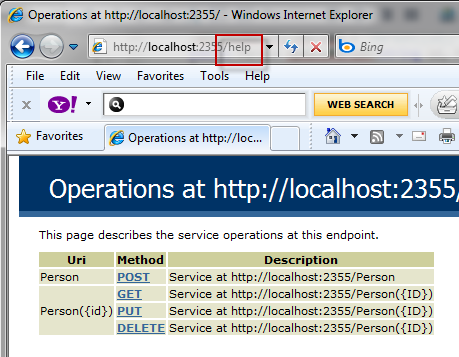
The automatic format selection in WCF will honor the Accept header and/or the Content-type header and return XML, JSON, etc. to the caller based on the value specified in the header. Again, that takes custom code in MVC which you get for free in WCF.
posted on Saturday, August 21, 2010 9:17 PM Print