
Linq Table Attach() based on timestamp or row version
In a previous post here, I showed an example of using the Attach() method in conjunction with a Timestamp column in your database table. In listing options that are supported, Microsoft's documentation states: "Optimistic concurrency based on timestamps or RowVersion numbers." So what are some alternatives to using a Timestamp column in your SQL Server database? It turns out, this is pretty simple. Two other alternatives are using a DateTime or a unique identifier column.
DateTime Last Updated
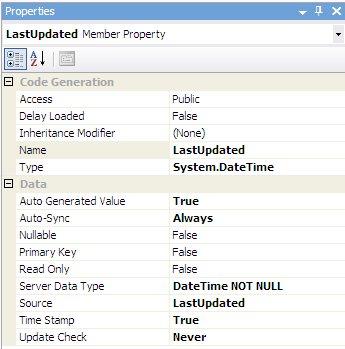
The key here is to create a LastUpdated DateTime column with a default value of getdate() and an AFTER UPDATE trigger which inserts the current getdate() any time there is a modification.
1: CREATE TABLE Contacts(
2: ContactID int IDENTITY(1,1) NOT NULL,
3: FirstName varchar(50),
4: LastName varchar(50),
5: LastUpdated datetime NOT NULL default (getdate()),
6: CONSTRAINT [PK_Contacts] PRIMARY KEY CLUSTERED (ContactID ASC)
7: )
8: GO
9:
10: CREATE TRIGGER trig_ContactsVersion
11: ON Contacts
12: AFTER UPDATE
13: AS
14: BEGIN
15: UPDATE Contacts
16: SET LastUpdated = getdate()
17: WHERE ContactID IN (SELECT ContactID FROM inserted);
18: END;
And the corresponding properties must be configured:
Unique Identifier
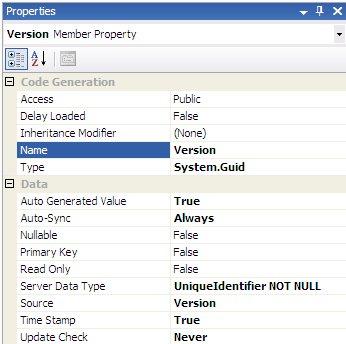
The key here is to create a Version unique identifier column with a default value of newid() and an AFTER UPDATE trigger which inserts a new guid any time there is a modification.
1: CREATE TABLE Contacts(
2: ContactID int IDENTITY(1,1) NOT NULL,
3: FirstName varchar(50),
4: LastName varchar(50),
5: Version uniqueidentifier NOT NULL default (newid()),
6: CONSTRAINT [PK_Contacts] PRIMARY KEY CLUSTERED (ContactID ASC)
7: )
8:
9: CREATE TRIGGER trig_ContactsVersion
10: ON Contacts
11: AFTER UPDATE
12: AS
13: BEGIN
14: UPDATE Contacts
15: SET Version = newid()
16: WHERE ContactID IN (SELECT ContactID FROM inserted);
17: END;
And the corresponding properties must be configured:
So you actually have a lot of flexibility here. If you don't like the SQL Server Timestamp data type, no problem. Just use your Optimistic concurrency implementation of choice. Of course, these implementations can all be used with a stored procedure approach as well.
posted on Tuesday, December 18, 2007 10:51 PM Print