
Installing Citrix XenServer from bootable USB stick

Installing Citrix XenServer from bootable USB stick

Installing XenServer 6.2 to my new Intel NUC was not so straight forward as thought.

The downloaded ISO (XenServer-6.2.0-install-cd.iso) I burned on my MacBook with Unetbootin onto a USB stick. Unfortunately this stick was not bootable at all. Not in the NUC and also not on the MacBook.

So I switched to my “Standby-Windows” on Bootcamp and made the next attempt with YUMI. Now XenServer booted but a few installation steps later it hanged with “failed to load com32 file mboot.c32”. There are some advices in the web to fix such errors by replacing that file with one from a running installation. Too complex for my aim.

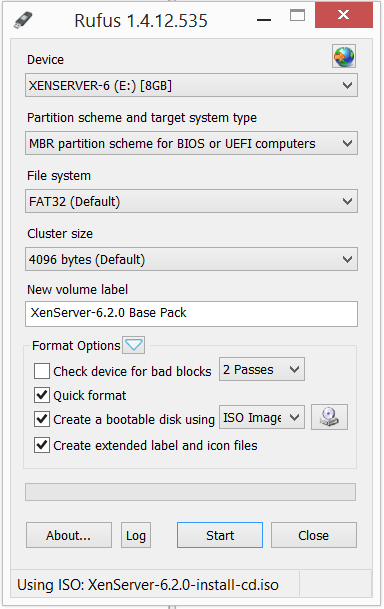
But one of the hints gave me the idea, that another burning program can fix that issue. Under www.pendrivelinux.com are some more burning tools listed and I gave Rufus a try. And bingo! – that burner created a bootable USB stick which let me complete the installation.

I used these parameters:
image

This article is part of the GWB Archives. Original Author: Marko Apfel

New on Geeks with Blogs

  • We Won The One Award I Actually Care About

    Full Scale made the Inc. 5000 for the fifth year straight, the 12th listing across my three companies. Here is why the one award you cannot buy is worth stopping for.

  • Your Customers Build the Features Now

    I let a tool I liked sit dead for a year rather than build the features I wanted. An MCP server meant I never had to, and your customers can do the same to your product.

  • Get the Size of a Directory in Linux the Easy Way

    du -sh for the quick answer, ncdu for the cleanup, df for the disk itself: every command for checking directory size in Linux, plus why du and df never agree.

  • Vim Search and Replace: The Ultimate Guide

    One :%s command replaces every match in a file before a find dialog would even open. The Vim substitute patterns worth the muscle memory: flags, ranges, capture groups, and multi-file edits.