
The Only Console Application Template You Will Ever Need
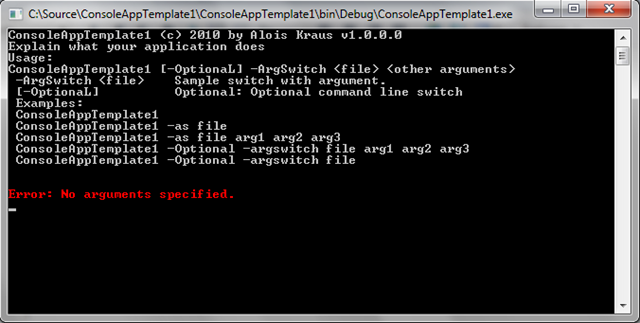
I create quite often some small console application to do this or that. But the standard Console Application project is rather … empty. To prevent me from reinventing the wheel over and over again I sat down and created a more usable Console Application skeleton. The features are
- Functional style command line parser
- Console Coloring
- Error Handler set up (try/catch around Main and AppDomain.UnhandledException Handler)
- Help
- Clean Code
- No additional dependencies required. Only 20 KB of additional source code with documentation is added. That is all.
With VS210 there is the new VSIX format to install templates but my working horse is still VS2008. I did create therefore an MSI which takes care of deploying the Color Console template for VS2008 and VS2010 when present.
Your main method looks much more declarative now where you can set in the delegates the values of the command line switches as you like.
///
/// Main entry point which is directly called from main where nothing happens except exception catching.
///
///
public Program(string [] args)
{
// define parameterless command line switches.
// Please note: Upper case characters define the shortcut name for each switch
var switches = new Dictionary <string, Action >
{
{"OptionaL", => Optional=true }, // shortcut -ol
};
// define command line switches which take one parameter
var switchWithArg = new Dictionary <string, Action >
{
{"ArgSwitch", (arg) => ArgSwitch = arg }, // shortcut -AS
};
// Handler for if present
Action <List > rest = (parameters) => OtherArgs = parameters;
ArgParser parser = new ArgParser (switches, switchWithArg, rest);
// check if command line is well formed
if (!parser.ParseArgs(args))
{
parser.PrintHelpWithMessages(HelpStr);
return;
}
if (!ValidateArgs(parser))
{
// Display errors but not the help screen.
parser.PrintHelpWithMessages(null );
}
else
{
// Ok we can start
Run;
}
}
Where can you get it? You can download it from the Visual Studio Gallery where I put it as Colored Console Application Template. The command line parser is case insensitive and supports shortcuts for commands.
The main challenge was creating the installer with the Windows Installer Extensions toolkit. MSI is an arcane but still relevant technology. After reading a bit what can go wrong during installation/update/upgrade I wonder if any MSI package out there is 100% correct. No wonder that MS wanted to make deployment easier with the packages but these do work only with VS2010.