
I ran into this particular issue and didn’t find any answers to this specific question online. Here’s how I was able to accomplish this. A couple notes about my scenario:
- I used slsvcutil.exe to generate my service. I could not get connected to a service through “Add Service Reference” when connecting from outside the ISA server protected connection.
- This connection was tested and successfully retrieved data from a Windows Phone 7 device. I figured on the scale of success this was the platform that I had the most concern for.
- This works for services behind ISA Server 2006’s cookie-based authentication.
Step 1: Get the details about the ISA Server POST
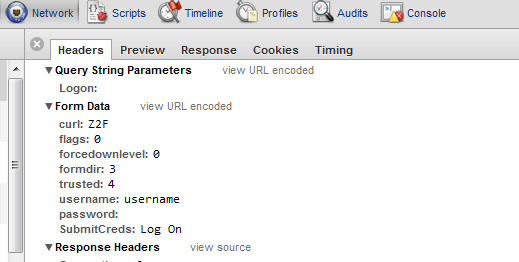
Using firebug or a similar tool, take a look at what information happens when you select “Log On” on the ISA Server FBA page. The important information to keep is the Request URL and any Form Data passed in the HTTP POST made when you click “Log On”. The request url should appear in the format ****
Here’s the form data as reported in Chrome:
Step 2: Mimic the POST in your code with a provided CookieContainer
First we have to POST to the CookieAuth.dll?Logon in order to get our CookieContainer populated. _container is a private CookieContainer shared between all methods.
1: Public Sub New
2: InitializeComponent
3:
4: Dim logonUrl = "https://mysite.com/CookieAuth.dll?Logon"
5: _container = New CookieContainer
6:
7: Dim request = CType(WebRequest.Create(logonUrl), HttpWebRequest)
8: request.CookieContainer = _container
9: request.Method = "POST"
10:
11: request.ContentType = "application/x-www-form-urlencoded"
12:
13: request.BeginGetRequestStream(AddressOf RequestCallback, request)
14: End Sub
15:
16: Private Sub RequestCallback(ByVal ar As IAsyncResult)
17: Dim postData = String.Format("curl=Z2F&flags=0&forcedownlevel=0&formdir=3&trusted=4&username={0}&password={1}&SubmitCreds=Log On", "username", "password")
18:
19: Dim request = CType(ar.AsyncState, HttpWebRequest)
20:
21: Dim stream = request.EndGetRequestStream(ar)
22:
23: Using sw As New StreamWriter(stream)
24: sw.Write(postData)
25: End Using
26:
27: request.BeginGetResponse(AddressOf ResponseCallback, request)
28: End Sub
Step 3: Pass the CookieContainer to your service
When using WCF basicHttpBinding make sure that the binding configuration specifies allowCookies=”true”. You can also set this by specifying the same in code against the binding.
1: Private Sub ResponseCallback(ByVal ar As IAsyncResult)
2: Dim request = CType(ar.AsyncState, HttpWebRequest)
3: Dim response = request.EndGetResponse(ar)
4:
5: Dim service = New ListsSoapClient With {.CookieContainer = _container}
6:
7: AddHandler service.GetListCollectionCompleted, AddressOf GetListCollectionCompleted
8:
9: service.GetListCollectionAsync(service)
10: End Sub
11:
12: Private Sub GetListCollectionCompleted(ByVal sender As Object, ByVal e As GetListCollectionCompletedEventArgs)
13: Dim result = e.Result.Descendants.Select(Function(x) x.Attribute("Title").Value).ToList
14: Deployment.Current.Dispatcher.BeginInvoke(Sub ListBox1.ItemsSource = result)
15: End Sub
Step 4: Profit!
Now you should be good to go get data from your service!
C# Example:
1: public MainPage
2: {
3: InitializeComponent;
4:
5:
6: var logonUrl = "https://mysite.com/CookieAuth.dll?Logon";
7: _container = new CookieContainer;
8:
9: var request = (HttpWebRequest) WebRequest.Create(logonUrl);
10: request.CookieContainer = _container;
11: request.Method = "POST";
12:
13: request.ContentType = "application/x-www-form-urlencoded";
14:
15: request.BeginGetRequestStream(RequestCallback, request);
16: }
17:
18: private void RequestCallback(IAsyncResult ar)
19: {
20: var postData = string.Format("curl=Z2F&flags=0&forcedownlevel=0&formdir=3&trusted=4&username={0}&password={1}&SubmitCreds=Log On", @"username", "password");
21:
22: var request = (HttpWebRequest) ar.AsyncState;
23:
24: var stream = request.EndGetRequestStream(ar);
25:
26: using(var sw = new StreamWriter(stream))
27: {
28: sw.Write(postData);
29: }
30:
31: request.BeginGetResponse(ResponseCallback, request);
32:
33: }
1: private void ResponseCallback(IAsyncResult ar)
2: {
3: var request = (HttpWebRequest) ar.AsyncState;
4: var response = request.EndGetResponse(ar);
5:
6: var service = new ListsSoapClient { CookieContainer = _container};
7:
8: service.GetListCollectionCompleted += GetListCollectionCompleted;
9:
10: service.GetListCollectionAsync(service);
11: }
12:
13: private void GetListCollectionCompleted(object sender, GetListCollectionCompletedEventArgs e)
14: {
15: var result = e.Result.Descendants.Select(x => x.Attribute("Title").Value).ToList;
16: Deployment.Current.Dispatcher.BeginInvoke( => listBox1.ItemsSource = result);
17: }