
TOMBSTONING (Application Lifecycle)
Today we are going to talk about “Application Lifecycle” of an application in Windows Phone. Before we write our first application it is good to have a good understating on how your application is going to be treated by the phone (OS) depending on any user action. Every stage of the application is critical to think before we create our first application. Our application is going to run with so many other things that are on the phone (apps, songs, radio, mail etc.). Since the “User Experience” is what users love about their phone is only possible by following the application life cycle. Even to get our application published to the Market place depends on how we are handling all the user actions and how we are following the application life cycle. Lets concentrate here a little bit.
Windows Phone provides the best user multi tasking experience, this is done by pausing, suspended without alerting the user about the application is being paused. But the system notifies the application when it is pausing it or when it is resuming. In the pause and resume state the application is given a chance to either save the data and reload the data back to the screen when the application is being resumed. Every application on a windows phone will have 5 states in its life time. This process is called Tombstoning. Below is a diagram that shows the 5 stages of an application in detail. If an user ignores the pause or resume states of an application then the OS considers it as an re-start of an application. The developer may ignore to add the pause and resume states to his/her application but it is useful for the user if we have this implemented. This gives the user a best user experience which Windows Phone users are found of. Please take a minute and understand the image (re-created from the book with colors for better understanding), below that show the 5 stages of an application.
THIS IMAGE IS VERY SELF EXPLANATORY, EVERY STATE OF AN APPLICATION IS EXPLAINED WITH THE REASON WHEY THE USER/OS PUTS YOUR APPLICATION IN THAT STATE AND WHAT HAPPENS WHEN OUR APPLICATION STATE CHANGES.
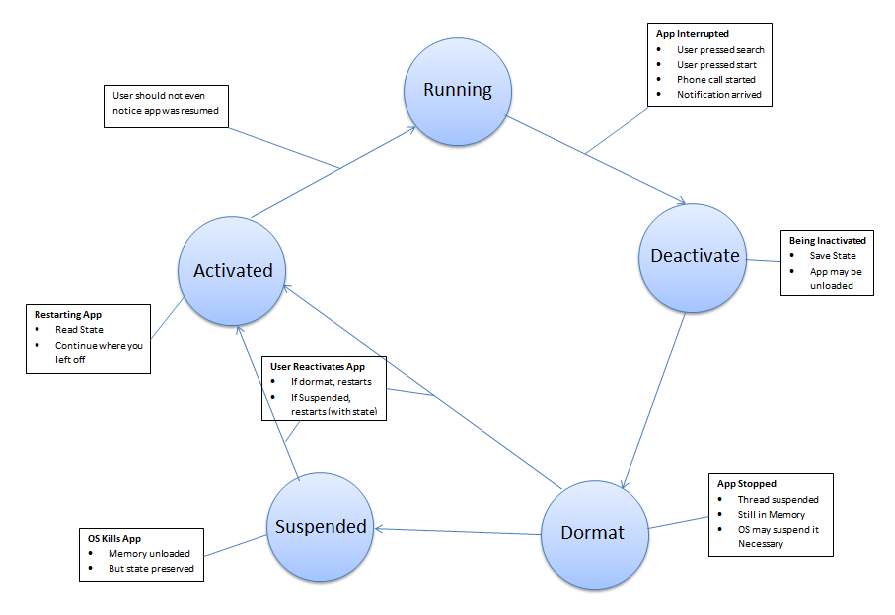
Thanks to our Author Shawn Wildermuth for a great illustration what happens to our application. This is going to be very helpful in the process of our application development. A good understanding of this tombstoning process makes our application stand out among other applications in the market place by giving the user the best user experience.