On my current project I found it useful to use both NUnit and MsTest for unit testing. When using ReSharper for running unit tests, it just simply works better with NUnit, and on large scale projects NUnit tends to run faster. We would have just simply used NUnit for everything, but MSTest gave us a few bonuses out of the box that were hard to pass up. Namely code coverage (without having to shell out thousands of extra dollars for the privilege) and integrated tests into the build process. I’m one of those guys who wants the build to fail if the unit tests don’t pass. If they don’t pass, there’s no point in sending that build on to QA.
So making the build work with MsTest is easiest if you just create a unit test project in your solution. This adds the right references and project type Guids in the project file so that everything just automagically just works. Then (using NuGet of course) you add in NUnit. At the top of your test file, remove the using statements that refer to MsTest and replace it with the following:
#if NUNIT using NUnit.Framework; #else using TestFixture = Microsoft.VisualStudio.TestTools.UnitTesting.TestClassAttribute; using Test = Microsoft.VisualStudio.TestTools.UnitTesting.TestMethodAttribute; using TestFixtureSetUp = Microsoft.VisualStudio.TestTools.UnitTesting.TestInitializeAttribute; using SetUp = Microsoft.VisualStudio.TestTools.UnitTesting.TestInitializeAttribute; using Microsoft.VisualStudio.TestTools.UnitTesting; #endif
Basically I’m taking the NUnit naming conventions, and redirecting them to MsTest. You can go the other way, of course. I only chose this direction because I had already written the tests as NUnit tests. NUnit and MsTest provide largely the same functionality with slightly differing class names. There’s few actual differences between then, and I have not run into them on this project so far.
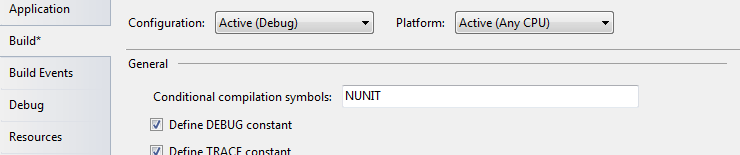
To run the tests as NUnit tests, simply open up the project properties tab and add the compiler directive NUNIT. Remove it, and you’re back in MsTest land.