
Well, back from work and I was sitting idle. I thought the first screen of my application looks a bit stale really, so, I decided to add a small picture to the main screen.
Adding an image resource to your project:
This is really easy.
1. Copy the bitmap file into you project directory.
2. Go to Resource View, right click and select "Add Resource.."
3. Select "Bitmap" and click on "Import.."
4. Point it to the file you copied in step 1
5. Note the ID assigned to your bitmap. In my case it was IDB_BITMAP1
And thats it! The resource is now present within your project, you just need to write code to use it.
In my WndProc function, just before breaking under WM_CREATE, I make a call to this function AlignComponents(), which looks like this:
void AlignComponents(HWND hWnd)
{
RECT rect;
int imageWidth = 32, imageHeight = 32;
int imageX = 0, imageY = 0;
int captionX = 0, captionY = 0;
const int offset = 25;
TCHAR captionText[] = TEXT("TechTwaddle\n Copyright (c) 2009");
GetClientRect(hWnd, &rect);
imageX = rect.right/2 - imageWidth/2;
imageY = rect.bottom/2 - imageHeight*2;
HWND hStatic = CreateWindowEx (0, L"STATIC", NULL, WS_CHILD | WS_VISIBLE | SS_BITMAP,
imageX, imageY, imageWidth, imageHeight, hWnd, 0, g_hInst, NULL);
if (hStatic)
{
HBITMAP hImage = LoadBitmap(g_hInst, MAKEINTRESOURCE(IDB_BITMAP1));
SendMessage(hStatic, STM_SETIMAGE, IMAGE_BITMAP, (LPARAM)hImage);
}
captionX = rect.left + offset;
captionY = imageY + imageHeight + 3;
HWND hStaticCaption = CreateWindowEx(0, L"STATIC", NULL, WS_CHILD | WS_VISIBLE | SS_CENTER,
captionX, captionY, rect.right - offset*2, 30, hWnd, 0, g_hInst, NULL);
if(hStaticCaption)
{
SendMessage(hStaticCaption, WM_SETTEXT, 0, (LPARAM)captionText);
}
}
The above code gets the client rect of the main window and calculates the X and Y position of the image based on the rect. I then use CreateWindowEx to create a static control which will show my bitmap. Use LoadBitmap to load the bitmap and get a handle to it and then send STM_SETIMAGE message, passing the bitmap handle so that the image can be shown in the control. Note that the static control was created using SS_BITMAP as one of its styles. Without this style the static control will not show the image.
Then I create another static control positionally relative to the image. And send WM_SETTEXT message to it to set the text. Note that the SS_BITMAP style is not mentioned in this static control. I had just copy pasted the code from above with SS_BITMAP set and sat wondering for a few minutes why the text was not showing up.
Anyways, my main screen now looks like:
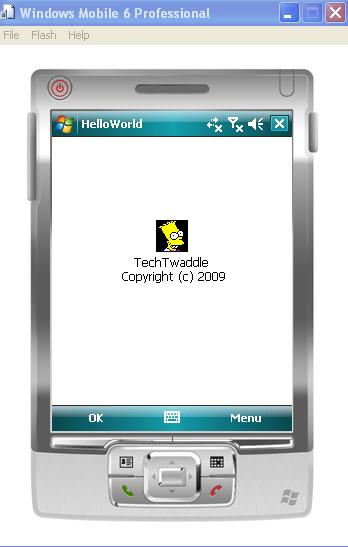
A lot better than before. I thought I'll change the font of the text but was too lazy. Maybe tomorrow.