
This issue is related to permission on MachineKeys folder. I think this is right place where you should know what the determination of MachineKeys folder is.
**What is MachineKeys Folder?
**
The MachineKeys folder stores certificate pair keys for both the computer and users. Both Certificate services and Internet Explorer use this folder.
Possible reasons for getting this error message in your application are, may be your application using a certificate or your application trying to access a private key.
There are two ways through which you can solve this error.
**
First Way (When you don’t know the certificate key)
**
Open this folder **C:\Documents and Settings\All Users\Application Data\Microsoft\Crypto\RSA\MachineKeys
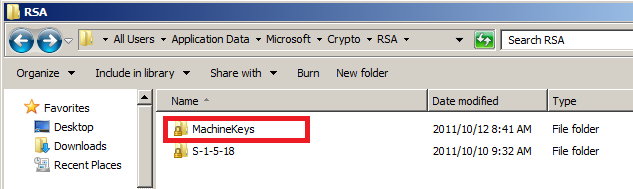
Fig 1: MachineKeys Folder is protected and showing lock sign.
Give “Read and Write” and “List Folder Contents” permissions in Security tab to the IIS worker processes impersonated account (IUSER_MachineName or Network Service or any other account) to below folder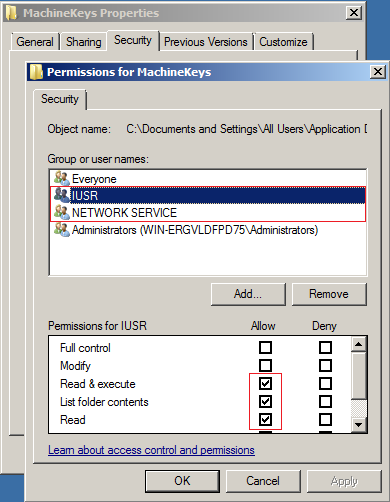
Fig 2: Giving Rights to MachineKeys Folder.
**
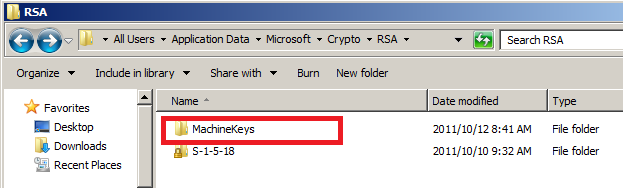
Fig 3: MachineKeys folder is granted for **IIS worker processes impersonated account and lock sign has gone.
Second Way (When you certificate key)
**Open mmc from Start menu. Add certificates snap-In and open the respective certificate store folder and then follow the step.
“Certificate Name” -> (Right-click) -> All Tasks -> Manage private keys
Add the IIS worker processes impersonated account (IUSER_MachineName or Network Service or any other account).
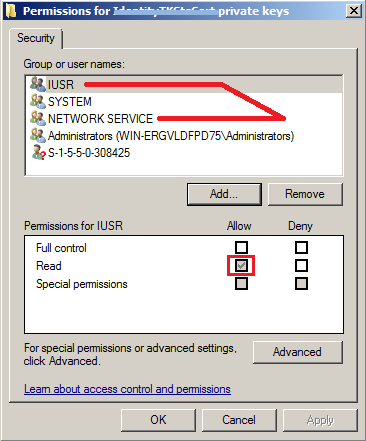
Fig 4: Certificate Manage private keys property.