
Download – http://visualstudiogallery.msdn.microsoft.com/591f2516-9aec-4892-be08-53c1d63bc5a1
Does this fit your use case?
var youUseTfsServiceBuildService = GetDoYouUseTfsServiceBuildService(visitor);
if(youUseTfsServiceBuildService) { // Welcome! You'll love this extension Download(Avanade.SoftwareInventory.VisualStudioExtension); }
What problem are we trying to address?
If you use TFS Service build services, you would like to know what software is installed on the hosted build servers. This becomes all the more important if your software depends on a certain version of the framework, for example Azure SDK has version 1.7, 1.8,... Currently it is not possible to see this information from with in Visual Studio. Though this information is updated on MSDN but not as frequently as you would like, causing trouble when the build fails and you have to figure out why because on the surface it seems that the dependant software is installed on the build server. But may be not
Visual Studio Extension – Software Inventory
The Software Inventory Extension for Visual Studio 2012… allows you to see the list of Software installed on the hosted build server right from with in Visual Studio, the extension also allows you to export this list to excel.
This extension is brought to you by…
Utkarsh Shigihalli | @onlyutkarsh
Tarun Arora | @arora_tarun


Feature walkthrough
After you have installed the extension…
- Where to find the extension?
Open Visual Studio 2012 and open Team Explorer
!
- View List of Software Installed on hosted build server
Click Software Inventory, the software inventory page will load
!
- Refresh the list
Clicking Refresh will reload the results in the page
!
- Tooltip for more details
Hovering over the items in the Inventory Details list will show more information about the item
!
- Export
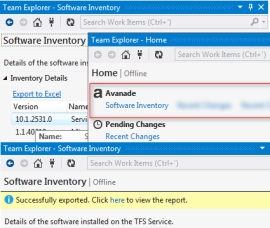
Click Export to Excel to trigger the export process. Once the export completes a notification message shows up in the software inventory page
!
Click on the link in the notification message to load the exported results in an excel
!
How has this been implemented?
The extension has been build using the TFS 2012 API, detailed Implementation details can be found here,
- Use PowerShell to get the installed software list - https://geekswithblogs.net/TarunArora/archive/2013/02/03/tfs---get-list-of-software-installed-on-build-agent.aspx
- Structure the data https://geekswithblogs.net/TarunArora/archive/2013/03/08/list-of-software-on-tfs-service-hosted-build.aspx
I hope you find this blog post useful… If you have any feedback please feel free to leave a comment. Thank you for taking the time out and reading this blog post. If you enjoyed the post, remember to subscribe to http://feeds.feedburner.com/TarunArora. Stay tuned!