
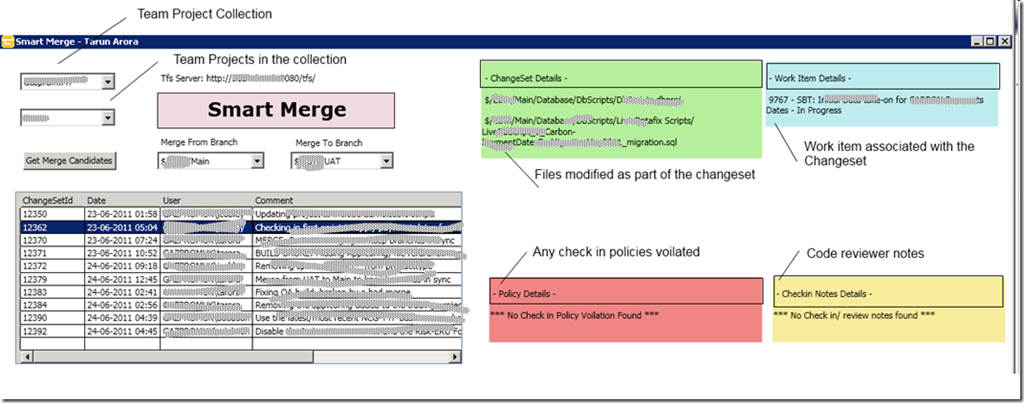
The information available in the Merge window in Team Foundation Server 2010 is very important in the decision making during the merging process. However, at present the merge window shows very limited information, more than often you are interested to know the work item, files modified, code reviewer notes, policies overridden, etc associated with the change set. Our friends at Microsoft are working hard to change the game again with vNext, but because at present the merge window is a modal window you have to cancel the merge process and go back one after the other to check the additional information you need. If you can relate to what i am saying, you will enjoy this blog post! I will show you how to programmatically create your own merging window using the TFS 2010 API.
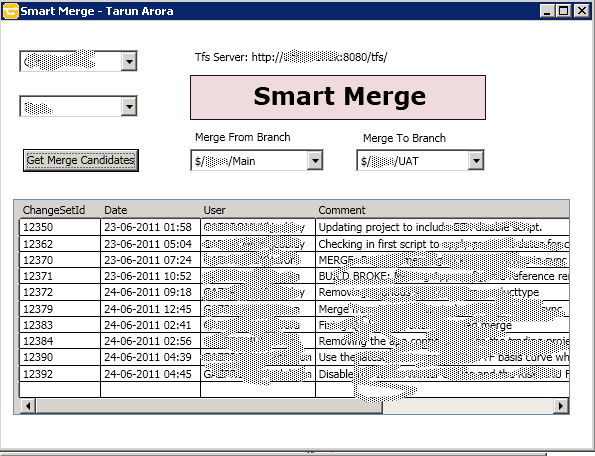
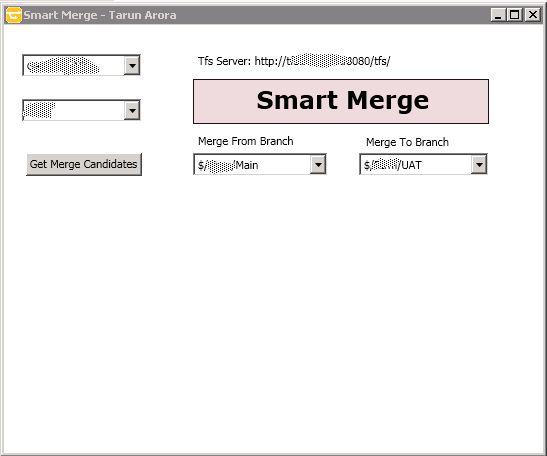
A few screen shots of the WPF TFS 2010 API – Custom Merging Application that we will be creating programmatically,
Excited??? Let’s start coding…
1. Get All Team Project Collections for the TFS Server
You can read more on connecting to TFS programmatically on my blog post => How to connect to TFS Programmatically
1: public static ReadOnlyCollection GetAllTeamProjectCollections
2: {
3: TfsConfigurationServer configurationServer =
4: TfsConfigurationServerFactory.
5: GetConfigurationServer(new Uri("http://xxx:8080/tfs/"));
6:
7: CatalogNode catalogNode = configurationServer.CatalogNode;
8: return catalogNode.QueryChildren(new Guid[]
9: { CatalogResourceTypes.ProjectCollection },
10: false, CatalogQueryOptions.None);
11: }
2. Get All Team Projects for the selected Team Project Collection
You can read more on connecting to TFS programmatically on my blog post => How to connect to TFS Programmatically
1: public static ReadOnlyCollection GetTeamProjects(string instanceId)
2: {
3: ReadOnlyCollection teamProjects = null;
4:
5: TfsConfigurationServer configurationServer =
6: TfsConfigurationServerFactory.GetConfigurationServer(new Uri("http://xxx:8080/tfs/"));
7:
8: CatalogNode catalogNode = configurationServer.CatalogNode;
9: var teamProjectCollections = catalogNode.QueryChildren(new Guid[] {CatalogResourceTypes.ProjectCollection },
10: false, CatalogQueryOptions.None);
11:
12: foreach (var teamProjectCollection in teamProjectCollections)
13: {
14: if (string.Compare(teamProjectCollection.Resource.Properties["InstanceId"], instanceId, true) == 0)
15: {
16: teamProjects = teamProjectCollection.QueryChildren(new Guid[] { CatalogResourceTypes.TeamProject }, false,
17: CatalogQueryOptions.None);
18: }
19: }
20:
21: return teamProjects;
22: }
3. Get All Branches with in a Team Project programmatically
I will be passing the name of the Team Project for which i want to retrieve all the branches. When consuming the ‘Version Control Service’ you have the method QueryRootBranchObjects, you need to pass the recursion type => none, one, full. Full implies you are interested in all branches under that root branch.
1: public static List GetParentBranch(string projectName)
2: {
3: var branches = new List;
4:
5: var tfs = TfsTeamProjectCollectionFactory.GetTeamProjectCollection(new Uri("http://:8080/tfs/"));
6: var versionControl = tfs.GetService;
7:
8: var allBranches = versionControl.QueryRootBranchObjects(RecursionType.Full);
9:
10: foreach (var branchObject in allBranches)
11: {
12: if (branchObject.Properties.RootItem.Item.ToUpper.Contains(projectName.ToUpper))
13: {
14: branches.Add(branchObject);
15: }
16: }
17:
18: return branches;
19: }
4. Get All Branches associated to the Parent Branch Programmatically
Now that we have the parent branch, it is important to retrieve all child branches of that parent branch. Lets see how we can achieve this using the TFS API.
1: public static List GetChildBranch(string parentBranch)
2: {
3: var branches = new List;
4:
5: var tfs = TfsTeamProjectCollectionFactory.GetTeamProjectCollection(new Uri("http://:8080/tfs/"));
6: var versionControl = tfs.GetService;
7:
8: var i = new ItemIdentifier(parentBranch);
9: var allBranches =
10: versionControl.QueryBranchObjects(i, RecursionType.None);
11:
12: foreach (var branchObject in allBranches)
13: {
14: foreach (var childBranche in branchObject.ChildBranches)
15: {
16: branches.Add(childBranche);
17: }
18: }
19:
20: return branches;
21: }
5. Get Merge candidates between two branches Programmatically
Now that we have the parent and the child branch that we are interested to perform a merge between we will use the method ‘GetMergeCandidates’ in the namespace ‘Microsoft.TeamFoundation.VersionControl.Client’ => http://msdn.microsoft.com/en-us/library/bb138934(v=VS.100).aspx
1: public static MergeCandidate[] GetMergeCandidates(string fromBranch, string toBranch)
2: {
3: var tfs = TfsTeamProjectCollectionFactory.GetTeamProjectCollection(new Uri("http://:8080/tfs/"));
4: var versionControl = tfs.GetService;
5:
6: return versionControl.GetMergeCandidates(fromBranch, toBranch, RecursionType.Full);
7: }
6. Get changeset details Programatically
Now that we have the changeset id that we are interested in, we can get details of the changeset. The Changeset object contains the properties => http://msdn.microsoft.com/en-us/library/microsoft.teamfoundation.versioncontrol.client.changeset.aspx
- Changes: Gets or sets an array of Change objects that comprise this changeset.
- CheckinNote: Gets or sets the check-in note of the changeset.
- Comment: Gets or sets the comment of the changeset.
- PolicyOverride: Gets or sets the policy override information of this changeset.
- WorkItems: Gets an array of work items that are associated with this changeset.
1: public static Changeset GetChangeSetDetails(int changeSetId)
2: {
3: var tfs = TfsTeamProjectCollectionFactory.GetTeamProjectCollection(new Uri("http://:8080/tfs/"));
4: var versionControl = tfs.GetService;
5:
6: return versionControl.GetChangeset(changeSetId);
7: }
7. Possibilities
In future posts i will try and extend this idea to explore further possibilities, but few features that i am sure will further help during the merge decision making process would be,
- View changed files
- Compare modified file with current/previous version
- Merge Preview
- Last Merge date
Any other features that you can think of?