
contains three main modules: task, calendar and drive. In calendar module user can create events such as meeting, appointment with participants, location, resources and recurrence. It also supports multiple types of reminders such as Worktile build-in message, email, SMS and phone-call. But some of our customers would like to us it in some third calendar application, such as Mac OS Calendar, Google Calendar, etc.. In this post I will describe how to build a calendar subscription service in Node.js with iCal protocol.
Overall Workflow
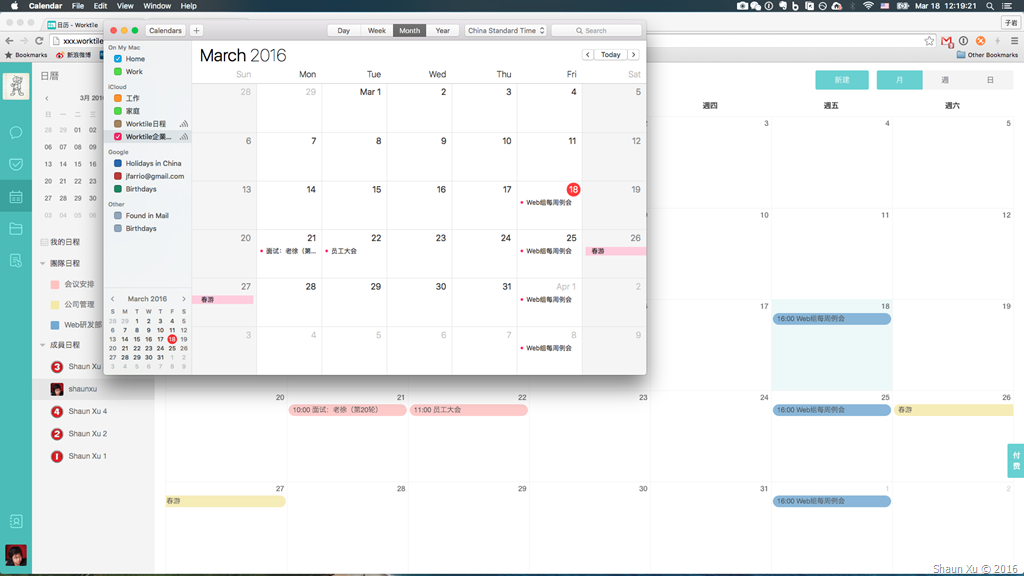
First of all, let's have a look on how it would be. The events belongs to my Worktile account had been synchronized with the Calendar.app on my MacBook Pro.
The overall workflow is very simple. First I opened my subscription URL, which begin with WEBCAL protocol in Safari. Then it opened Calendar.app and asked to subscribe this calendar source.
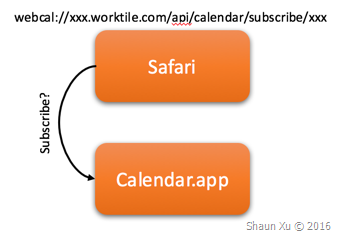
When I said "Yes", Calendar.app will use HTTP/HTTPS to replace the WEBCAL protocol to request events from Worktile.

Worktile received my request, find events related with me in the timeframe predefined in system. Then it generate a file in iCal format and respond.
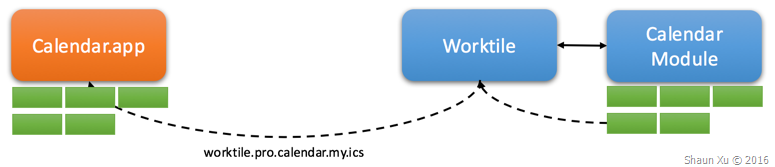
Calendar.app received this iCal file and parse to events to be shown in the UI. After a period of time (5 minutes I specified) Calendar.app will send the same request to download iCal file, compare and update them.
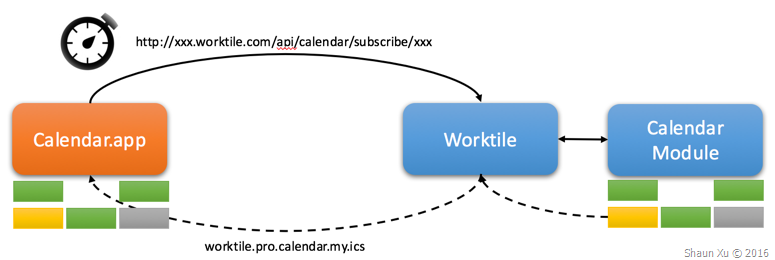
Most of calendar applications support requesting iCal file periodically. So any updates in your system will be upgraded to applications subscribing your service several minutes or hours later.
Create iCal File
iCal is a computer file format which allows Internet users to send meeting requests and tasks to other Internet users, via email, or sharing files with an extension of ".ics". It just takes responsible for transmitting calendar-based data, such as events, and intentionally does not describe what to do with that data.
An iCal file is just a plaint text file. The first line must be "BEGIN:VCALENDAR", and the last line must be "END:VCALENDAR". Between them it can contains one or more events encapsulated by "BEGIN:VEVENT" and "END:VEVENT". Each VEVENT has many properties and alarms. It can also contains "To-Do", "Journal", "Free Busy Time" etc. but in this post we only need VCALENDAR, VEVENT and VALARM.
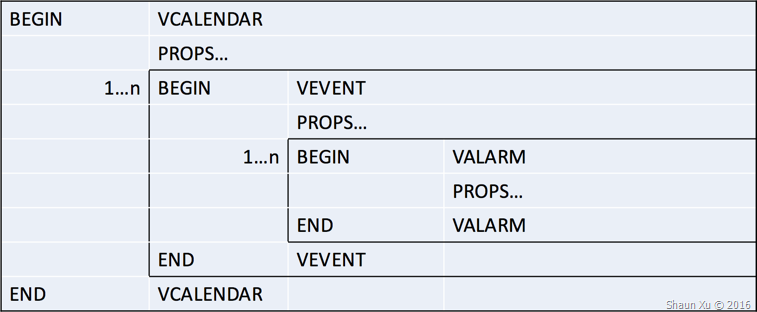
Below are some properties we are currently using and support in Worktile Pro.
VCALENDAR Section
| CALSCALE | Calendar type, default is "GREGORIAN". |
| VERSION | iCal file format version, default is "2.0". |
| X-WR-CALNAME | Calendar name shown in local application such as Calendar.app. |
| METHOD | How this calendar will be subscribed, default is "PUBLIC". |
| PRODID | The unique name of the production which published this calendar. It should following ISO.9070.1991. Worktile Pro Calendar is "-//YC Tech//NONSGML Worktile Pro Calendar//CN". |
VEVENT Section
| CALSCALE | Calendar type, default is "GREGORIAN". |
| UID | Identifier for each event. It should NOT be changed between each subscribe response against the same event. |
| DTSTAMP | Timestamp of event. It should always be date and time. |
| DTSTART | The start time of this event with time specified. |
| DTSTART;VALUE=DATE | The start date of this event when it's a all-day-event. |
| DTEND | The end time of this event with time specified. |
| DTEND;VALUE=DATE | The end date of this event when it's a all-day-event. |
| SUMMARY | Event title. |
| DESCRIPTION | Event description. |
| LOCATION | Event location. |
| CLASS | Classification of this event. In Worktile Pro we use this field to identify whether this is a "PUBLIC" or "PRIVATE" event. |
| CATEGORIES | We use this field to specify which calendar this event belongs to in Worktile system. |
| ORGANIZER;CN= | Organizer of this event. The name will be append to the key and value would be his/her mail address. For example "ORGANIZER;CN=Shaun Xu:shaun@worktile.com". |
| ATTENDEE;CN= | Attendees of this event. Same as organizer but each attendee should be in one line. |
The value of DTSTAMP, DTSTART and DTEND should be in ISO format in UTC time. For example, if an event will be started at Mar 18 2016 15:42:40 in Beijing time (UTC+8), the value should be "20160318T074240Z". If this is an all-day-event, the time part will be removed and the value should be "20160318"
VALARM Section
| X-WR-ALARMUID | Alarm identifier which should NOT be changed against the same alarm. |
| UID | Same as below. |
| TRIGGER | When this alarm should be fired. |
| ACTION | How this alarm will be remind, default is "DISPLAY". |
The value of TRIGGER should be in duration format. If it should alarm 5 minutes before the value would be "-PT5M". We can use moment.js to generate the value.
In order to make it easier to create iCal file below is the source code I'm using in Worktile Pro.
1 2 3 4 5 6 7 8 9 10 11 12 13 14 15 16 17 18 19 20 21 22 23 24 25 26 27 28 29 30 31 32 33 34 35 36 37 38 39 40 41 42 43 44 45 46 47 48 49 50 51 52 53 54 55 56 57 58 59 60 61 62 63 64 65 66 67 68 69 70 71 72 73 74 75 76 77 78 79 80 81 82 83 84 85 86 87 88 89 90 91 92 93 94 95 96 97 98 99 100 101 102 103 104 105 106 107 108 109 110 111 112 113 114 115 116 117 118 119 120 121 122 123 124 125 126 127 128 129 130 131 132 133 134 135 136 137 138 139 140 141 142 143 144 145 146 147 148 149 150 151 152 153 154 155 156 157 158 159 160 161 162 163 164 165 166 167 168 169 170 171 172 173 174 175 176 177 178 179 180 181 182 183 184 185 186 187 188 189 190 191 192 193 194 195 196 197 198 199 200 201 202 203 204 205 206 207 208 209 210 211 212 213 214 215 216 217 218 219 220 221 222 223 224 225 226 227 228 229 230 231 232 233 234 235 236 237 238 239 240 241 242 243 244 245 246 247 248 249 250 251 252 253 254 255 256 257
(function { 'use strict';
var _ = require('lodash');
var VCalendar = function (calName, calScale, version, method, prodId) { this._headers = [ { key: 'BEGIN', value: 'VCALENDAR' }, { key: 'CALSCALE', value: calScale || 'GREGORIAN' }, { key: 'VERSION', value: version || '2.0' }, { key: 'X-WR-CALNAME', value: calName }, { key: 'METHOD', value: method || 'PUBLISH' }, { key: 'PRODID', value: prodId } ]; this._events = []; this._footer = [ { key: 'END', value: 'VCALENDAR' } ]; };
var _formatDate = function (date, isAllDay) { var noMsDate = new Date(date.getTime); noMsDate.setMilliseconds(0); var noMsDateISOString = noMsDate.toISOString; var icsDateString = noMsDateISOString.replace(/-/g, '').replace(/:/g, '').replace(/\.000/g, ''); return isAllDay? icsDateString.substring(0, icsDateString.indexOf('T')): icsDateString; };
var VEvent = function (id, startDate, endDate, isAllDay, name, description, location, visibility, category, orgnizer, attendees, createdDate, lastModifiedDate) { var self = this; self._headers = [ { key: 'BEGIN', value: 'VEVENT' } ]; self._props = [ { key: 'TRANSP', value: 'TRANSPARENT' }, { key: 'UID', value: id }, { key: 'DTSTAMP', value: _formatDate(startDate, false) }, { key: 'DTSTART' + (isAllDay? ';VALUE=DATE': ''), value: _formatDate(startDate, isAllDay) }, { key: 'DTEND' + (isAllDay? ';VALUE=DATE': ''), value: _formatDate(endDate, isAllDay) }, { key: 'SUMMARY', value: name }, { key: 'DESCRIPTION', value: description }, { key: 'LOCATION', value: location }, { key: 'CLASS', value: visibility || 'PUBLIC' }, { key: 'CATEGORIES', value: category }, { key: 'STATUS', value: 'CONFIRMED' }, { key: 'SEQUENCE', value: 0 }, { key: 'CREATED', value: _formatDate(createdDate, false) }, { key: 'LAST-MODIFIED', value: _formatDate(lastModifiedDate, false) }, { key: 'ORGANIZER;CN=' + orgnizer.name, value: orgnizer.email } ]; _.forEach(attendees, function (attendee) { self._props.push({ key: 'ATTENDEE;CN=' + attendee.name, value: attendee.email }); }); self._alarms = []; self._footer = [ { key: 'END', value: 'VEVENT' } ]; };
VEvent.prototype.addAlarm = function (id, trigger, description, action) { var self = this; var alarm = [ { key: 'BEGIN', value: 'VALARM' }, { key: 'X-WR-ALARMUID', value: id }, { key: 'UID', value: id }, { key: 'TRIGGER', value: trigger }, { key: 'DESCRIPTION', value: description }, { key: 'ACTION', value: action || 'DISPLAY' }, { key: 'END', value: 'VALARM' } ]; self._alarms.push(alarm); };
VCalendar.prototype.addEvent = function (id, startDate, endDate, isAllDay, name, description, location, visibility, category, orgnizer, attendees, createdDate, lastModifiedDate) { var self = this; var event = new VEvent(id, startDate, endDate, isAllDay, name, description, location, visibility, category, orgnizer, attendees, createdDate, lastModifiedDate); self._events.push(event); return event; };
VCalendar.prototype._toICSLine = function (key, value) { if (_.isEmpty(key) || _.isEmpty(value)) { return null; } else { value = _.isString(value)? value: value.toString;
key = key.replace(/[\\;,\n]/g, function (match) { return (match === '\n'? '\\n': ('\\' + match)); }); value = value.replace(/[\\;,\n]/g, function (match) { return (match === '\n'? '\\n': ('\\' + match)); }); return key + ':' + value; } };
VCalendar.prototype.toICSString = function { var self = this; var lines = []; var line = null; _.forEach(self._headers, function (header) { line = self._toICSLine(header.key, header.value); if (!_.isEmpty(line)) { lines.push(line); } }); _.forEach(self._events, function (event) { _.forEach(event._headers, function (header) { line = self._toICSLine(header.key, header.value); if (!_.isEmpty(line)) { lines.push(line); } }); _.forEach(event._props, function (prop) { line = self._toICSLine(prop.key, prop.value); if (!_.isEmpty(line)) { lines.push(line); } }); _.forEach(event._alarms, function (alarm) { _.forEach(alarm, function (prop) { line = self._toICSLine(prop.key, prop.value); if (!_.isEmpty(line)) { lines.push(line); } }); }); _.forEach(event._footer, function (footer) { line = self._toICSLine(footer.key, footer.value); if (!_.isEmpty(line)) { lines.push(line); } }); }); _.forEach(self._footer, function (footer) { line = self._toICSLine(footer.key, footer.value); if (!_.isEmpty(line)) { lines.push(line); } }); return lines.join('\r\n'); };
exports.createNew = function (calName, calScale, version, method, prodId) { return new VCalendar(calName, calScale, version, method, prodId); };
});
I will show the code how to use it.
Build Subscription Web Service
Now let's create a very simple web service to demonstrate iCal subscription. The code below is a simple web service with one API on top of Node.js and Express.js.
1 2 3 4 5 6 7 8 9 10 11 12 13 14 15 16
( => { 'use strict';
const express = require('express'); const app = express;
app.get('/api/calendar/subscribe', (req, res) => { // calendar subscription code will be here res.send('Hello iCal!'); });
const port = 22222; app.listen(port); console.log(`Application started at ${port}`);
});
Add the reference of iCal source code I mentioned above. Now we can generate our iCal content. In Worktile Pro I need to validate the request and find the user it associated, then connect to calendar service to retrieve events in a timeframe (30 days by default). Then push events into iCal file. But in this post I will just create an iCal file directly.
1 2 3 4 5 6 7 8 9
app.get('/api/calendar/subscribe', (req, res) => { // for demo purpose just create iCal on the fly let iCal = ics.createNew('iCal Demo by Shaun Calendar', null, null, null, '-//Shaun Xu//NONSGML iCal Demo Calendar//EN'); let iCalString = iCal.toICSString;
res.set('Content-Type', 'text/calendar;charset=utf-8'); res.set('Content-Disposition', 'attachment; filename="worktile.pro.calendar.my.ics"'); res.send(iCalString); });
Now if we refresh the web browser it will download this empty iCal file. The content would be like this.
BEGIN:VCALENDAR CALSCALE:GREGORIAN VERSION:2.0 X-WR-CALNAME:iCal Demo by Shaun Calendar METHOD:PUBLISH PRODID:-//Shaun Xu//NONSGML iCal Demo Calendar//EN END:VCALENDAR
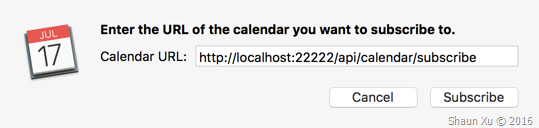
If we opened Calendar.app and clicked File > New Calendar Subscription and paste the URL, it will request iCal file and show events.
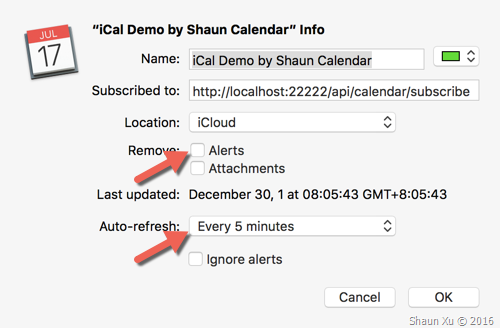
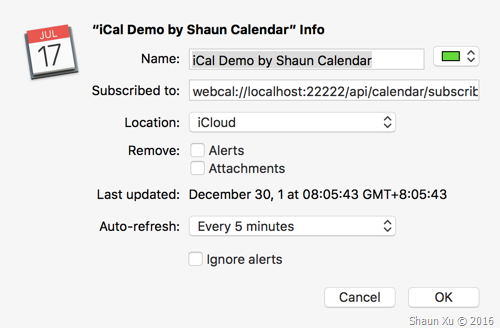
In the dialog below, make sure you unchecked "Remove: Alerts" and adjust the value of "Auto-refresh".
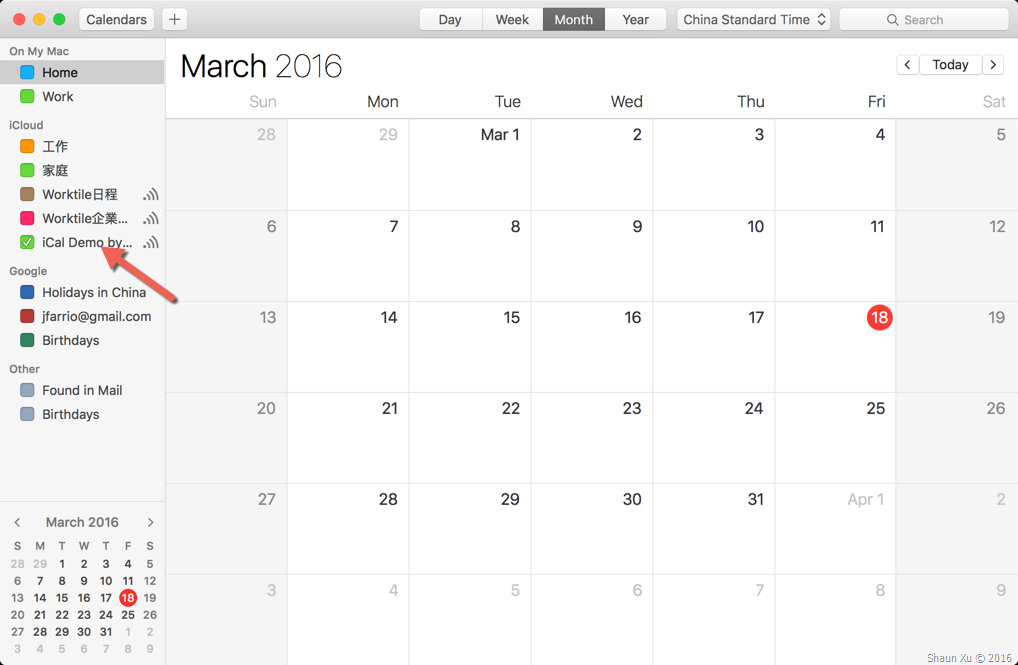
Then you can see the calendar had been subscribed in Calendar.app.
Now let's change our service implementation to push one event into iCal.
1 2 3 4 5 6 7 8 9 10 11 12 13 14 15 16 17 18 19 20 21
let iCal = ics.createNew('iCal Demo by Shaun Calendar', null, null, null, '-//Shaun Xu//NONSGML iCal Demo Calendar//EN'); iCal.addEvent( '1', new Date(2016, 2, 18, 17, 0, 0), new Date(2016, 2, 18, 17, 30, 0), false, 'Meet with anytao', 'Meet with anytao to talk about Worktile Pro', 'Conf.Rm.1', null, null, { name: 'Shaun Xu', email: 'shaun@worktile.com' }, [ { name: 'Shaun Xu', email: 'shaun@worktile.com' }, { name: 'anytao', email: 'anytao@worktile.com' } ], new Date, new Date); let iCalString = iCal.toICSString;
Restart the service and wait at most 5 minutes, we will find Calendar.app had updated.
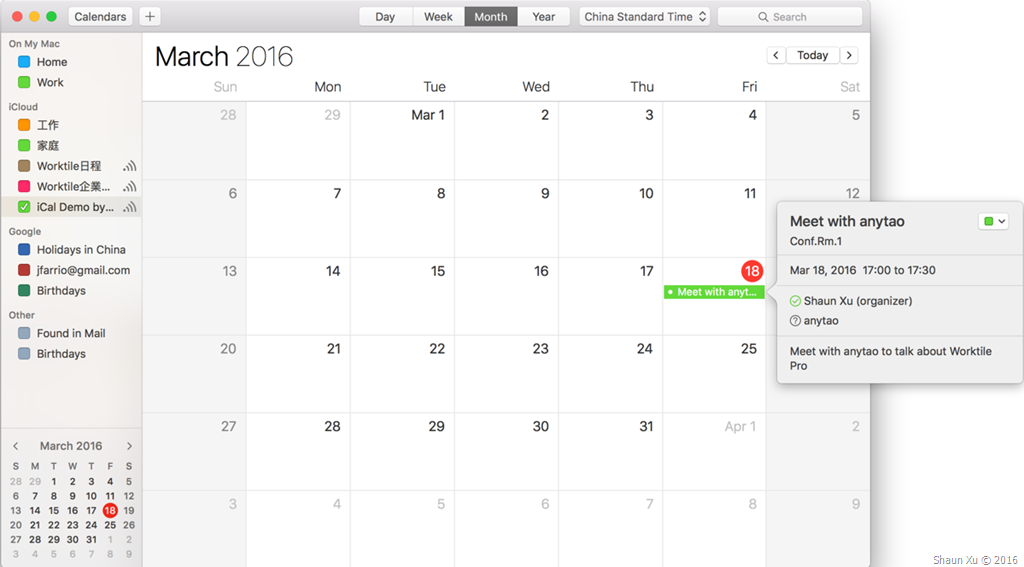
As you can see, the event name, description, location, start and end time, organizer and attendees were all be synchronized.
I can also add alarm if the source event contains reminders. For example, the code below I added an alarm which will be fired 5 minutes before it start.
I used "moment.js" to generate alarm trigger value. Just make sure to specify value in minus which means how long *before* the event starts.
1 2 3 4 5 6
let iCal = ics.createNew('iCal Demo by Shaun Calendar', null, null, null, '-//Shaun Xu//NONSGML iCal Demo Calendar//EN'); let event = iCal.addEvent( //...... ); event.addAlarm('1', moment.duration(-5, 'm').toString, null, null); let iCalString = iCal.toICSString;
Several minutes later Calendar.app received this update.
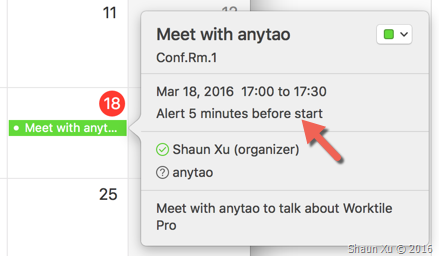
If we allow Calendar.app to send notification it will display the alarm at 16:55, 5 minutes before it starts.
Use "WEBCAL" Protocol
Now we can use "WEBCAL" protocol to let web browser open Calendar.app or any proper application to subscribe. In fact, WEBCAL protocol is just HTTP/HTTPS. When browser detect that it's "WEBCAL", it will try to open a calendar application on local machine and ask to subscribe. We don't need to do anything to support "WEBCAL".
Now let's open Safari and go to the URL we had just implemented, just replace "HTTP" to "WEBCAL".
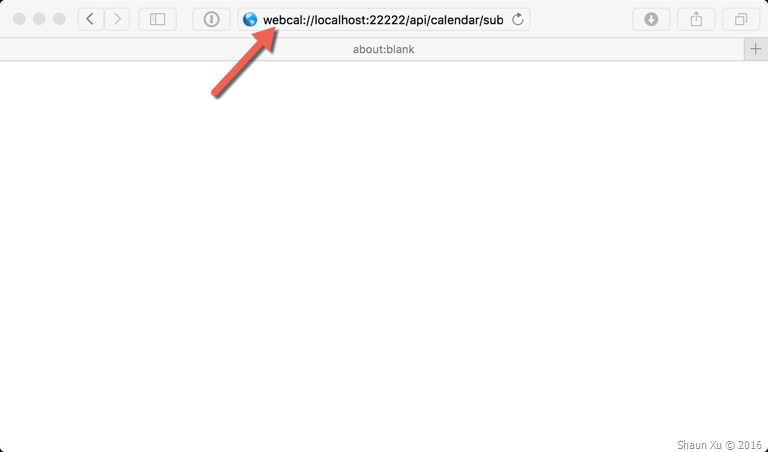
Then Calendar.app will be opened and subscription dialog will be there automatically.
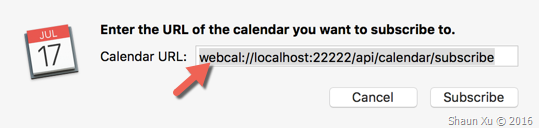
And we will subscribe this calendar.
Summary
In this post I demonstrated on how to implement a calendar subscription service through iCal format in Node.js. Basically it is just a HTTP/HTTPS endpoint which return a plaint text in iCal format. Client calendar application, such as Calendar.app in Mac, will request this endpoint periodically to update events.
Hope this helps,
Shaun
All documents and related graphics, codes are provided "AS IS" without warranty of any kind. Copyright © Shaun Xu. This work is licensed under the Creative Commons License.