
In my project there is a platform component which takes the responsible for controlling and monitoring all other components and it need to lead all other components' metadata when starting. We defined metadata in each component assembly with attributes and will be retrieved through .NET reflection. At the beginning of this project ,about 3 years ago, there are only 5 - 6 components and it takes about 10 - 20 seconds to reflect them. But with more and more components were introduced currently there will be more than 30 components installed in our system. Then we met a performance problem when system start up, it takes 60 - 80 seconds to scan all those assemblies to retrieve the metadata in my development workstation. And it takes several minutes in some of customers and testers machine since less hardware capability (slower CPU and less memory).
After reviewed the code I found there is no problem in our implementation. The main problem is we utilizes System.Reflection to retrieve metadata, the performance of System.Reflection is not that satisficed. After some investigation and research I found an alternative solution which is using Mono.Cecil to reflect .NET assembly.
We thought the best solution is to move all metadata information from assembly attributes to database or configuration file so that we can load them without using reflection technology. But since we also need to maintain backward capability, we must allow all existing components works for our new platform component. So we have to continue using attributes to store metadata.
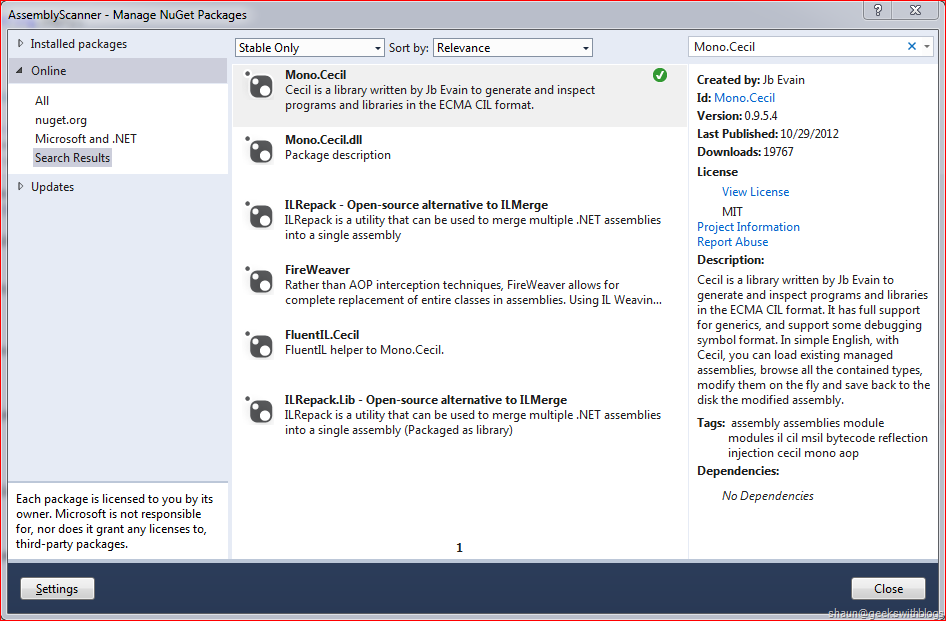
We can find Mono.Cecil here. We also can add Mono.Cecil into our .NET project reference from NuGet package management in Visual Studio.
Below are the operations we are using defined in Mono.Cecil to replace System.Reflection.
| System.Reflection | Mono.Cecil |
| Assembly.LoadFrom() | AssemblyDefinition.ReadAssembly() |
| CustomAttributeData.GetCustomAttributes(Assembly) | AssemblyDefinition.CustomAttributes |
| Aassmebly.GetTypes() | AssemblyDefinition.Modules.SelectMany(m => m.GetTypes()) |
| Type.GetInterfaces() | TypeDefinition.Interfaces |
| CustomAttributeData.GetCustomAttributes(Type) | TypeDefinition.CustomAttributes |
| CustomAttributeData.Constructor.GetParameters() | CustomAttribute.Constructor.Resolve().Parameters |
Most of them are easy to learn and use. We load an assembly from the static class `AssemblyDefinition` and the static method `ReadAssembly` by passing the file path. Different from System.Reflection, it will NOT lock the assembly file. This means by using Mono.Cecil we don't need to create a new AppDomain to load the assembly and unload it at the end.
With the `AssemblyDefinition` we can retrieve attributes and types. Then we can use the `TypeDefinition` and `CustomAttribute` instances to retrieve the type name, interfaces it implements and the value defined in the attribute.
Just one thing need to be highlighted here, by default Mono.Cecil will reflect limited information from the targeting assembly. For example, let's say I have an assembly `MyClass.dll` and there's a class with a custom attribute attached, as well as implemented an interface those are defined in separated assemblies.
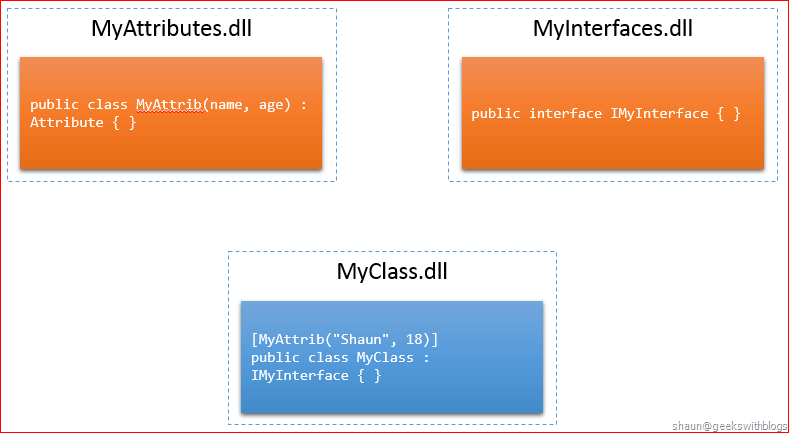
When we invoked `AssemblyDefinition.ReadAssembly` to `MyClass.dll`, Mono will only load this assembly but will NOT lock it.
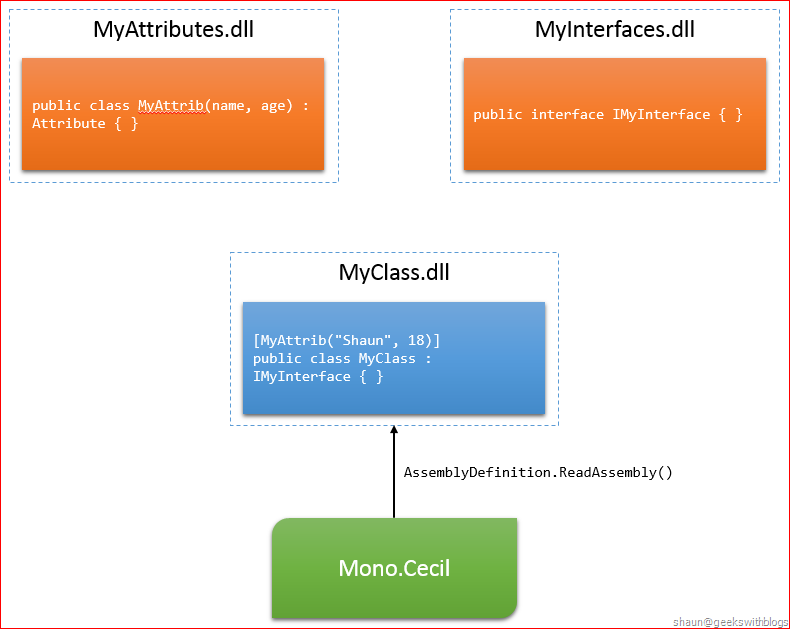
Now we can retrieve the types defined in this assembly and the attributes, interfaces it associates. But since the attribute and interface were defined in other assemblies, when we invoke `CustomAttributes` and `Interfaces` they will return metadata that can be found in this assembly. For example we can retrieve the constructor of `MyAttrib` in type of `MethodReference`, which contains the parameter values and the arguments. But we cannot retrieve the parameter names since the definition of this attribute was in another assembly. To retrieve more information we need to invoke `Resolve` method to let Mono find the definition assembly of this type and load more information. We can also define the behavior how Mono find the relevant assemblies, which path Mono need to lookup. I will show the code later.
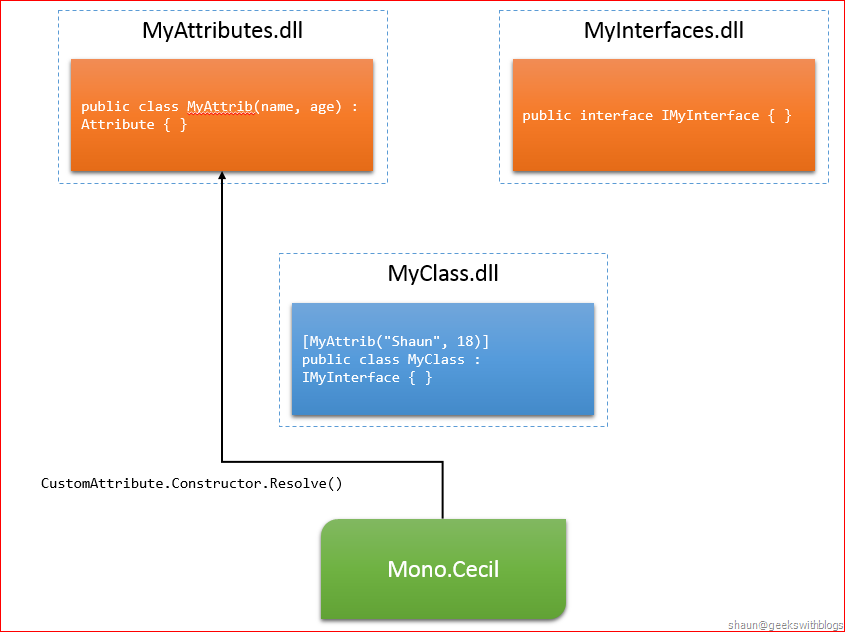
Similarly if we want to retrieve more information of the interface our class was implemented, we need to invoke `TypeReference.Resolve()`.
Below is the code I implemented in my project that using Mono.Cecil to retrieve metadata information from assemblies. In order to decouple from my business logic I created a set of interfaces represents all operations I need for reflection as below.
The `IReflector` interface is the main entry to let user load assembly.
1: public interface IReflector
2: {
3: IAssemblyReflector LoadAssembly(string path);
4: }
`IAssemblyReflector` interface isolates operations that interact with assembly, such as retrieving attributes, types, name, file path, etc..
1: public interface IAssemblyReflector
2: {
3: IEnumerable GetAttributes() where T : Attribute;
4:
5: IEnumerable GetTypes();
6:
7: string Location { get; }
8:
9: string FileName { get; }
10:
11: string FullName { get; }
12: }
With `ITypeReflector` interface we can retrieve attributes attached as well as interfaces it implements.
1: public interface ITypeReflector
2: {
3: IEnumerable GetInterfaces();
4:
5: IEnumerable GetAttributes() where T : Attribute;
6:
7: string FullName { get; }
8:
9: string Name { get; }
10: }
With `IAttributeReflector` we can get values of the arguments and named property values from its constructor.
1: public interface IAttributeReflector
2: {
3: IDictionary<string, string> Values { get; }
4: }
Below is the Mono.Cecil implementation of these interfaces. Notice that I invoked `Resolve` to load the definition assembly when retrieving interfaces and attribute values. I also tell Mono.Cecil to lookup relevant assemblies in the same folder of the assembly I'm loading.
1: public class MonoReflector : IReflector
2: {
3: public IAssemblyReflector LoadAssembly(string path)
4: {
5: var resolver = new DefaultAssemblyResolver();
6: resolver.AddSearchDirectory(Path.GetDirectoryName(path));
7: var reader = new ReaderParameters()
8: {
9: AssemblyResolver = resolver
10: };
11:
12: var assembly = AssemblyDefinition.ReadAssembly(path, reader);
13: return new MonoAssemblyReflector(assembly);
14: }
15: }
16:
17: public class MonoAssemblyReflector : IAssemblyReflector
18: {
19: private AssemblyDefinition _assembly;
20:
21: public MonoAssemblyReflector(AssemblyDefinition assembly)
22: {
23: _assembly = assembly;
24: }
25:
26: public IEnumerable GetAttributes() where T : Attribute
27: {
28: if (_assembly.HasCustomAttributes)
29: {
30: var expectedTypeName = typeof(T).Name;
31: return _assembly.CustomAttributes
32: .Where(a => a.AttributeType.Name == expectedTypeName)
33: .Select(a => new MonoAttributeReflector(a))
34: .ToList();
35: }
36: else
37: {
38: return new IAttributeReflector[] { };
39: }
40: }
41:
42: public IEnumerable GetTypes()
43: {
44: var result = new List();
45: var modules = _assembly.Modules;
46: foreach (var module in modules)
47: {
48: var types = module.GetTypes();
49: foreach (var type in types)
50: {
51: result.Add(new MonoTypeReflector(type));
52: }
53: }
54: return result;
55: }
56:
57: public string Location
58: {
59: get
60: {
61: return _assembly.MainModule.FullyQualifiedName;
62: }
63: }
64:
65: public string FileName
66: {
67: get
68: {
69: return _assembly.MainModule.Name;
70: }
71: }
72:
73: public string FullName
74: {
75: get
76: {
77: return _assembly.FullName;
78: }
79: }
80: }
81:
82: public class MonoTypeReflector : ITypeReflector
83: {
84: private TypeDefinition _type;
85:
86: public MonoTypeReflector(TypeDefinition type)
87: {
88: _type = type;
89: }
90:
91: public IEnumerable GetInterfaces()
92: {
93: return _type.Interfaces.Select(i => new MonoTypeReflector(i.Resolve()));
94: }
95:
96: public IEnumerable GetAttributes() where T : Attribute
97: {
98: if (_type.HasCustomAttributes)
99: {
100: var expectedTypeName = typeof(T).Name;
101: return _type.CustomAttributes
102: .Where(a => a.AttributeType.Name == expectedTypeName)
103: .Select(a => new MonoAttributeReflector(a))
104: .ToList();
105: }
106: else
107: {
108: return new IAttributeReflector[] { };
109: }
110: }
111:
112: public string FullName
113: {
114: get
115: {
116: return _type.FullName;
117: }
118: }
119:
120: public string Name
121: {
122: get
123: {
124: return _type.Name;
125: }
126: }
127: }
128:
129: public class MonoAttributeReflector : IAttributeReflector
130: {
131: private CustomAttribute _attribute;
132: private IDictionary<string, string> _values;
133:
134: public MonoAttributeReflector(CustomAttribute attribute)
135: {
136: _attribute = attribute;
137: }
138:
139: public IDictionary<string, string> Values
140: {
141: get
142: {
143: if (_values == null)
144: {
145: _values = new Dictionary<string, string>();
146: var constructorArguments = _attribute.Constructor.Resolve().Parameters.Select(p => p.Name).ToList();
147: var constructorParameters = _attribute.ConstructorArguments.Select(a => a.Value.ToString()).ToList();
148: for (var i = 0; i < constructorArguments.Count; i++)
149: {
150: _values.Add(constructorArguments[i], constructorParameters[i]);
151: }
152: foreach (var prop in _attribute.Properties)
153: {
154: _values.Add(prop.Name, prop.Argument.Value.ToString());
155: }
156: }
157: return _values;
158: }
159: }
160: }
Below is the implementation by System.Reflection.
1: public class DotNetAssemblyReflector : IAssemblyReflector
2: {
3: private Assembly _assmebly;
4:
5: public DotNetAssemblyReflector(Assembly assmebly)
6: {
7: _assmebly = assmebly;
8: }
9:
10: public virtual IEnumerable GetAttributes() where T : Attribute
11: {
12: List returnValue = new List();
13: var pCustomAttributeType = typeof(T);
14:
15: foreach (CustomAttributeData customAttributeData in CustomAttributeData.GetCustomAttributes(_assmebly))
16: {
17: if (customAttributeData.Constructor.DeclaringType.Name == pCustomAttributeType.Name)
18: {
19: returnValue.Add(customAttributeData);
20: }
21: }
22:
23: return returnValue.Select(x => new DotNetAttributeReflector(x)).ToList();
24: }
25:
26: public string GetVersion()
27: {
28: string version = string.Empty;
29: var assemblyFileVersionCustomAttributeData = GetAttributes();
30: if (assemblyFileVersionCustomAttributeData.Count() == 1)
31: {
32: try
33: {
34: var assemblyFileVersion = assemblyFileVersionCustomAttributeData.First().Values;
35: version = assemblyFileVersion["version"];
36: }
37: catch (FormatException ex)
38: {
39: // // Console.WriteLine(String.Format("Problem getting the assembly version: {0}", assembly.FullName));
40: // // Console.WriteLine(ex);
41: }
42: }
43: return version;
44: }
45:
46: public IEnumerable GetTypes()
47: {
48: return _assmebly.GetTypes().Select(t => new DotNetTypeReflector(t)).ToList();
49: }
50:
51: public string Location
52: {
53: get
54: {
55: return _assmebly.Location;
56: }
57: }
58:
59: public string FileName
60: {
61: get
62: {
63: return _assmebly.ManifestModule.Name;
64: }
65: }
66:
67: public string FullName
68: {
69: get
70: {
71: return _assmebly.FullName;
72: }
73: }
74: }
75:
76: public class DotNetTypeReflector : ITypeReflector
77: {
78: private Type _type;
79:
80: public DotNetTypeReflector(Type type)
81: {
82: _type = type;
83: }
84:
85: public IEnumerable GetInterfaces()
86: {
87: return _type.GetInterfaces().Select(i => new DotNetTypeReflector(i)).ToList();
88: }
89:
90: public IEnumerable GetAttributes() where T : Attribute
91: {
92: List returnValue = new List();
93: var pCustomAttributeType = typeof(T);
94:
95: foreach (CustomAttributeData customAttributeData in CustomAttributeData.GetCustomAttributes(_type))
96: {
97: if (customAttributeData.Constructor.DeclaringType.Name == pCustomAttributeType.Name)
98: {
99: returnValue.Add(customAttributeData);
100: }
101: }
102:
103: return returnValue.Select(a => new DotNetAttributeReflector(a)).ToList();
104: }
105:
106: public string FullName
107: {
108: get
109: {
110: return _type.FullName;
111: }
112: }
113:
114: public string Name
115: {
116: get
117: {
118: return _type.Name;
119: }
120: }
121: }
122:
123:
124: public class DotNetAttributeReflector : IAttributeReflector
125: {
126: private CustomAttributeData _attribute;
127: private IDictionary<string, string> _values;
128:
129: public IDictionary<string, string> Values
130: {
131: get
132: {
133: if (_values == null)
134: {
135: Dictionary<string, string> returnValue = new Dictionary<string, string>();
136: try
137: {
138: ParameterInfo[] ConstructorParameters = _attribute.Constructor.GetParameters();
139: for (int i = 0; i < ConstructorParameters.Length; i++)
140: {
141: returnValue.Add(ConstructorParameters[i].Name, _attribute.ConstructorArguments[i].Value.ToString());
142: }
143: }
144: catch (KeyNotFoundException ex)
145: {
146: // something is not matching up with constructor parameters and arguments
147: // this will be a FormatException for our purposes, so we will wrap and rethrow
148: throw;
149: }
150: foreach (CustomAttributeNamedArgument argument in _attribute.NamedArguments)
151: {
152: returnValue.Add(argument.MemberInfo.Name, argument.TypedValue.Value.ToString());
153: }
154: _values = returnValue;
155: }
156: return _values;
157: }
158: }
159:
160: public DotNetAttributeReflector(CustomAttributeData attribute)
161: {
162: _attribute = attribute;
163: }
164: }
165:
166: public class DotNetReflector : IReflector
167: {
168: public IAssemblyReflector LoadAssembly(string path)
169: {
170: return new DotNetAssemblyReflector(Assembly.LoadFrom(path));
171: }
172: }
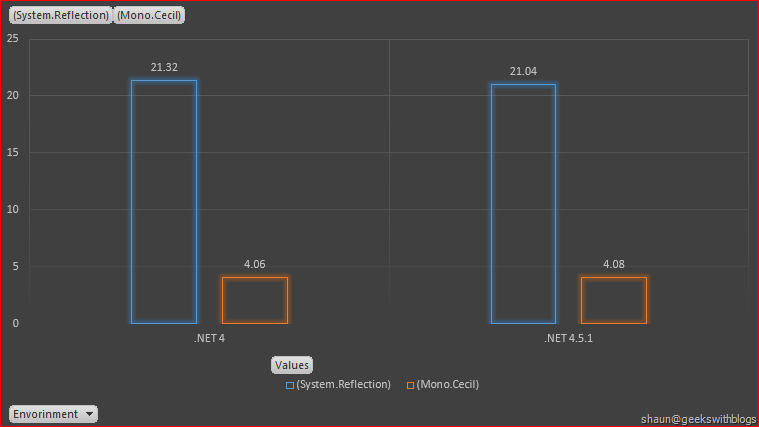
Finally let's have a look on the performance result. I'm using Mono.Cecil and System.Reflection to retrieve the metadata information from all 38 components in my system. In .NET 4.0 and 4.5.1, Mono.Cecil took 4 seconds while System.Reflection took 21 seconds.
Hope this helps,
Shaun
All documents and related graphics, codes are provided "AS IS" without warranty of any kind.
Copyright © Shaun Ziyan Xu. This work is licensed under the Creative Commons License.