
In my previous post I demonstrated how to install, configure and run Node.js application on Windows. In this post I will cover a specific and short topic, which is how to use SQL Server in Node.js.
Install SQL Service Module
In NPM there are many SQL Server modules. From the command windows we can use “npm find” to find the modules for specified terms. For example, below is the result when I found “sqlserver”.
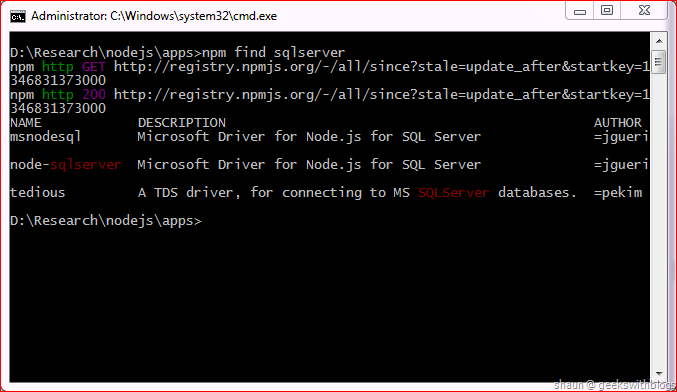
In this post I will describe one of them, the “node-sqlserver” module. This module was built by Microsoft. It utilizes a library built in C++ as the bridge between the JavaScript API and the backend SQL Server Native Client. When we download and install this module, it will retrieve the source code from NPM, and it will compile the C++ code by a script written in Python. Hence there are some requirement components.
- Node.js: version 0.6.10 or higher. But per MS said it’s not fully tested under the 0.8.x Node.js.
- Python 2.7.x: It’s said that Python 3.x is not acceptable.
- Visual C++ 2010: Installed alone with Visual Studio Express 2010 or higher.
- SQL Server Native Client 11.0: Can be found at SQL Server 2012 Feature Pack.
If we have those installed then we can use NPM to download and install this module.
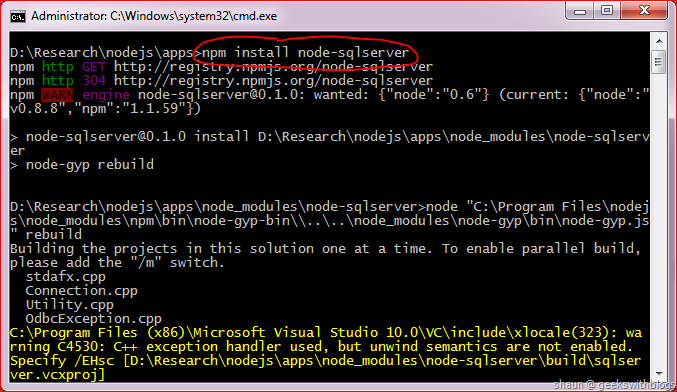
After it installed there is still one step need to be done manually. Seems like a bug in the module installation package, by default the binary of the SQL client (which compiled from the C++ source code) was not in the module’s library folder. So we need to do it by ourselves.
For example, assuming we installed node-sqlserver under the folder “D:\Research\nodejs\apps”, then we need to go to “D:\Research\nodejs\apps\node_modules\node-sqlserver\build\Release”, find a file named “sqlserver.node”, copy it to “D:\Research\nodejs\apps\node_modules\node-sqlserver\lib”.
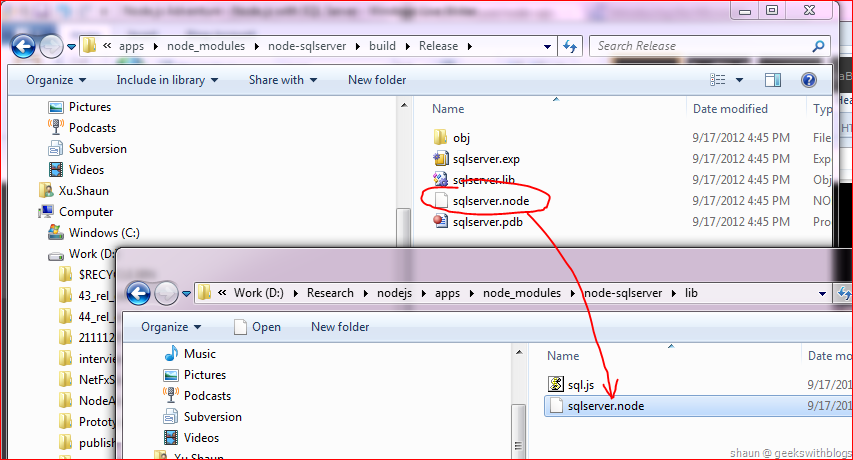
The sqlserver.node will be compiled based on whether we installed x86 or x64 of Python. Basically if we are using x64 Node.js then we should use x64 Python to get x64 sqlserver.node. Otherwise the Node.js will raise an exception said it cannot find “sqlserver.node”.
Querying in Node.js
Here I would like to use the database I introduced in my Caspar project. It only contains one table with 3 columns which is very simple. The full schema and data creation script is listed below.
1: /****** Object: Table [dbo].[Resource] Script Date: 9/4/2012 3:47:14 PM ******/
2: SET ANSI_NULLS ON
3: GO
4: SET QUOTED_IDENTIFIER ON
5: GO
6: CREATE TABLE [dbo].\Resource\ NOT NULL,
8: [Culture] \varchar\ NOT NULL,
9: [Value] \nvarchar\ NOT NULL,
10: CONSTRAINT [PK_Resource] PRIMARY KEY CLUSTERED
11: (
12: [Key] ASC,
13: [Culture] ASC
14: )WITH (STATISTICS_NORECOMPUTE = OFF, IGNORE_DUP_KEY = OFF)
15: )
16:
17: GO
18: INSERT [dbo].[Resource] ([Key], [Culture], [Value]) VALUES (N'Controller_HomeAbout_Message', N'en-US', N'Your app description page.')
19: GO
20: INSERT [dbo].[Resource] ([Key], [Culture], [Value]) VALUES (N'Controller_HomeAbout_Message', N'zh-CN', N'???????')
21: GO
22: INSERT [dbo].[Resource] ([Key], [Culture], [Value]) VALUES (N'Controller_HomeContact_Message', N'en-US', N'Your contact page.')
23: GO
24: INSERT [dbo].[Resource] ([Key], [Culture], [Value]) VALUES (N'Controller_HomeContact_Message', N'zh-CN', N'?????????')
25: GO
26: INSERT [dbo].[Resource] ([Key], [Culture], [Value]) VALUES (N'Controller_HomeIndex_Message', N'en-US', N'Modify this template to jump-start your ASP.NET MVC application.')
27: GO
28: INSERT [dbo].[Resource] ([Key], [Culture], [Value]) VALUES (N'Controller_HomeIndex_Message', N'zh-CN', N'??????,??????ASP.NET MVC?????')
29: GO
30: INSERT [dbo].[Resource] ([Key], [Culture], [Value]) VALUES (N'Model_AccountModels_LoginModel_Password_Display', N'en-US', N'Password')
31: GO
32: INSERT [dbo].[Resource] ([Key], [Culture], [Value]) VALUES (N'Model_AccountModels_LoginModel_Password_Display', N'zh-CN', N'??')
33: GO
34: INSERT [dbo].[Resource] ([Key], [Culture], [Value]) VALUES (N'Model_AccountModels_LoginModel_Password_Required', N'en-US', N'Please input {0}.')
35: GO
36: INSERT [dbo].[Resource] ([Key], [Culture], [Value]) VALUES (N'Model_AccountModels_LoginModel_Password_Required', N'zh-CN', N'???{0}?')
37: GO
38: INSERT [dbo].[Resource] ([Key], [Culture], [Value]) VALUES (N'Model_AccountModels_LoginModel_RememberMe_Display', N'en-US', N'Remember me?')
39: GO
40: INSERT [dbo].[Resource] ([Key], [Culture], [Value]) VALUES (N'Model_AccountModels_LoginModel_RememberMe_Display', N'zh-CN', N'???????')
41: GO
42: INSERT [dbo].[Resource] ([Key], [Culture], [Value]) VALUES (N'Model_AccountModels_LoginModel_UserName_Display', N'en-US', N'User Name')
43: GO
44: INSERT [dbo].[Resource] ([Key], [Culture], [Value]) VALUES (N'Model_AccountModels_LoginModel_UserName_Display', N'zh-CN', N'???')
45: GO
46: INSERT [dbo].[Resource] ([Key], [Culture], [Value]) VALUES (N'Model_AccountModels_LoginModel_UserName_Required', N'en-US', N'Please input the {0}.')
47: GO
48: INSERT [dbo].[Resource] ([Key], [Culture], [Value]) VALUES (N'Model_AccountModels_LoginModel_UserName_Required', N'zh-CN', N'???{0}?')
49: GO
50: INSERT [dbo].[Resource] ([Key], [Culture], [Value]) VALUES (N'Model_AccountModels_RegisterModel_ConfirmPassword_Compare', N'en-US', N'The password and confirmation password do not match.')
51: GO
52: INSERT [dbo].[Resource] ([Key], [Culture], [Value]) VALUES (N'Model_AccountModels_RegisterModel_ConfirmPassword_Compare', N'zh-CN', N'???????????')
53: GO
54: INSERT [dbo].[Resource] ([Key], [Culture], [Value]) VALUES (N'Model_AccountModels_RegisterModel_ConfirmPassword_Display', N'en-US', N'Confirm password')
55: GO
56: INSERT [dbo].[Resource] ([Key], [Culture], [Value]) VALUES (N'Model_AccountModels_RegisterModel_ConfirmPassword_Display', N'zh-CN', N'??????')
57: GO
58: INSERT [dbo].[Resource] ([Key], [Culture], [Value]) VALUES (N'Model_AccountModels_RegisterModel_Password_StringLength', N'en-US', N'The {0} must be at least {2} characters long.')
59: GO
60: INSERT [dbo].[Resource] ([Key], [Culture], [Value]) VALUES (N'Model_AccountModels_RegisterModel_Password_StringLength', N'zh-CN', N'{0}?????')
61: GO
62: INSERT [dbo].[Resource] ([Key], [Culture], [Value]) VALUES (N'View_AccountLogin_ExtenalAccount', N'en-US', N'Use another service to log in.')
63: GO
64: INSERT [dbo].[Resource] ([Key], [Culture], [Value]) VALUES (N'View_AccountLogin_ExtenalAccount', N'zh-CN', N'?????????')
65: GO
66: INSERT [dbo].[Resource] ([Key], [Culture], [Value]) VALUES (N'View_AccountLogin_LocalAccount', N'en-US', N'Use a local account to log in.')
67: GO
68: INSERT [dbo].[Resource] ([Key], [Culture], [Value]) VALUES (N'View_AccountLogin_LocalAccount', N'zh-CN', N'?????????')
69: GO
70: INSERT [dbo].[Resource] ([Key], [Culture], [Value]) VALUES (N'View_AccountLogin_RegisterIfNoAccount', N'en-US', N'{0} if you don''t have an account.')
71: GO
72: INSERT [dbo].[Resource] ([Key], [Culture], [Value]) VALUES (N'View_AccountLogin_RegisterIfNoAccount', N'zh-CN', N'??????,?{0}?')
73: GO
74: INSERT [dbo].[Resource] ([Key], [Culture], [Value]) VALUES (N'View_AccountRegister_Message', N'en-US', N'Create a new account.')
75: GO
76: INSERT [dbo].[Resource] ([Key], [Culture], [Value]) VALUES (N'View_AccountRegister_Message', N'zh-CN', N'????????')
77: GO
78: INSERT [dbo].[Resource] ([Key], [Culture], [Value]) VALUES (N'View_ExternalLoginsListPartial_MessageInfo', N'en-US', N'There are no external authentication services configured. See this article for details on setting up this ASP.NET application to support logging in via external services.')
79: GO
80: INSERT [dbo].[Resource] ([Key], [Culture], [Value]) VALUES (N'View_ExternalLoginsListPartial_MessageInfo', N'zh-CN', N'???????????????????ASP.NET?????????????????,???????')
81: GO
82: INSERT [dbo].[Resource] ([Key], [Culture], [Value]) VALUES (N'View_ExternalLoginsListPartial_SocialLoginList', N'en-US', N'Log in using another service')
83: GO
84: INSERT [dbo].[Resource] ([Key], [Culture], [Value]) VALUES (N'View_ExternalLoginsListPartial_SocialLoginList', N'zh-CN', N'?????????')
85: GO
86: INSERT [dbo].[Resource] ([Key], [Culture], [Value]) VALUES (N'View_HomeAbout_Title', N'en-US', N'About')
87: GO
88: INSERT [dbo].[Resource] ([Key], [Culture], [Value]) VALUES (N'View_HomeAbout_Title', N'zh-CN', N'??')
89: GO
90: INSERT [dbo].[Resource] ([Key], [Culture], [Value]) VALUES (N'View_HomeContact_Title', N'en-US', N'Contact')
91: GO
92: INSERT [dbo].[Resource] ([Key], [Culture], [Value]) VALUES (N'View_HomeContact_Title', N'zh-CN', N'????')
93: GO
94: INSERT [dbo].[Resource] ([Key], [Culture], [Value]) VALUES (N'View_HomeIndex_Title', N'en-US', N'Home Page')
95: GO
96: INSERT [dbo].[Resource] ([Key], [Culture], [Value]) VALUES (N'View_HomeIndex_Title', N'zh-CN', N'??')
97: GO
98: INSERT [dbo].[Resource] ([Key], [Culture], [Value]) VALUES (N'View_HomIndex_Featured', N'en-US', N'To learn more about ASP.NET MVC visit http://asp.net/mvc. The page features videos, tutorials, and samples to help you get the most from ASP.NET MVC. If you have any questions about ASP.NET MVC visit our forums.')
99: GO
100: INSERT [dbo].[Resource] ([Key], [Culture], [Value]) VALUES (N'View_HomIndex_Featured', N'zh-CN', N'???????ASP.NET MVC??????http://asp.net/mvc????????,?????,??????????ASP.NET MVC???????????ASP.NET MVC???,?????????')
101: GO
102: INSERT [dbo].[Resource] ([Key], [Culture], [Value]) VALUES (N'View_HomIndex_Suggest', N'en-US', N'We suggest the following:')
103: GO
104: INSERT [dbo].[Resource] ([Key], [Culture], [Value]) VALUES (N'View_HomIndex_Suggest', N'zh-CN', N'????:')
105: GO
106: INSERT [dbo].[Resource] ([Key], [Culture], [Value]) VALUES (N'View_HomIndex_Suggest_1_Title', N'en-US', N'Getting Started')
107: GO
108: INSERT [dbo].[Resource] ([Key], [Culture], [Value]) VALUES (N'View_HomIndex_Suggest_1_Title', N'zh-CN', N'??')
109: GO
110: INSERT [dbo].[Resource] ([Key], [Culture], [Value]) VALUES (N'View_HomIndex_Suggest_1_Val', N'en-US', N'ASP.NET MVC gives you a powerful, patterns-based way to build dynamic websites that enables a clean separation of concerns and that gives you full control over markup for enjoyable, agile development. ASP.NET MVC includes many features that enable fast, TDD-friendly development for creating sophisticated applications that use the latest web standards. Learn more...')
111: GO
112: INSERT [dbo].[Resource] ([Key], [Culture], [Value]) VALUES (N'View_HomIndex_Suggest_1_Val', N'zh-CN', N'ASP.NET MVC?????????????????????????,???????????,????,?????????????? ASP.NET MVC???????,????????????,?????Web??,TDD??????????…')
113: GO
114: INSERT [dbo].[Resource] ([Key], [Culture], [Value]) VALUES (N'View_HomIndex_Suggest_2_Title', N'en-US', N'Add NuGet packages and jump-start your coding')
115: GO
116: INSERT [dbo].[Resource] ([Key], [Culture], [Value]) VALUES (N'View_HomIndex_Suggest_2_Title', N'zh-CN', N'??NuGet???,??????')
117: GO
118: INSERT [dbo].[Resource] ([Key], [Culture], [Value]) VALUES (N'View_HomIndex_Suggest_2_Val', N'en-US', N'NuGet makes it easy to install and update free libraries and tools. Learn more...')
119: GO
120: INSERT [dbo].[Resource] ([Key], [Culture], [Value]) VALUES (N'View_HomIndex_Suggest_2_Val', N'zh-CN', N'NuGet??????????????????????????…')
121: GO
122: INSERT [dbo].[Resource] ([Key], [Culture], [Value]) VALUES (N'View_HomIndex_Suggest_3_Title', N'en-US', N'Find Web Hosting')
123: GO
124: INSERT [dbo].[Resource] ([Key], [Culture], [Value]) VALUES (N'View_HomIndex_Suggest_3_Title', N'zh-CN', N'??????')
125: GO
126: INSERT [dbo].[Resource] ([Key], [Culture], [Value]) VALUES (N'View_HomIndex_Suggest_3_Val', N'en-US', N'You can easily find a web hosting company that offers the right mix of features and price for your applications. Learn more...')
127: GO
128: INSERT [dbo].[Resource] ([Key], [Culture], [Value]) VALUES (N'View_HomIndex_Suggest_3_Val', N'zh-CN', N'???????????Web????,?????????????????????????…')
129: GO
130: INSERT [dbo].[Resource] ([Key], [Culture], [Value]) VALUES (N'View_Layout_LogoHere', N'en-US', N'your logo here')
131: GO
132: INSERT [dbo].[Resource] ([Key], [Culture], [Value]) VALUES (N'View_Layout_LogoHere', N'zh-CN', N'???????')
133: GO
134: INSERT [dbo].[Resource] ([Key], [Culture], [Value]) VALUES (N'View_Layout_Title', N'en-US', N'My ASP.NET MVC Application')
135: GO
136: INSERT [dbo].[Resource] ([Key], [Culture], [Value]) VALUES (N'View_Layout_Title', N'zh-CN', N'??ASP.NET MVC????')
137: GO
138: INSERT [dbo].[Resource] ([Key], [Culture], [Value]) VALUES (N'View_LoginPartial_Login', N'en-US', N'Log in')
139: GO
140: INSERT [dbo].[Resource] ([Key], [Culture], [Value]) VALUES (N'View_LoginPartial_Login', N'zh-CN', N'??')
141: GO
142: INSERT [dbo].[Resource] ([Key], [Culture], [Value]) VALUES (N'View_LoginPartial_Logoff', N'en-US', N'Log off')
143: GO
144: INSERT [dbo].[Resource] ([Key], [Culture], [Value]) VALUES (N'View_LoginPartial_Logoff', N'zh-CN', N'??')
145: GO
146: INSERT [dbo].[Resource] ([Key], [Culture], [Value]) VALUES (N'View_LoginPartial_Register', N'en-US', N'Register')
147: GO
148: INSERT [dbo].[Resource] ([Key], [Culture], [Value]) VALUES (N'View_LoginPartial_Register', N'zh-CN', N'??')
149: GO
150: INSERT [dbo].[Resource] ([Key], [Culture], [Value]) VALUES (N'View_PageName_About', N'en-US', N'About')
151: GO
152: INSERT [dbo].[Resource] ([Key], [Culture], [Value]) VALUES (N'View_PageName_About', N'zh-CN', N'??')
153: GO
154: INSERT [dbo].[Resource] ([Key], [Culture], [Value]) VALUES (N'View_PageName_Contact', N'en-US', N'Contact')
155: GO
156: INSERT [dbo].[Resource] ([Key], [Culture], [Value]) VALUES (N'View_PageName_Contact', N'zh-CN', N'????')
157: GO
158: INSERT [dbo].[Resource] ([Key], [Culture], [Value]) VALUES (N'View_PageName_Home', N'en-US', N'Home')
159: GO
160: INSERT [dbo].[Resource] ([Key], [Culture], [Value]) VALUES (N'View_PageName_Home', N'zh-CN', N'??')
161: GO
It’s very simple to connect to the SQL Server through node-sqlserver. First of all, we need to import this module. Then we invoke its “open” function to open the connection. The first parameter is the connection string while the second parameter is a callback, which will be invoked once the connection was opened or failed.
1: var sql = require("node-sqlserver");
2:
3: var connectionString = "Driver={SQL Server Native Client 11.0};Server={.};Database={Caspar};Trusted_Connection={Yes};";
4:
5: sql.open(connectionString, function(err, conn) {
6: if(err) {
7: // error handler code
8: }
9: else {
10: // do what you want to do to this database
11: }
12: });
Once we have the connection opened, we can execute any T-SQL commands through the “queryRaw” function. This function has two parameters. The first one is the T-SQL command while the second one is a callback that will be invoked once the query was performed completed or failed.
1: sql.open(connectionString, function(err, conn) {
2: if(err) {
3: // error handler here
4: }
5: else {
6: var command = "{YOUR_COMMAND_HERE}";
7: conn.queryRaw(command, function(err, results) {
8: if(err) {
9: // error handler here
10: }
11: else {
12: // results in JSON format here
13: }
14: });
15: }
16: });
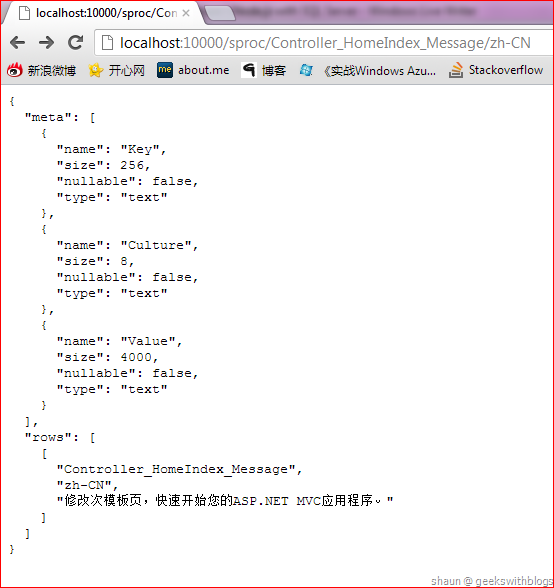
The parameter “results” represents all records that in JSON format. It contains two parts. The first part named “meta”, which is the metadata information of each columns of the result. The second part named “rows” which is an array contains all records.
For example, below is the query result against the table I had just created. In the meta part it said there are three columns in the result which are Key, Culture and Value. And the rows part is an array of all records.
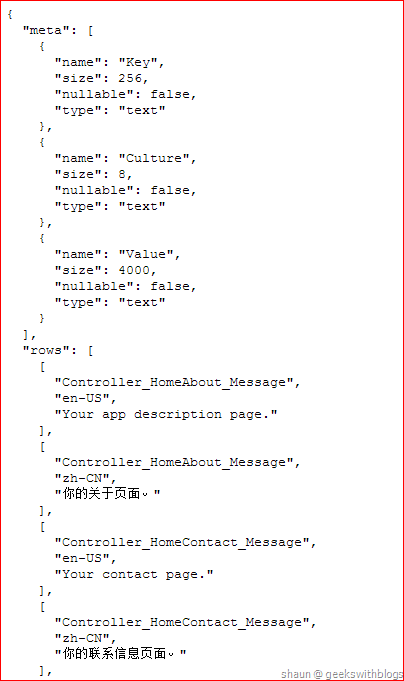
Hence if we need to retrieve the data from the result we have to use the rows array. Currently the module doesn’t support getting result value from the column name.
1: conn.queryRaw(command, function(err, results) {
2: if(err) {
3: // error handler here
4: }
5: else {
6: for(var i = 0; i < result.rows.length; i++) {
7: console.log(i + ": " + "Key = " + result.rows[i][0]);
8: console.log(i + ": " + "Culture = " + result.rows[i][1]);
9: console.log(i + ": " + "Value = " + result.rows[i][2]);
10: }
11: }
12: });
You can find the source code and the wiki of node-sqlserver on its GitHub page. More information about this module please refer here.
Let’s create a simple web server to demonstrate how to use the node-sqlserver module. I created a new Node.js application named “hellosql.js”, installed two modules: express and node-sqlserver. Then when user navigate to the home page I will connect to the database and return all the records in JSON type.
1: var express = require("express");
2: var sql = require("node-sqlserver");
3:
4: var app = express;
5: var connectionString = "Driver={SQL Server Native Client 11.0};Server={.};Database={Caspar};Trusted_Connection={Yes};";
6:
7: app.configure(function {
8: app.use(express.bodyParser);
9: });
10:
11: app.get("/", function(req, res) {
12: sql.open(connectionString, function(err, conn) {
13: if(err) {
14: console.log(err);
15: res.send(500, "Cannot open connection.");
16: }
17: else {
18: conn.queryRaw("SELECT * FROM [Resource]", function(err, results) {
19: if(err) {
20: console.log(err);
21: res.send(500, "Cannot retrieve records.");
22: }
23: else {
24: res.json(results);
25: }
26: });
27: }
28: });
29: });
30:
31: app.listen(10000);
And since currently node-sqlserver doesn’t support SQL parameter so we have to use text combination if we need some query criteria. In the code below I added another path that the user can specify resource key and culture in URL, then our application will search for the value.
1: app.get("/text/:key/:culture", function(req, res) {
2: sql.open(connectionString, function(err, conn) {
3: if(err) {
4: console.log(err);
5: res.send(500, "Cannot open connection.");
6: }
7: else {
8: var key = req.params.key;
9: var culture = req.params.culture;
10: var command = "SELECT * FROM [Resource] WHERE [Key] = '" + key + "' AND [Culture] = '" + culture + "'";
11: conn.queryRaw(command, function(err, results) {
12: if(err) {
13: console.log(err);
14: res.send(500, "Cannot retrieve records.");
15: }
16: else {
17: res.json(results);
18: }
19: });
20: }
21: });
22: });
The result would look like as below.
Insert, Update and Delete
As I mentioned, the “queryRaw” function can be used to insert, update and delete rows against the database. In fact we can specify any T-SQL commands in this function. For example we can pass “EXEC sp_GetItem ‘MY_KEY’, ‘en-US’” to invoke the store procedure.
The code below I added a route for user to insert a new record in the database. The user must send the request by HTTP POST method and specify the values in the request body. The application retrieves the values from the body, combine the SQL command and then invoke the node-sqlserver module to insert the data.
1: app.post("/new", function(req, res) {
2: var key = req.body.key;
3: var culture = req.body.culture;
4: var val = req.body.val;
5:
6: sql.open(connectionString, function(err, conn) {
7: if(err) {
8: console.log(err);
9: res.send(500, "Cannot open connection.");
10: }
11: else {
12: var command = "INSERT INTO [Resource] VALUES ('" + key + "', '" + culture + "', '" + val + "')";
13: conn.queryRaw(command, function(err, results) {
14: if(err) {
15: console.log(err);
16: res.send(500, "Cannot retrieve records.");
17: }
18: else {
19: res.send(200, "Inserted Successful");
20: }
21: });
22: }
23: });
24: });
Since we need to use POST method this cannot be done from the browser, I created a simple console application in C#.
1: class Program
2: {
3: static void Main(string[] args)
4: {
5: var key = args[0];
6: var culture = args[1];
7: var val = args[2];
8:
9: var req = HttpWebRequest.Create("http://EPEKW-Q1100423.is.ad.igt.com:10000/new");
10: req.ContentType = "application/x-www-form-urlencoded";
11: req.Method = WebRequestMethods.Http.Post;
12:
13: var param = string.Format("key={0}&culture={1}&val={2}", key, culture, val);
14: var bytes = System.Text.Encoding.UTF8.GetBytes(param);
15: req.ContentLength = bytes.Length;
16: using(var stream = req.GetRequestStream)
17: {
18: stream.Write(bytes, 0, bytes.Length);
19: }
20:
21: var res = req.GetResponse;
22: using (var sr = new StreamReader(res.GetResponseStream))
23: {
24: Console.WriteLine(sr.ReadToEnd);
25: }
26: Console.ReadKey;
27: }
28: }
Let’s run this console application and specify the values we want to insert into database.
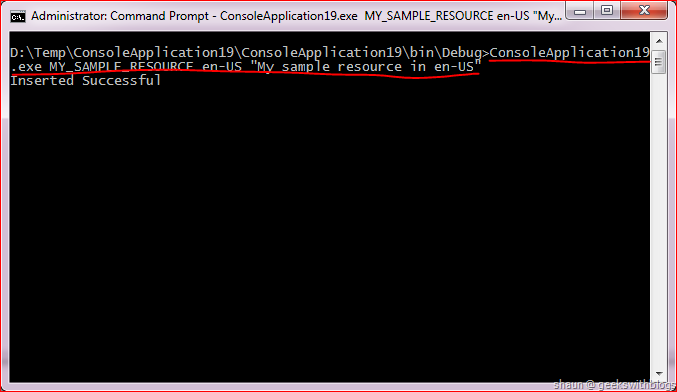
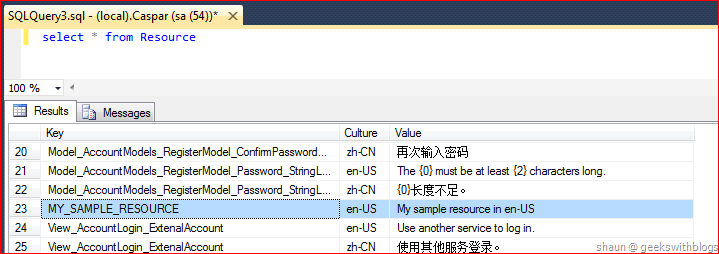
And then back to the database we can see it had been inserted.
Summary
In this post introduced a SQL Server Node.js module named “node-sqlserver”. This module is created by Microsoft which works with SQL Server as well as Windows Azure SQL Database. It’s still in the early preview phase so the functionality may not be perfect, such as not supporting SQL parameter, not supporting store procedure and not supporting getting result value by column name, etc.. But Microsoft is working to add more features.
In the next post, I will describe how to run Node.js application on Windows Azure. I will demonstrate how to use Windows Azure Web Site to host our Node.js application and how to connect to the Windows Azure SQL Database as well.
PS: The full source code below.
1: var express = require("express");
2: var sql = require("node-sqlserver");
3:
4: var app = express;
5: var connectionString = "Driver={SQL Server Native Client 11.0};Server={.};Database={Caspar};Trusted_Connection={Yes};";
6:
7: app.configure(function {
8: app.use(express.bodyParser);
9: });
10:
11: app.get("/", function(req, res) {
12: sql.open(connectionString, function(err, conn) {
13: if(err) {
14: console.log(err);
15: res.send(500, "Cannot open connection.");
16: }
17: else {
18: conn.queryRaw("SELECT * FROM [Resource]", function(err, results) {
19: if(err) {
20: console.log(err);
21: res.send(500, "Cannot retrieve records.");
22: }
23: else {
24: res.json(results);
25: }
26: });
27: }
28: });
29: });
30:
31: app.get("/text/:key/:culture", function(req, res) {
32: sql.open(connectionString, function(err, conn) {
33: if(err) {
34: console.log(err);
35: res.send(500, "Cannot open connection.");
36: }
37: else {
38: var key = req.params.key;
39: var culture = req.params.culture;
40: var command = "SELECT * FROM [Resource] WHERE [Key] = '" + key + "' AND [Culture] = '" + culture + "'";
41: conn.queryRaw(command, function(err, results) {
42: if(err) {
43: console.log(err);
44: res.send(500, "Cannot retrieve records.");
45: }
46: else {
47: res.json(results);
48: }
49: });
50: }
51: });
52: });
53:
54: app.get("/sproc/:key/:culture", function(req, res) {
55: sql.open(connectionString, function(err, conn) {
56: if(err) {
57: console.log(err);
58: res.send(500, "Cannot open connection.");
59: }
60: else {
61: var key = req.params.key;
62: var culture = req.params.culture;
63: var command = "EXEC GetItem '" + key + "', '" + culture + "'";
64: conn.queryRaw(command, function(err, results) {
65: if(err) {
66: console.log(err);
67: res.send(500, "Cannot retrieve records.");
68: }
69: else {
70: res.json(results);
71: }
72: });
73: }
74: });
75: });
76:
77: app.post("/new", function(req, res) {
78: var key = req.body.key;
79: var culture = req.body.culture;
80: var val = req.body.val;
81:
82: sql.open(connectionString, function(err, conn) {
83: if(err) {
84: console.log(err);
85: res.send(500, "Cannot open connection.");
86: }
87: else {
88: var command = "INSERT INTO [Resource] VALUES ('" + key + "', '" + culture + "', '" + val + "')";
89: conn.queryRaw(command, function(err, results) {
90: if(err) {
91: console.log(err);
92: res.send(500, "Cannot retrieve records.");
93: }
94: else {
95: res.send(200, "Inserted Successful");
96: }
97: });
98: }
99: });
100: });
101:
102: app.listen(10000);
Hope this helps,
Shaun
All documents and related graphics, codes are provided "AS IS" without warranty of any kind. Copyright © Shaun Ziyan Xu. This work is licensed under the Creative Commons License.