
Here in this series of post I am discussing few techniques to give client instant feedback on task progress in ASP.NET page. In the previous post I have discussed about displaying task progress - using regular handler, here I will discuss how to do the same in standard asp.net page.
 to download the source code please click here
Display task progress – in standard asp.net page
In this technique we write some regular ASP.NET script in the page itself, that performs streaming to the original page response directly. We put the lengthy task related code in the page and keep flushing the response when task state changes. The data is pushed to the the pages outgoing stream and the browser immediately displays the output. The connection to the browser is kept open until the task is complete.
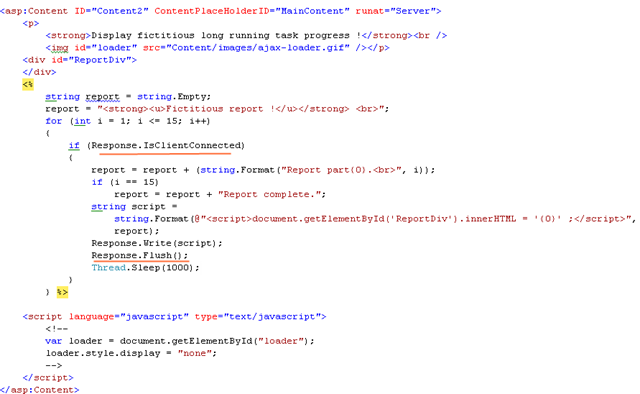
You see above I have written a regular ASP.NET page with some C# scripts that simulated a long running task by forcing the thread to sleep. However before the thread goes to sleep it Flushes the response using Response.Flush method. I discussed about the Flush method in earlier post. It basically facilitates to send buffered output to the browser immediately. The other thing to note here is the the Response.IsClientConnected property which indicates the server whether the browser is still connected or not. The Response.IsClientConnected property can determine if the browser is still connected. So when we perform a lengthy operation it is a good idea to periodically test whether the browser is still connected.
You may have already noticed that I am writing embedded javascript codes that manipulates the DOM. In this case this the ReportDiv elements innerHTML is assigned to latest flushed response. However to keep this example simple, I have been flushing the “report” string over and over again to reflect the changes in the browser and the same data is sent across the wire over and over. This may not be a good idea when you are flushing out a large report with 1000 records. You can reduce the amount of response traffic just by sending the progressive latest content only. To do this you will need to change your DOM manipulation code to perform append instead of replacement. Something like below.
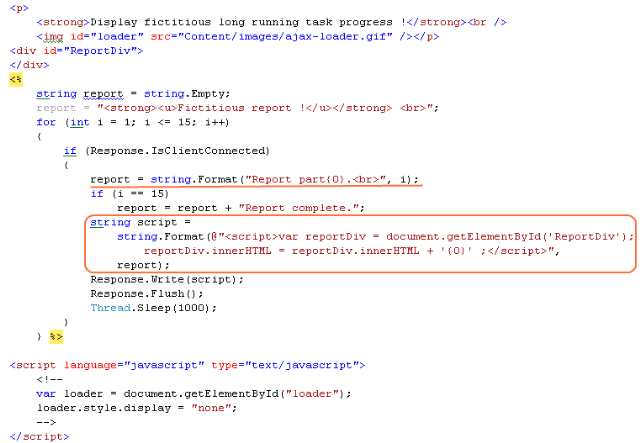
Note that I have changed the codes to flush progressing latest content only, I have also modified the rendered javascript codes that is now appending latest flushed content to the existing content instead of replacement.
The above example is serving the long task in a regular synchronous manner however It is a good idea to implement long running tasks asynchronously, lets look at that in the next post.