
1. Make sure your dynamic controls are Loaded on every postback.
Lets play with a very simple example,
ASPX
<%@ Page Language="C#" AutoEventWireup="true" CodeFile="Default.aspx.cs" Inherits="_Default" %>
C# Code Behind
public partial class _Default : System.Web.UI.Page
{
protected void Page_Load(object sender, EventArgs e)
{
TextBox t = new TextBox();
t.ID = "textBox";
this.PlaceHolder1.Controls.Add(t);
}
}
The above code works fine, but a common mistake is to try to conditionally load dynamic controls, if we tweak the code a little bit you will notice we loose our TextBox after any postback. The following code will not load the TextBox after our first postback.
public partial class _Default : System.Web.UI.Page
{
protected void Page_Load(object sender, EventArgs e)
{
**if (!IsPostBack)
** {
TextBox t = new TextBox();
t.ID = "textBox";
this.PlaceHolder1.Controls.Add(t);
}
}
}
Its recommended to load the dynamic controls during the Page_Init instead, because we may want to hook up our events with proper handler at an early stage.
public partial class _Default : System.Web.UI.Page
{
**protected void Page_Init(object sender, EventArgs e)
** {
TextBox t = new TextBox();
t.ID = "textBox";
t.TextChanged+=new EventHandler(t_TextChanged);
this.PlaceHolder1.Controls.Add(t);
}
}
2. Do not assigning properties of a dynamic control (viewstate enabled), during Page_Init, it will not be reflected.
Here is scenario of another common mistake, "123" assigned to the Text property during Page_Init,
public partial class _Default : System.Web.UI.Page
{
protected void Page_Init(object sender, EventArgs e)
{
TextBox t = new TextBox();
t.ID = "textBox";
**t.Text = "123";
** this.PlaceHolder1.Controls.Add(t);
}
}
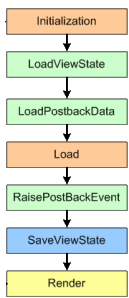
the above code will not work because, Initialization happens before LoadViewState during the control lifecycle. The value assigned to the properties during Initialization will simply get overwritten by the ViewState values.
3. If you are expecting your ViewState to retain after the postback, always assign same ID to the dynamic control
The following piece of code will not work, as I am assigning a new ID to the dynamic control after each postback. The LoadViewState retrieves previously saved viewstate data using the control ID, as the control ID has changed, it doesn't know anymore what to load, as a result it cannot load previously saved viewstate data any more.
public partial class _Default : System.Web.UI.Page
{
protected void Page_Init(object sender, EventArgs e)
{
TextBox t = new TextBox();
t.ID = Guid.NewGuid().ToString();
this.form1.Controls.Add(t);
}
}
Thank you for being with me so far.