
I was trying to host a small DNN application in one of our Server and I was facing couple of issues.
Problem 1:
The first problem I faced is it was always redirecting to localhost, whenever I tried http://domain.com/dnn it was redirecting to http://localhost/dnn as a result the site was un-accessible from outside.
Solution
This was easy to solve.
1. I needed to log in as host account.
2. Then I needed to go to the Admin > Site Settings page
3. And finally In the Portal Alias section I added a new Http Alias "domain.com/dnn"
This solved my problem when I hosted the site in port 80.
![clip_image002[14]](/images/shahed/119788/703665bc-clip_image00214.jpg)
Problem 2:
Now I tried to host the application in a different port 8080. I.e. http://domain.com:8080/dnn. and somehow when I clicking to redirect to any other page the port started to disappear. The http://domain.com:8080/ automatically turned to http://domain.com/ .
Solution
After googling and looking at the web.config carefully I found, its clearly documented in web.config that
![clip_image002[12]](/images/shahed/119788/5095352f-clip_image00212.jpg)
I tweaked my appsettings section and added the magic key
Also I had to add a new Http Alias "domain.com:8080"
This solved my problem and started retaining the port for my http://localhost:8080 but not http://domain.com:8080. The http://domain.com:8080 was still turning to http://domain.com
Note: I later discovered this was not a problem of DNN and the issue happened because of the setup of our router settings and port forwarding, which I'll discuss next.
Problem 3:
Even after adding the "UsePortNumber" key it did not solve my problem
Solution
Our Router was Port Forwarding all traffic of 8080 to the port 80 of the machine where DNN app is hosted. I.e. 8080 --> 80. As a result even from a browser I as typing http://domain.com:8080 , the DNN Request object was getting http://domain.com and when DNN handlers and url rewriters spitting the reformatted url it was spitting http://domain.com.
This was a big problem for me, initially I thought I would write a HttpHandler for 404 page not found, but soon realized it will never hit the server with the spitted Url so that didn't work. Then I thought I would tweak the DNN handlers to handle this scenario, but later tweaked the IIS and Router to handle this.
1. In IIS I added, support for 8080 to my Default Website.
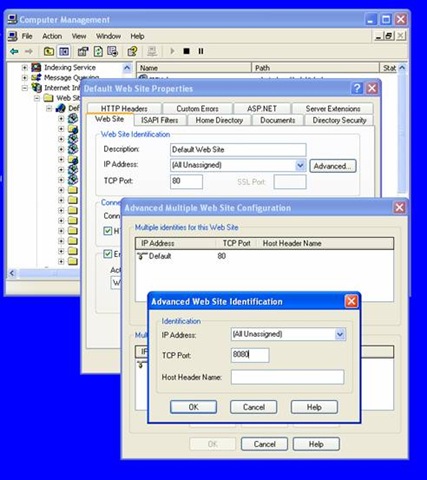
2. In Router instead of forwarding to port 80 I started forwarding 8080 to 8080.
3. Made sure that in my DNN Site Settings, I have added Http Alias "domain.com:8080/dnn".
Waaa la, This solved my issue.
Hope this helps and Thank you for being with me so far.