
UPDATE: Please see first comment to do this the "safe" way...
It took a bit for me to get comfortable enough with LINQ-to-objects to write ‘queries’ off the top of my head…but once you’re used to it you realize it’s much more concise, easier to interpret/read, and well..it’s less code. Here are some real quick examples…
This first example selects the string array value as well as its position from the someItems array. Note, the user of new{} creates a new generic type that has the properties ItemName and Position. I could have called these two properties whatever I pleased, because I’m creating them at query-time.
string[] someItems = { "cat", "dog", "purple elephant", "unicorn" };
var selectedItems = someItems.Select((item, index) => new
{
ItemName = item,
Position = index
});
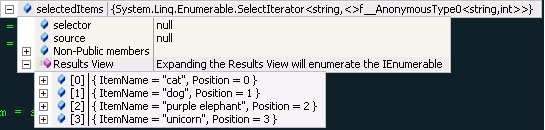
After you run this, selectedItems will look like this….
And if you needed to just get the position as an int to use that for some other logic, your code may look like this..
int firstItem = someItems.Select((item, index) => new
{
ItemName = item,
Position = index
}).Where(i => i.ItemName == "purple elephant")
.First
.Position;
In which case, firstItem would equal 2. Naturally, this is only the beginning of what LINQ to objects can do for you – but it definitely illustrates how LINQ can ease your daily coding.
Technorati Tags:,,,