
If anyone of you has debugged managed crash dumps, I am sure you must have come across a situation when debugger keeps telling you it’s not able to load mscordacwks.dll.
It usually happens when the dump was taken from a machine that had a specific version on .NET framework with patches installed and the machine where the crash dump is being analyzed has different .NET framework version number. When I talk about different version no, I mean the minor version. E.g. Crash dump was taken from machine v2.0.50727.5448 but the debugger is running on machine v2.0.50727.4016, the debugger would complain as version doesn’t match. Something like this –
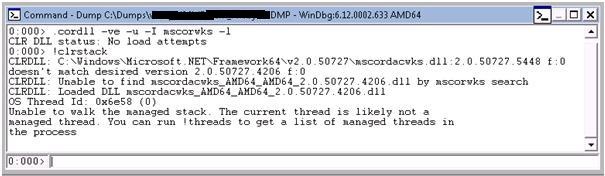
OR
Failed to load data access DLL, 0x80004005
Verify that 1) you have a recent build of the debugger (6.2.14 or newer)
2) the file mscordacwks.dll that matches your version of mscorwks.dll is
in the version directory
3) or, if you are debugging a dump file, verify that the file
mscordacwks___.dll is on your symbol path.
4) you are debugging on the same architecture as the dump file.
For example, an IA64 dump file must be debugged on an IA64
machine.
Resolution
To solve this, we need this specific version of the assembly to continue debugging. The minor version of the framework changes whenever Microsoft releases some patches, hot fixes or service packs. Depending on what patch or hot fix is applied on that machine, the version of the assembly will differ.
One of the easy ways to resolve is to copy the mscordacwks.dll from the machine the dump was taken and copy in the “discoverable” folder (path which is part of .sympath).
But there are times when that machine is not available or don’t have access to it or simply you are not able to get your hands on the specific assembly.
This site(http://www.mskbfiles.com/mscorwks.dll.php) details out each and every hotfix/patch with specific framework version number associated to it so that when we need a specific version, we can download the patch and extract the required assemblies.
Once the update/hotfix is downloaded, we extract the required assemblies using the below commands –
c:\ >expand.exe -f:* C:\Windows6.0-KB983589-x64.msu C:\temp
c:\ >expand.exe -f:* C:\temp\Windows6.0-KB983589-x64.cab C:\temp\cab
In the cab folder, the required assembly would be present.
The other way to extract the files is to use Winzip or some compression tool which lets you extract files from *.cab.
Just rename the assembly in mscordacwks___.dll format and place it in the discoverable path of the debugger (path which is part of .sympath).