
The Tarantino Project is a very simple to use database change management system that uses an application or NAnt deployment tasks to do so. I've been checking out Tarantino for about a week and I just started using it today and wanted to share my experience with how easy it is to use.
To use Tarantino, all you have to do is follow a couple of conventions.
You create a folder for a particular database. Then you have two folders under that, Create and Update.
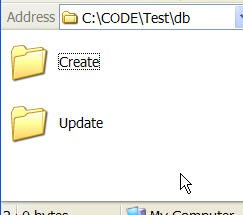
You name each sql task you want it to do in ORDER, starting with 0001-name.sql.
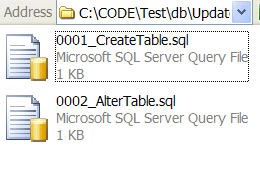
Then you set up a task that points to that top level folder:
<manageSqlDatabase scriptDirectory="db" action="Update" server="(local)" integratedAuthentication="true" database="test" />
The actions you can do include Create, Update, Drop, and Rebuild.
Push the values for these task properties into their own properties or external to the NAnt file.
You also need to drop the required files in your NAnt directory (these are a little different than the documentation, consider this the updated list).
- log4net.dll
- Microsoft.SqlServer.BatchParser.dll
- Microsoft.SqlServer.ConnectionInfo.dll
- Microsoft.SqlServer.Replication.dll
- Microsoft.SqlServer.Smo.dll
- Nhibernate.dll
- StructureMap.dll
- Tarantino.Core.dll
- Tarantino.DatabaseManager.Tasks.dll
- Tarantino.Infrastructure.dll
There is a more detailed explanation here: http://code.google.com/p/tarantino/wiki/DatabaseChangeManagement