Goal
Setting the windows command path in Windows 7.
Additional information
Modifying the path statement will enable an MS-DOS window opened in Microsoft Windows as well as older programs to locate files that may be required to run the program.
In the old MS-DOS environment we used the PATH= command, located in the autoexec.bat file. Additional information about the MS-DOS path command that is still usable in Windows 2000 and Windows XP can be found on our path command page, additional information about the MS-DOS command can be found on our set command page.
See our dictionary path definition for additional information about this term and related definitions.
Answer
The path is now managed by Windows 7 and not the autoexec.bat or autoexec.nt files. To change the system environment variables, follow the below steps.
-
From the desktop, right-click My Computer and click Properties.
-
In the System Properties window, click on the Advanced tab.
-
In the Advanced section, click the Environment Variables button.
-
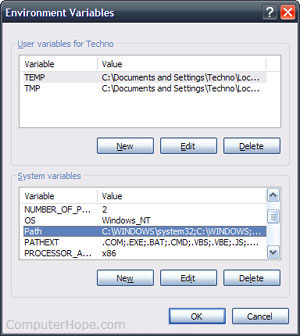
Finally, in the Environment Variables window (as shown below), highlight the Path variable in the Systems Variable section and click the Edit button. Add or modify the path lines with the paths you wish the computer to access. Each different directory is separated with a semicolon as shown below:
C:\Program Files;C:\Winnt;C:\Winnt\System32