
I recently came across baffling issue when setting up an existing BizTalk solution on some new servers. As part of our standard build processes we have a suite of BizUnit tests integrated into a CI Build process with TFS. Some of the tests compared the output message from a send port with a known good example message, and a number of these tests were failing on the new environment but ran fine in a our development machines. After some investigation it appeared that BizTalk was now introducing CR LF characters into the body of the message causing a failure in the BizUnit compare step. As a number of the downstream systems can be very fussy about message formats, the appearance of these extra characters was a show stopper.
It transpires that I had applied the cumulative updates for BizTalk 2010 onto the new environment, but our development machines were not patched to the same level.
Service Pack and Cumulative Update list for BizTalk Server
Cumulative Update 1 for BizTalk Server 2010 introduced a fix for whitespace processing. The setting is on the BizTalk host, and prior to the update it had no effect.
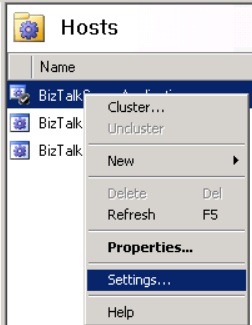
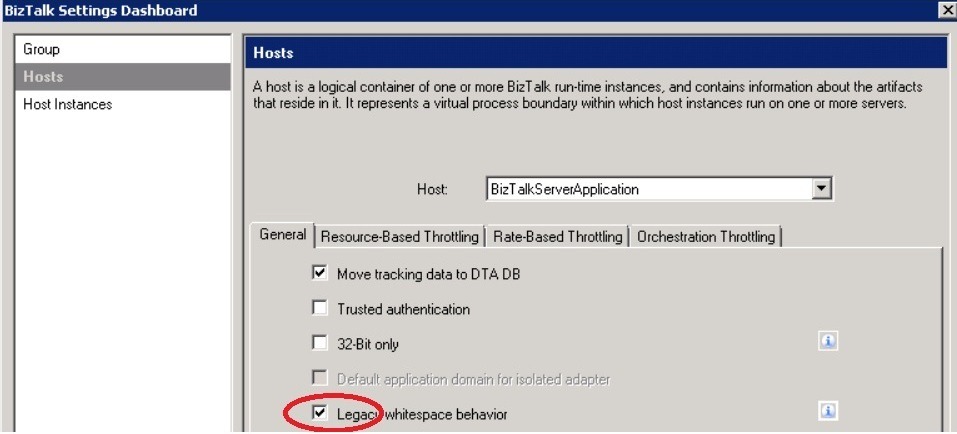
I’m sure that world of pain awaits the unwary if they were to automatically patch their production BizTalk servers with this update (which probably will be included in the next service pack for BizTalk).
The other great lesson learnt here is… it has shown once again the value in having a comprehensive set of BizUnit tests to validate the health of the environment.