
Let’s assume you have all (most) of the framework versions installed on your machine. How can you determine which application uses which framework version? Reminder: There is plenty of information about how to determine which framework version is installed. The question at hand, is about which framework version does an application actually use! Microsoft published an kb about : For your information, here is a full list of version numbers:
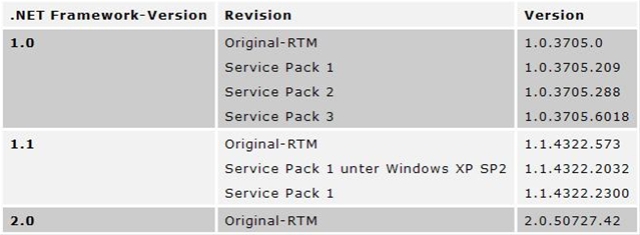
However, most people just differentiate between v. 1.0/1.1 (what they mean is 1.1.4322.2032) and v 2.0 (which is 2.0.50727.42).
Now back to the original question. How can you determine what framework version an application uses?
There is an tool called clrver.exe which is shipped with the SDK for.Net 2.0, you can find the tool under C:\Programme\Microsoft Visual Studio 8\SDK\v2.0\Bin
If you use the clrver.exe tool without arguments you get the following output: **C:\Programme\Microsoft Visual Studio 8\VC>clrver.exe Versions installed on the machine: v2.0.50727 **You can use all / argument to get more detailed information. -all - Displays all processes on the machine using the CLR. - Displays the version of the CLR used by the specified process.
Thus you can get detail information about the running processes.
3920 devenv.exe v2.0.50727 2084 WebDev.WebServer.EXE v2.0.50727 2944 Obab.UI.ProfessorenClientCab.vshost.exe v2.0.50727
Unfortunatley, you can only get the information from running applications. There is no way to let clrver.exe determine the required/used framework version from the application file itself.
Over at, you find an interesting about the above topic and what is more important, you can even download a simple tool to determine the version information directly from a file.You pass that tool a filename and it outputs the Version information and what version of the CLR runtime the file requires. The source code for that tool can be found.
I wonder why clrver.exe does not supply this functionality out-of-the-box?