
If you try to install an application with the MSI installer and you only have.Net Framework 2.0 installed you sometimes get a message: “This setup required.net framework version 1.1.4322. Do you want to download it now?”.
!(/images/pavelka/69425/ff9705e6-requires_small_thumb1.jpg)

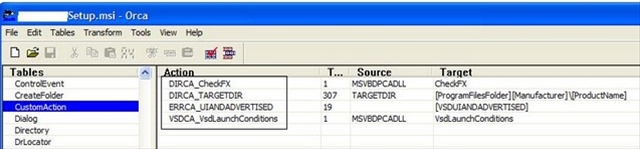
The error is resulting from a two custom actions inside the msi file: DIRCA_CheckFX and VSDCA_VsdLaunchConditions.
If you delete those actions from the MSI file the installer won’t check for the Net Framework.
Editing of an msi file is possible with the help of Orca.
Orca is a Microsoft utility for modifying and validating Windows Installer packages. You can use Orca to open and modify MSI files. Orca is included in the or you can download Orca directly from.
If you open the msi file with Orca navigate to the Custom Action Node and delete those two actions. ( Drop Row from Context Menu)
!(/images/pavelka/69425/c229273d-req2_small_thumb.jpg)
Save the msi file and you should be ready to go.
If you still can’t install you can delete CheckFx and VsdLaunchConditions from the InstallUISequence and InstallExecuteSequence tables.
The installed application will most likely run without problems. But there are (seldom) cases where an application developed for 1.1 won’t run with 2.0.