
I wanted to take a few minutes to talk about the project management / tracking / estimation methods I use. Over time the processes and tools I use have changed quite a bit, but the way I've been doing things recently really works well for me. The primary tool I use to manage a project is a feature list. Similar to a product backlog from SCRUM (although we don't do sprints...or I suppose you could say we do a sprint for every feature). The feature list is constantly evolving as we discover new requirements, or new feature requests are received. I maintain this list using a Sharepoint list on our project site. The feature list is prioritized (stack-ranked) in order from highest priority to lowest. We don't give each feature a priority from 1 to 10 or some similar ranking (low, medium, high, etc), instead we sort the whole list according to priority relative to the other items on the list. This prioritization is done as a group with the project stakeholders, and we hold a weekly meeting where any new feature requests are reviewed and their priority relative to the rest of the list determined. One of the nice things about using this method, is that we never have to refuse a feature request, or somebody requesting to expand the scope. Every request will be added to the list, then it's up to the group to decide where it should be prioritized. Even feature requests that are just wish-list type stuff, that we know won't get done in the near future can still be added to the list, they will just be prioritized near the bottom.
At our weekly meeting, in addition to reviewing and prioritizing new feature requests, we also review and update (if necessary) the "go live" point. This is the cutoff point in the feature list that all the stakeholders feel includes enough functionality and benefits that we can roll out the application into production.
Each item in the feature list is also assigned an Effort Required rating from 1 (easy) to 5 (hard). This is just a rough estimate done by me (the development manager) that gives everybody an idea of the work required to implement each feature relative to the other features. If I find myself giving a rating of 5 (hard) I will usually attempt to break the feature up into 2 or more smaller features that can be tackled separately. If I feel a feature is a 1 (easy) I will see if I can group it together with another related feature.
Along with each feature we also maintain a % Complete which is updated by the developer(s) working on that feature. We define specific percentages to represent key points (milestones) in that features lifecycle.
0-49% is under development
50% is ready for review by the feature owner(s)
60% means it has been reviewed
61-79% means it is undergoing revisions as a result of the review
80% is ready for demo to the larger group (at our weekly meeting)
90% means it has been demo'd
91-99% is undergoing final revisions as a result of the demo
100% is completed
Now that we have the effort required rating for each feature (I also call these "Work Points") and the % complete, we can do a number of useful calculations. We can multiply out the % complete by the Work Points for each feature and sum it up to get the total work points completed. If we compare this to the total work points required we can come up with a % complete for the whole project. We can also track the # of work points completed each week/month to determine the velocity. Using this we can calculate the estimated time required to complete all the remaining work points. I produce a status report every week that includes all these calculations. Here is a sample of what it looks like:
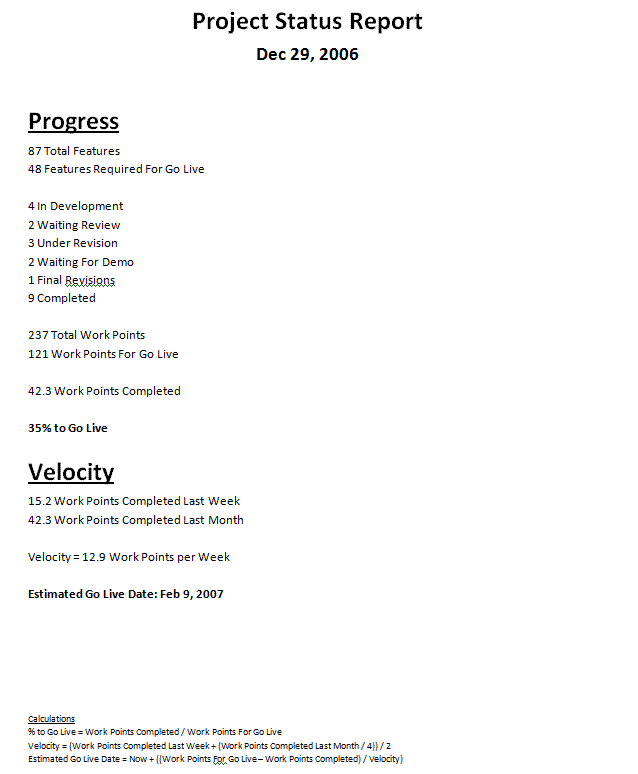
The beauty of this report is it is extremely easy to generate (when I get some spare time I may write some code that automates the generation of this report by reading from sharepoint directly). It also provides very useful information, to me, the project stakeholders and upper management. The % Complete number gives a quick update on the progress being made on the project. And the Estimated Go Live Date is a useful piece of information to compare against any previously created timelines or deadlines. Since it's based off of real measurements of progress it makes it much more useful than somebodies (usually mine) wild estimate of when we'll be done.
Do any of you guys do something similar? Let me know what you think in the comments.