
I have always been surprised that this was not already baked into the framework, but it turns out it is fairly easy to add. There are just a few steps.
In the end, we want a drop down that will list the valid values from the enumeration.
We will start by creating a new Editor Template. The template itself is fairly straight forward:
<%@ Control Language="C#" Inherits="System.Web.Mvc.ViewUserControl" %>
<%
Func<object, string> GetDisplayName = o =>
{
var result = null as string;
var display = o.GetType()
.GetMember(o.ToString()).First()
.GetCustomAttributes(false)
.OfType()
.LastOrDefault();
if (display != null)
{
result = display.GetName();
}
return result ?? o.ToString();
};
var values = Enum.GetValues(ViewData.ModelMetadata.ModelType)
.Cast<Enum>()
.Select(v => new SelectListItem
{
Selected = v.Equals(Model),
Text = GetDisplayName(v)
});
%>
<%= Html.DropDownList("", values,
new { @class = "chzn-container" })%>
Next we need to do a little bit of work to make sure that this template will be used. We will create a new CustomModelMetadataProvider that will let the DataAnnotationsModelMetaDataProvider handle all of the work, but if there is not a TableHint added and the property is an enum, we will assign our own TableHint of "Enum.
Because we let the base class do all of the heavy lifting, our custom model meta data provider is very simple:
public class CustomModelMetadataProvider
: DataAnnotationsModelMetadataProvider
{
public override ModelMetadata GetMetadataForProperty
(Func<object> modelAccessor,
Type containerType, string propertyName)
{
var result = base.GetMetadataForProperty
(modelAccessor, containerType, propertyName);
if (result.TemplateHint == null && typeof(Enum)
.IsAssignableFrom(result.ModelType))
{
result.TemplateHint = "Enum";
}
return result;
}
}
Finally we need to let the framework know about our new provider. Simply add something like this to your Application_Start event handler in the global object:
ModelMetadataProviders.Current =
new CustomModelMetadataProvider();
Now with a simple enum like this:
public enum Occupancy
{
[Display(Name = "Owner Occupied")]
OwnerOccupied,
[Display(Name = "Second Home")]
SecondHome,
[Display(Name = "Investment Property")]
InvestmentProperty
}
and adding to the to the View:
<%=Html.EditorFor(m=>m.Occupancy) %>
We get a drop down that looks like this:
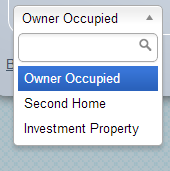
It may seem like a lot of work, but once this is in place, you don't have to worry about any of these steps again.