
Article Source: https://geekswithblogs.net/charliemott
Tracking the count of TODO’s in your solution can be used for the following:
- Use as an additional measure of code quality.
- Predict estimated completion dates through use of a burndown chart.
- Once in production, TODO’s can be a good measure of how much Technical Debt lives within a solution.
As such, I have created a “FilesTextSearch” WF activity that can be plugged into a TFS build template. I’ve uploaded this as patch in the codeplex project.
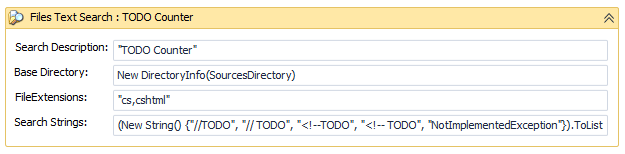
The default configuration of this activity is used to count TODO’s in the solution code.
- Search all directories below this base directory. - Comma separated list of file extensions to search. - List of strings to search (case insensitive).
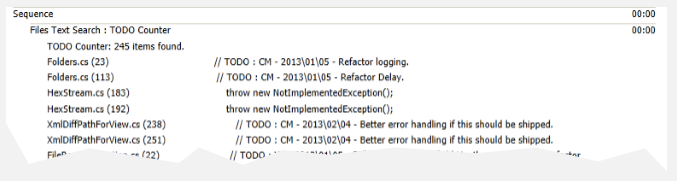
This produces the following output in the build log:
Future Improvements
- Make use of the public OutArgument<int> MatchCount property. It could be used as additional data to support reporting requirements in order to produce a burndown chart.
TODO Formatting
See my post on recommendations for TODO formatting: https://geekswithblogs.net/charliemott/archive/2011/11/22/todo-formatting.aspx.