
MS Access and TFS?

One of my first Windows applications was an Access 2.0 database.  Man has Access changed since then!  Recently one of my customers needed to be able to source control some of their Access 2003 database.  I knew about the MSSCCI provider for TFS, but I had not used if for Access before. 

Here is what I did to get this working:

  1. Installed the Access source control Add-in
  2. Installed the Office 2003 SP 3
  3. Installed KB 945674 (this fixes a problem with source control)
  4. Installed the TFS MSSCCI provider

Once everything was setup, I got this error when I tried to create the .mdb from TFS:

      Failed to import file 'C:\path\file name.acf' into Microsoft Access.

Grant Holiday (now a blue badge) found the fix for me.  Turns out to be a setting in the options of Access on the Advanced tab.  The Default File Format must be set to “Access 2002 – 2003”.

Here is where you set this:
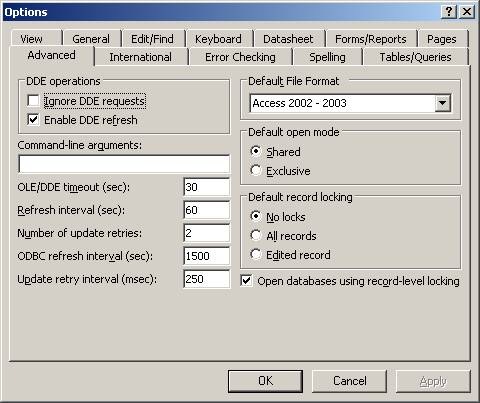
image001

Hope this helps you.

Happy Coding!

This article is part of the GWB Archives. Original Author: Mike Azocar

New on Geeks with Blogs

  • We Won The One Award I Actually Care About

    Full Scale made the Inc. 5000 for the fifth year straight, the 12th listing across my three companies. Here is why the one award you cannot buy is worth stopping for.

  • Your Customers Build the Features Now

    I let a tool I liked sit dead for a year rather than build the features I wanted. An MCP server meant I never had to, and your customers can do the same to your product.

  • Get the Size of a Directory in Linux the Easy Way

    du -sh for the quick answer, ncdu for the cleanup, df for the disk itself: every command for checking directory size in Linux, plus why du and df never agree.

  • Vim Search and Replace: The Ultimate Guide

    One :%s command replaces every match in a file before a find dialog would even open. The Vim substitute patterns worth the muscle memory: flags, ranges, capture groups, and multi-file edits.