Tim goes through quite a bit, I just want to cover the very bare minimum for getting log4net to work in a console application.
Step 0 – Reference Log4Net
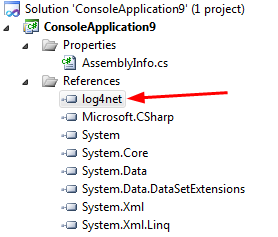
Using NuGet this is really easy – but no matter how you do it, you should end up with a reference to log4net in your project.
Step 1 – Add an entry to AssemblyInfo.cs
Add the assembly for the log4net.config to AssemblyInfo.cs
[assembly: log4net.Config.XmlConfigurator(Watch = true)]
Step 2 – Config settings file for App.config
Add a config file called App.config to your solution if it is not there already…
I added the following config settings within this file as follows:
### Step 3 – Create an instance of a logger and call logging
To create an instance of a logger, there are a couple of ways you can do this….
One suggestion by Tim is to add the following line within each class where you want to have logging…
private static readonly log4net.ILog log = log4net.LogManager.GetLogger
(System.Reflection.MethodBase.GetCurrentMethod().DeclaringType);
I am not sold on this approach, this is something where I would use Dependency Injection to inject the logger, but for a simple console app example this would complicate things, so I would go with the following approach just to get things working…
class Program
{
static void Main(string\[\] args)
{
log4net.Config.BasicConfigurator.Configure();
ILog log = log4net.LogManager.GetLogger(typeof(Program));
log.Debug("This is a debug message");
log.Warn("This is a warn message");
log.Error("This is a error message");
log.Fatal("This is a fatal message");
Console.ReadLine();
}
}
### Step 4 - Run the application
Simply run the application and you should see log file being created.
Local Disk (C)\_2012-01-30\_10-28-10_2012-01-30_10-28-10_thumb.png "Local Disk (C)_2012-01-30_10-28-10")_2012-01-30_10-28-10_2.png)

