
I was doing a data conversion that involved importing data from a flat-file source into SQL Server. I fired up SSIS and created the Data Flow tasks that would move the data into the SQL Server tables.
The problem was, the longer fields (i.e. a “Notes” column) were all being truncated no matter what data type I made the destination field. So I created a Data Conversion task to sit between the Flat-File data source and the SQL Server Destination. After I had tried every conceivable destination data type and Data Conversion, I decided that the problem was occurring before SSIS even got a hold of it.
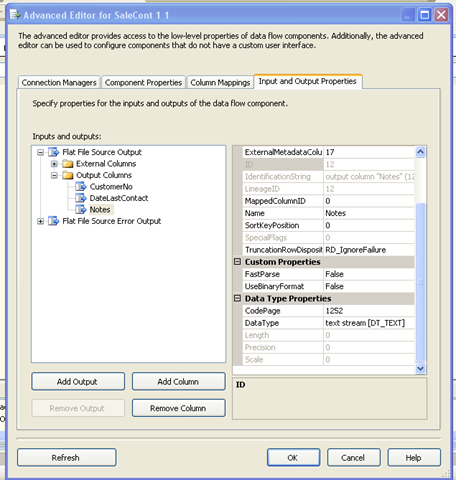
This is when I discovered the Advanced Editor for the data source.
Write click on the data source and select “Show Advanced Editor”. Select the “Input and Output Properties” tab. Under “Flat File Source Output” –> “Output Columns” you will see the fields to be imported. Here you can change the data type of the fields. I selected “text stream” and that fixed the truncation issue. I was able to get rid of all the Data Conversion steps and just do a straight import to the SQL Server table.
Technorati Tags:,