
Occasionally I run into a problem difficult to reproduce in that it takes a laborious amount of tinkering. Sometimes I’ve gone through the work of plugging away at the user interface or forcefully moving the current statement manually around if statements. In these situations, I become very attached to my debugging session (no pun intended).
I am secure in my nerdiness enough to admit that there have been instances where I have changed code for testing purposes and forgotten to revert those changes before checkin time. Because of this I’ve developed an aversion to making such changes to the code. I recently discovered one additional tool in my arsenal to futz with the running code without changing it.
Abuse a breakpoint condition!
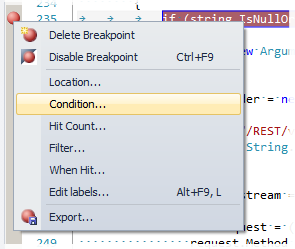 |
You would usually use a condition to specify when the breakpoint should hit, but you can enter any valid code as the condition. In my case, I used this:
(addressState = "AL") == null
The null check was just to ensure that the breakpoint would not actually break the debugger. You could use “!= null” if you still wanted the breakpoint to hit.
Ultimately this aids the same benefit you get when setting values in local or watch windows. Using this trick, you can “automate” these actions if you need to.