
Entity Framework v1 did not support a commonly implemented ORM feature called Lazy Loading. Entity Framework 4 adds that feature. In Beta 1 it was known (confusingly IMHO) as Deferred Loading. In Beta 2 it is (thankfully IMHO) known as Lazy Loading.
You run up against the absence of Lazy Loading in v1 when you start moving across associations between Entities (Objects). Imagine for instance you had an instance of Order from Northwind and wanted to access its Order_Details, perhaps to do something as simple as return a count of the number of Order_Details.
You would be tempted to write:
order.Order_Details.Count
However this will return 0 unless you have already explicitly loaded the related Order_Details into the ObjectContext.
In v1 you could either explicitly project in your query (stating up front that you were interested in the count of Order_Details) or you could use explicit loading :
Orders.Include(“Order_Details”)
Either approach would ultimately give you the correct value instead of a dreaded 0.
However Lazy Loading ensures that in situations like the above, “It just works” and the beauty is that it requires a single statement to turn it on.
context.ContextOptions.LazyLoadingEnabled = true;
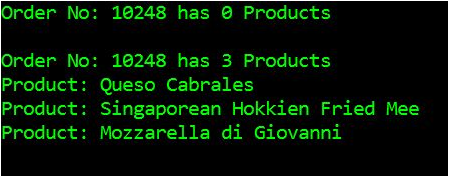
The following example performs the same operation, first with Lazy Loading off, then with it on:
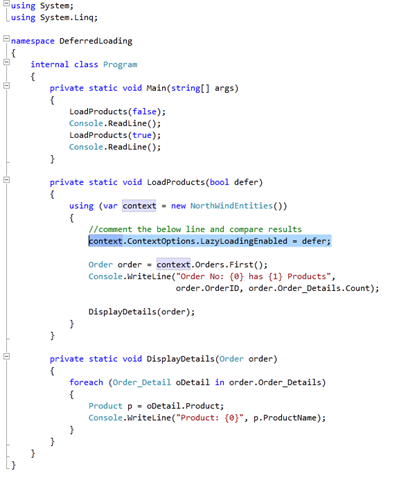
Will product the output:
In a future post I will talk about the hidden dangers of LazyLoading and compare it to other ORM implementations.