
Entity Framework 4 relies significantly on the Text Template Transformation Toolkit (T4) to generate code from the EDM.
I thought it would be useful to show a really simple example of T4 in action which is nothing to do with Entity Framework.
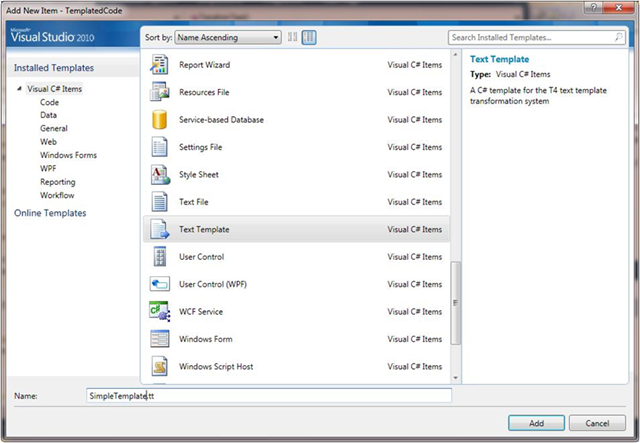
In a Visual Studio 2008/2010 solution, add a new item of type Text Template:
Edit the “output extension=” pragma to generate a “.cs” file and add some C# code for a very simple class which has a single method TheAnswer which contains a single WriteLine. In the WriteLine use a T4 <#= #> block. <#= represents the start of a simple evaluation block, in this case the evaluation is to add 41+1:
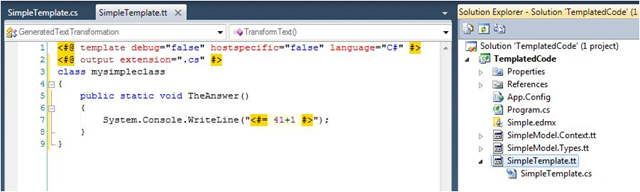
NB: I am using the Tangible T4 editor to give me syntax highlighting and intellisense. You will need to add this into Visual Studio using the Extensions Manager.
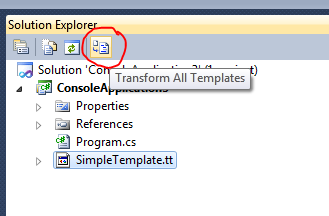
Next build the project or click on Transform Templates in the Solution Explorer:
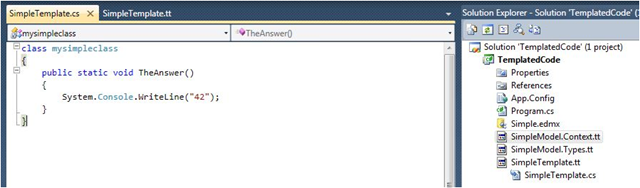
You will now see a new C# file in your project, SimpleTemaplate.cs:
In summary a T4 template is composed of:
- Blocks of text: text that simply is copied into the output file(s)
- Directives: meta information for the template such as “output extension=” enclosed in <#@ … #>
- Statements: code enclosed in <#...#>
- Expressions: code that is evaluated to a string <#= …#>
The above is pretty much the most basic example of T4 I could come up with. However there are plenty of other great resources on T4 out there. has been heavily involved with T4 for many years and has many great posts. You may want to start with done as a series of posts.