
A new preview of the ASP.NET Dynamic Data Web Site was made available on April 23, 2008. Some new nice features for Dynamic Data Wizard and routed URLs were included in this release. The Visual Basic language support was added for the first time as well.
In this quick blog post, we will take a look at some of the enhancements to the wizard template. First off, download the latest release from the following URL http://code.msdn.microsoft.com/Release/ProjectReleases.aspx?ProjectName=dynamicdata&ReleaseId=954. The installation process is the same as the 04/08 preview. Unzip your download, launch Visual Studio 2008 Command Prompt, and execute the install.cmd file to begin the installation.
Since I am going to focus on the changes from 04/08 preview, not every single step of the site generation will be listed here. To see how to generate a Dynamic Data web site using the wizard, please refer to my earlier blog post First look at ASP.NET Dynamic Data Web Site Preview.
We will again generate the site from the Northwind database. The tables I selected are Customers, Orders, and OrderDetails. Accept all the files and CRUD methods the wizard has generated for you.
The first change I want to show you is the automatic association with the Site.master page. Open any generated web form in the DynamicData/CustomPages folder and you should see the MasterPageFile is already added in the page direction. In the previous two releases of Dynamic Data, although this site.master file was created for you, you would have to associate it with the content pages manually.
<%@ Page Title="Customers Details" MasterPageFile="~/Site.master" Language="C#" AutoEventWireup="true" CodeFile="Details.aspx.cs" Inherits="CustomersDetails" %>
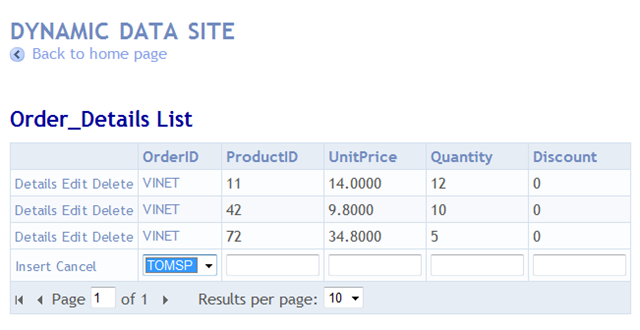
Another cool change in the 04/23 preview is drop-down lists are rendered for foreign-key fields in edit/insert pages.
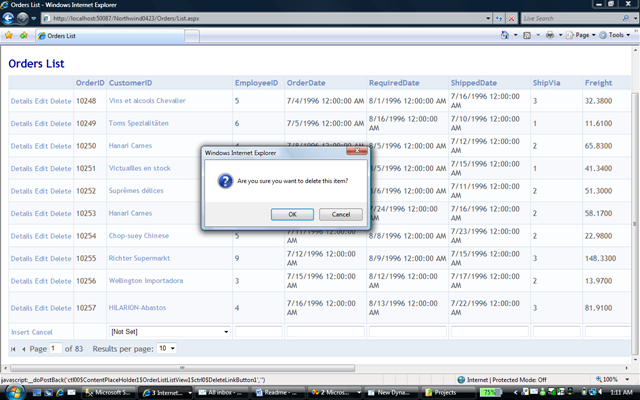
JavaScript dialog box has been added to confirm deletions.
For a complete list of changes in this release, please refer to the Release Changes page on MSDN Code Gallery.
The complete source code for this example can be downloaded here.