
Here's a sample template that lets you have the String.Replace() functionality in XSLT 1.0. The template "string-replace-all" takes 3 parameters and recursively processes the input text string.
- text : main string
- replace : the string fragment to be replaced
- by : the replacement string
xsl:template name\="string-replace-all"\
xsl:param name\="text" /
xsl:param name\="replace" /
xsl:param name\="by" /
xsl:choose\
xsl:when test\="contains($text, $replace)"\
xsl:value-of select\="substring-before($text,$replace)" /
xsl:value-of select\="$by" /
xsl:call-template name\="string-replace-all"\
<xsl:with-param name="text"
select="substring-after($text,$replace)" />
xsl:with-param name\="replace" select\="$replace" /
xsl:with-param name\="by" select\="$by" /
</xsl:call-template>
</xsl:when>
xsl:otherwise\
xsl:value-of select\="$text" /
</xsl:otherwise>
</xsl:choose>
</xsl:template>
Here's how it is called:
xsl:variable name\="myVar"\
xsl:call-template name\="string-replace-all"\
xsl:with-param name\="text" select\="'This is a sample text : {ReplaceMe} and {ReplaceMe}'" /
xsl:with-param name\="replace" select\="'{ReplaceMe}'" /
xsl:with-param name\="by" select\="'String.Replace() in XSLT'" /
</xsl:call-template>
</xsl:variable>
(Edit : Thanks to Marky and granadaCoder for typing out the xslt code in the comments.)
The resulting value of $myVar after {ReplaceMe} is replaced is "This is a sample text : String.Replace() in XSLT and String.Replace() in XSLT"
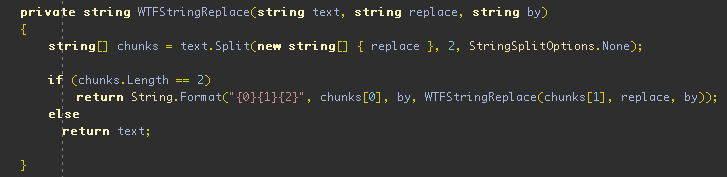
For those who are not familiar with XSLT syntax and here's the C# equivalent. An excellent material for the thedailywtf! :)
(Note: I'm not so sure, but I think in XSL 2.0 there is already a built-in replace function on strings)