
Step 1:
Download CouchDB on your Android phone from Android Market Place:
info available at: http://www.couchone.com/android
!(/images/emanish/142752/829de66b-google_20nexus_20one_-507404736.jpg "google nexus one_-507404736.jpg")
Step 2:
Download CouchDB on your Windows machine
info available at: http://www.couchone.com/get#win
Download link:
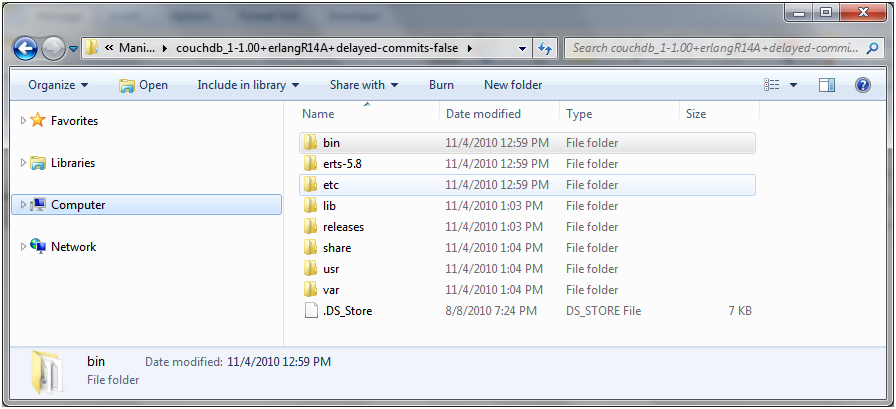
after unzip, it looks like this:
Step 3:
Check IP of your Windows machine
Note: Your Android phone and Windows machine shall be on the same network (in case of local network).
Step 4:
On your Windows machine, Goto etc/couchdb folder in the CouchDB directory and change the IP from 127.0.0.1 to your Windows machine IP in local.ini file
Step 5:
On your Windows machine, Goto bin/ folder in the CouchDB directory,
Run the couchdb.bat file, it will show the following log
Erlang R14A (erts-5.8) [source] [smp:2:2] [rq:2] [async-threads:0]
Eshell V5.8 (abort with ^G)
1> Apache CouchDB 1.0.0 (LogLevel=info) is starting.
Apache CouchDB has started. Time to relax.
[info] [<0.44.0>] Apache CouchDB has started on http://192.168.0.2:5984/
Step 6:
Access http://192.168.0.2:5984/_utils URL from your Android phone browser
It should show the CouchDB page with database names.
And immediately it will show this log in the Erlang server window:
[info] [<0.107.0>] 192.168.0.3 - - 'GET' /_utils 301
[info] [<0.107.0>] 192.168.0.3 - - 'GET' /_all_dbs 200
[info] [<0.169.0>] 192.168.0.3 - - 'GET' /_session 200
[info] [<0.107.0>] 192.168.0.3 - - 'GET' / 200
[info] [<0.169.0>] 192.168.0.3 - - 'GET' /_users/ 200
[info] [<0.168.0>] 192.168.0.3 - - 'GET' /xyz/ 200’
Step 7:
Now Open the CouchDB on Android phone Notification bar. (You will see the local IP of the phone i.e. 127.0.0.1:5984)
Create a new database… (in my case database name was xyzA)
Go to Replicator link on the right side of the page
In From DB, fill the http url of your CouchDB running on your Windows desktop
for e.g. http://192.168.0.2:5984/xyz (xyz was the database name on my Windows CouchDB)
In To DB, select the newly created database from the dropdown which shows _replicator as selected by default.
or in case if the newly created db is not there in the dropdown list,
fill the http URL, for e.g. http://127.0.0.1:5984/xyzA
Note: even though new database is created, it may not appear on the Local Database dropdown on the Replicator page
Remember to Reload/Refresh the page in your Android Browser always, you may have to do it at many different times on various pages.
You can select Continuous check box for continuous replication between the two.
Press Replicate button
Immediately it will show this log in the Erlang server window:
[info] [<0.742.0>] 192.168.0.3 - - 'GET' /xyz/ 200
[info] [<0.743.0>] 192.168.0.3 - - 'GET' /xyz/_local%2F34c99c134a502c2cd41d6df7775902e2 404
[info] [<0.744.0>] 192.168.0.3 - - 'GET' /xyz/_local%2F6ed566d89c8c3c6b5c00ddb810717b2d 404
[info] [<0.745.0>] 192.168.0.3 - - 'GET' /xyz/_changes?style=all_docs&heartbeat=10000&since=0&feed=continuous 200
[info] [<0.746.0>] 192.168.0.3 - - 'GET' /xyz/e63b8aa6b2685686199c7e131900052f?open_revs=["1-6371fc9e2fa97f39bd567a3649b3a825"]&revs=true&latest=true&att_encoding_info=true 200
[info] [<0.749.0>] 192.168.0.3 - - 'GET' /xyz/f1ca5a35948b802b82a346a792000e20?open_revs=["2-a73c0007b41ce0b84b6960cd55b2d487"]&revs=true&latest=true&att_encoding_info=true 200
[info] [<0.750.0>] 192.168.0.3 - - 'POST' /xyz/_ensure_full_commit?seq=3 201
[info] [<0.757.0>] 192.168.0.3 - - 'PUT' /xyz/_local%2F34c99c134a502c2cd41d6df7775902e2 201
Problems identified during this exercise:
1. In CouchDB web UI, to change any field value, one has to double click, but if you have opened CouchDB Web UI in Android Browser, double click/double tap work as zoom feature!!
2. Continuous Replication stopped working, once my Android phone moved from WiFi to EDGE and back, I had to restart CouchDB on Android and again set up the replication!!