
[Source: https://geekswithblogs.net/EltonStoneman]
This is one in a series of posts covering my generic mapping library on github: Sixeyed.Mapping.
1. Mapping and Auto-Mapping Objects
2. Mapping and Auto-Mapping Objects from IDataReader
3. Mapping and Auto-Mapping Objects from XML
4. Mapping and Auto-Mapping Objects from CSV
5. Comparing Sixeyed.Mapping to AutoMapper
The mapping library has support for IDataReader objects used as the source. Using data readers, AutoMap will try to populate the target by matching property names to column names. Alternatively a static map can be defined, manually specifying the mapping between column names and properties.
Auto-Mapping
Using a populated data reader as a source, you can auto-map a target object using the DataReaderAutoMap and the same syntax as for an object source:
IDataReader reader = GetReader(id);
User user = DataReaderAutoMap<User>.CreateTarget(reader);
The data reader must be open, and the map will populate from the current row so the data reader should be read to the desired start position before mapping. For a single row, call Read once on the reader before passing it to the Create call.
DataReaderAutoMap and AutoMap share the same base class, and the mapping logic is the same for all sources. Specification, caching strategy and naming strategy options still apply. To specify a property mapping, you need to provide the name of the source column:
var addressMap = new DataReaderAutoMap<Address>
.Specify("PostCode", t => t.PostCode.Code);
//or:
var addressMap = new DataReaderAutoMap<Address>
.Specify((s, t) => t.PostCode.Code = (string)s["PostCode"]);
You can also use the conversion overloads for converting the source value during population:
var map = new DataReaderAutoMap<User>
.Specify<DateTime, DateTime>("JoinedDate", t => t.JoinedDate, sd =>FromLegacyDate(sd));
Static Mapping
For static maps, extend the base DataReaderMap class. As we’re dealing with string constants for the column names, static maps may be the better option in caseswhere the source and target names can’t be matched by convention – they centralise the constant definition in one place:
public class FullUserFromDataReaderMap: DataReaderMap<User>
{
///
/// Default constructor, initialises mapping
///
public FullUserFromDataReaderMap
{
this.AutoMapUnspecifiedTargets = false;
Specify(ColumnName.Id, t => t.Id);
Specify(ColumnName.FirstName, t => t.FirstName);
//etc.
}
private struct ColumnName
{
public const string Id = "UserId";
public const string FirstName = "FirstName";
//etc.
}
}
Nested Maps
Maps can include nested maps, populating an object graph from a flattened representation in a single data reader:
var addressMap = new DataReaderAutoMap<Address>
.Specify("PostCode", t => t.PostCode.Code);
var map = newDataReaderAutoMap<User>
.Specify("UserId", t => t.Id)
.Specify((s, t) => t.Address = addressMap.Create(s));
var user = map.Create(reader);
Nested maps can also populate objects from multiple readers – although this requires each reader to be associated with a separate connection:
var addressMap = new DataReaderAutoMap<Address>
.Specify((s, t) => t.PostCode.Code = (string)s["PostCode"]);
var map = new DataReaderAutoMap<User>
.Specify("UserId", t => t.Id)
.Specify((s, t) => t.Address = addressMap.Create(addressReader));
var user = map.Create(userReader);
Limitations
Data reader maps can only operate in one direction – populating an object from a reader. They also rely on the column names being available in the IDataReader implementation through the GetOrdinal method. Not all data providers supply this, and if there are no column names available, mapping will fail for auto-maps and static maps, leaving the target object unpopulated.
Performance
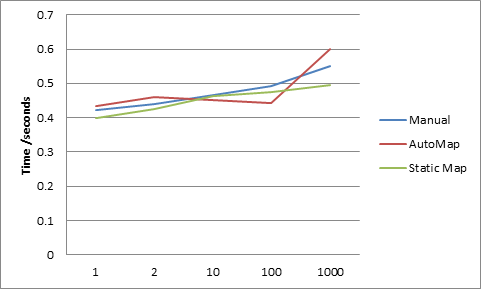
Mapping from data readers uses the column names of the source, so only the target is reflected over. For small numbers of reads, there is less of a performance impact than with object-to-object mapping, and the benefits are greater as mapping also takes care of type conversion. Using a SqlServerCe database populated with 250,000 rows (80+Mb of data), the performance was bounded by the speed of the database connection and not the speed of mapping. Up to 1,000 are read and mapped in 0.4-0.6 seconds for all reads, with a small performance hit for the automap:
For larger reads, the performance impact is more significant, with DataReaderAutoMap and a static DataReaderMap taking almost twice as long as manually reading and mapping the data, when you reach 100K or 250K reads:
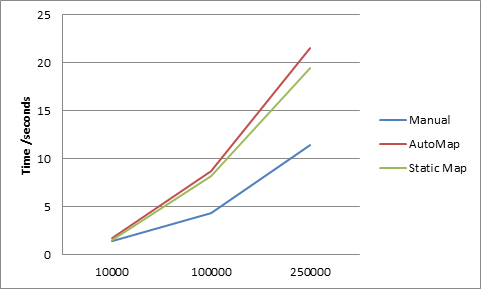
At 10K reads, performance is still comparable for auto-mapping and manual mapping, so whether you can use the DataReaderAutoMap would need to be looked at in context of your own data, mapping complexity and any upstream caching in your solution.