
The published SQL Azure documentation indicates that authentication may require the suffix "@servername" attached to your username (where servername is your SQL Azure server name), but there is little additional information provided to differentiate the required scenarios from the non-required. I recently attended a user group chat with David Robinson, Program Manager for SQL Azure. During his presentation, he also mentioned the occasional need for "@servername", but didn't get into detail. When pressed for more information, he said the issue had to do with the version of the Tabular Data Stream (TDS) client used to connect to SQL Azure, and specifically that v2.6 (or prior) didn't send the server name as part of the pre-login message. David didn't elaborate on which ODBC versions cooresponded to TDS v2.6 but we concluded during the chat that adding the "@servername" suffix in coded applications and config settings would be a good practice to avoid any unexpected issues.
This past weekend, I decided to add a CNAME entry to my DNS server to point to my SQL Azure server. My intention was to make the SQL Server Management Studio (SSMS) connection process smoother by helping me to remember an easier server name. I'm currently a beta subscriber to Office 365, so I added the CNAME in the DNS Manager and proceeded to my SSMS2K8 instance and intiated a new connection to my SQL Azure server.
DNS Manager.png)
SSMS 2K8 alone only supports Query connections and not Object Explorer connections, so I opened a new query page and selected Change Connection from the toolbar. I entered my new DNS name database.myoffice365domain.org along with my SQL Azure admin account and password.
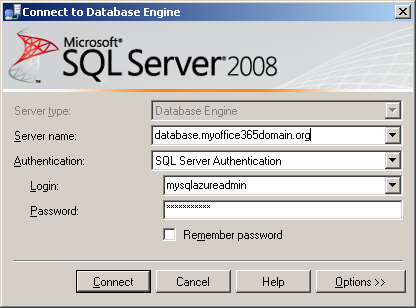
I naively expected it to connect successfully, but instead was presented with the following error message:
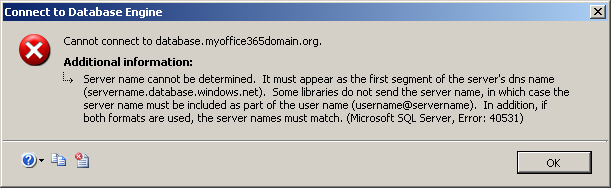
As indicated in the error message, I added the "@servername" suffix to my Login name and tried the connection again...
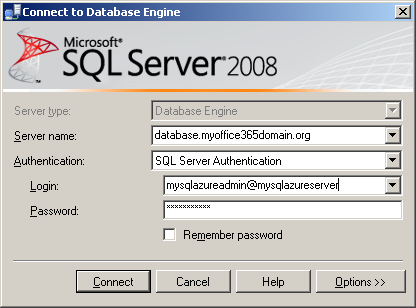
Success! My SSMS2k8 query connection succeeded and I was logged into my SQL Azure server using my custom DNS name. I'm not sure this technique will continue to work, or if other TDS client versions will yield the same behavior, but I was glad to see that at least in this scenario, one could mask the server name using DNS if desired. Of course, I still need to remember and record my SQL Azure server name in the @servername portion of the Login, but the exercise was a interesting testing and learning experience none the less.