
In my previous post here we've talked about how to calculate the sub-totals and grand total in GridView using JavaScript. In this post I'm going take more step further and will demonstrate how are we going to format the totals into a currency and how to validate the input that would only allow you to enter a whole number in the quantity TextBox.
Here are the code blocks below:
ASPX Source:
</head> <body> <form id="form1" runat="server"> <asp:gridview ID="GridView1" runat="server" ShowFooter="true" AutoGenerateColumns="false"> <Columns> <asp:BoundField DataField="RowNumber" HeaderText="Row Number" /> <asp:BoundField DataField="Description" HeaderText="Item Description" /> <asp:TemplateField HeaderText="Item Price"> <ItemTemplate> <asp:Label ID="LBLPrice" runat="server" Text='<%# Eval("Price","{0:C}") %>'></asp:Label> </ItemTemplate> </asp:TemplateField> <asp:TemplateField HeaderText="Quantity"> <ItemTemplate> <asp:TextBox ID="TXTQty" runat="server" onkeyup="CalculateTotals();"></asp:TextBox> </ItemTemplate> <FooterTemplate> <b>Total Amount:</b> </FooterTemplate> </asp:TemplateField> <asp:TemplateField HeaderText="Sub-Total"> <ItemTemplate> <asp:Label ID="LBLSubTotal" runat="server" ForeColor="Green" Text="0.00"></asp:Label> </ItemTemplate> <FooterTemplate> <asp:Label ID="LBLTotal" runat="server" ForeColor="Green" Font-Bold="true" Text="0.00"></asp:Label> </FooterTemplate> </asp:TemplateField> </Columns> </asp:gridview> </form> </body> </html>
Code Behind Source:
public partial class GridCalculation : System.Web.UI.Page { private void BindDummyDataToGrid() {
        DataTable dt = new DataTable();
        DataRow dr = null;

        dt.Columns.Add(new DataColumn("RowNumber", typeof(string)));
        dt.Columns.Add(new DataColumn("Description", typeof(string)));
        dt.Columns.Add(new DataColumn("Price", typeof(decimal)));

        dr = dt.NewRow();
        dr\["RowNumber"\] = 1;
        dr\["Description"\] = "Nike";
        dr\["Price"\] = "1000";
        dt.Rows.Add(dr);

        dr = dt.NewRow();
        dr\["RowNumber"\] = 2;
        dr\["Description"\] = "Converse";
        dr\["Price"\] = "800";
        dt.Rows.Add(dr);

        dr = dt.NewRow();
        dr\["RowNumber"\] = 3;
        dr\["Description"\] = "Adidas";
        dr\["Price"\] = "500";
        dt.Rows.Add(dr);

        dr = dt.NewRow();
        dr\["RowNumber"\] = 4;
        dr\["Description"\] = "Reebok";
        dr\["Price"\] = "750";
        dt.Rows.Add(dr);

        dr = dt.NewRow();
        dr\["RowNumber"\] = 5;
        dr\["Description"\] = "Vans";
        dr\["Price"\] = "1100";
        dt.Rows.Add(dr);

        dr = dt.NewRow();
        dr\["RowNumber"\] = 6;
        dr\["Description"\] = "Fila";
        dr\["Price"\] = "200";
        dt.Rows.Add(dr);


        //Bind the Gridview
        GridView1.DataSource = dt;
        GridView1.DataBind();

    }

    protected void Page\_Load(object sender, EventArgs e) {
        if (!IsPostBack) {
            BindDummyDataToGrid();
        }
    }
}
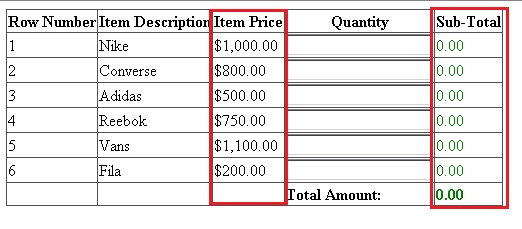
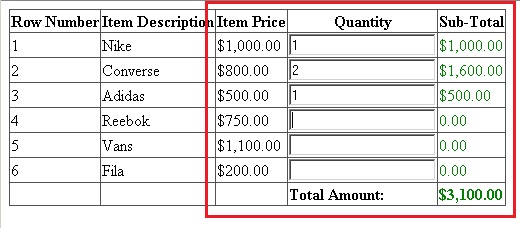
Running the code above will display something like this:
On initial load
After entering the quantity in the TextBox
That's it! I hope someone find this post useful!