
Few days ago, one of the members at asp.net forums ask if how to display the data that comes from the DataTable to a Table, so I decided to post the solution that I have provided there as a reference to others.
In this example I’m going to create a DataTable by hand and define the columns and row values manually and then display data to the Table.
Here are the code blocks below:
private DataTable CreateDataTable()
{
DataTable dt = new DataTable();
DataRow dr = null;
//Create the Columns Definition
dt.Columns.Add(new DataColumn("Column1", typeof(string)));
dt.Columns.Add(new DataColumn("Column2", typeof(string)));
dt.Columns.Add(new DataColumn("Column3", typeof(string)));
//Add the first Row to each columns defined
dr = dt.NewRow();
dr["Column1"] = "A";
dr["Column2"] = "B";
dr["Column3"] = "C";
dt.Rows.Add(dr);
//Add the second Row to each columns defined
dr = dt.NewRow();
dr["Column1"] = "D";
dr["Column2"] = "E";
dr["Column3"] = "F";
dt.Rows.Add(dr);
//You can continue adding rows here
return dt;
}
private void GenerateTable()
{
DataTable dt = CreateDataTable();
Table table = new Table();
TableRow row = null;
//Add the Headers
row = new TableRow();
for (int j = 0; j < dt.Columns.Count; j++)
{
TableHeaderCell headerCell = new TableHeaderCell();
headerCell.Text = dt.Columns[j].ColumnName;
row.Cells.Add(headerCell);
}
table.Rows.Add(row);
//Add the Column values
for (int i = 0; i < dt.Rows.Count; i++)
{
row = new TableRow();
for (int j = 0; j < dt.Columns.Count; j++)
{
TableCell cell = new TableCell();
cell.Text = dt.Rows[i][j].ToString();
row.Cells.Add(cell);
}
// Add the TableRow to the Table
table.Rows.Add(row);
}
// Add the the Table in the Form
form1.Controls.Add(table);
}
protected void Page_Load(object sender, EventArgs e)
{
GenerateTable();
}
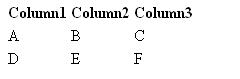
Running the code above will show this output below in the page.
That’s it! I hope you will find this example useful