
This demo shows how to generate a Table with TextBoxes dynamically based from the number of Columns and Rows entered from the TextBox control and print the values of the dynamically added TextBox on the page. See the screen shot below:
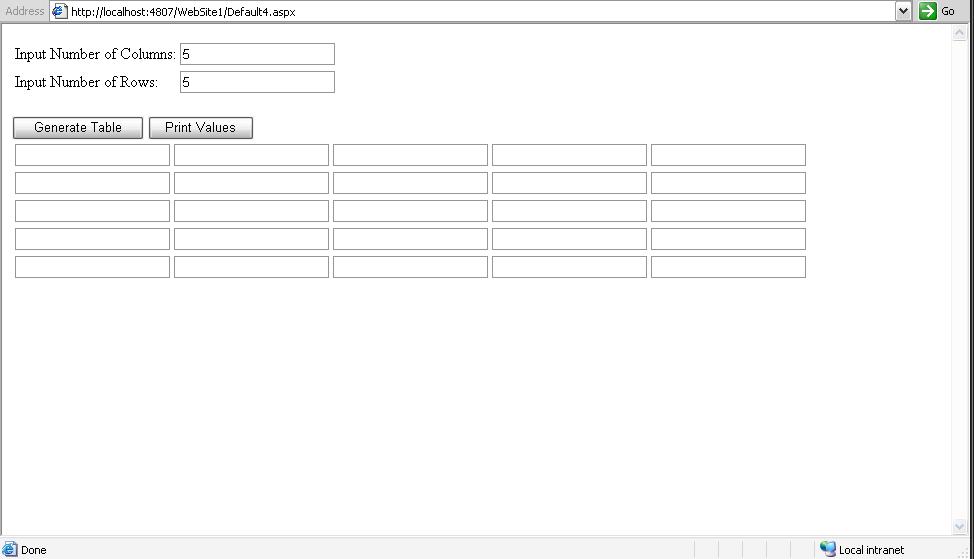
To start, let’s declare the following global variables below:
private int numOfRows = 0; private int numOfColumns = 0;
Here’s the code block for the generating the Tables with TextBoxes.
private void GenerateTable(int colsCount, int rowsCount){
    //Creat the Table and Add it to the Page
    Table table = new Table();
    table.ID = "Table1";
    Page.Form.Controls.Add(table);

    // Now iterate through the table and add your controls
    for (int i = 0; i < rowsCount; i++){
        TableRow row = new TableRow();
        for (int j = 0; j < colsCount; j++){
            TableCell cell = new TableCell();
            TextBox tb = new TextBox();

            // Set a unique ID for each TextBox added
            tb.ID = "TextBoxRow\_" + i + "Col\_" + j;
            // Add the control to the TableCell
            cell.Controls.Add(tb);
            // Add the TableCell to the TableRow
            row.Cells.Add(cell);
        }

        // Add the TableRow to the Table
        table.Rows.Add(row);
    }
}
As you can see from above code, we just simply create a blank table and add it to the form and then fill the table with columns and rows of TextBoxes based from the values of rowsCount and colsCount.
Now let’s call the method above on Page_Load event to recreate the Table when it post backs.
protected void Page_Load(object sender, EventArgs e){ // the two paramters are declared globally GenerateTable(numOfColumns, numOfRows); }
Now let’s call the method above on Button Click event (Generate Table) and pass the necessary parameters needed, see below code block.
protected void Button1_Click(object sender, EventArgs e){ //Check if the inputs are numbers if (int.TryParse(TextBox1.Text.Trim(), out numOfColumns) && int.TryParse(TextBox2.Text.Trim(), out numOfRows)) { //Generate the Table based from the inputs GenerateTable(numOfColumns, numOfRows);
        //Store the current Rows and Columns In ViewState as a reference value when it post backs
        ViewState\["cols"\] = numOfColumns;
        ViewState\["rows"\] = numOfRows;
    }
    else
    {
        Response.Write("Values are not numeric!");
    }
}
Since we are done creating our Table with TextBoxes dynamically then we can grab the values entered from the dynamic TextBox using Request.Form method. Here’s the code block below.
protected void Button2_Click(object sender, EventArgs e){ //Check if ViewState values are null if (ViewState["cols"] != null && ViewState["rows"] != null) { //Find the Table in the page Table table = (Table)Page.FindControl("Table1"); if (table != null) { //Re create the Table with the current rows and columns GenerateTable(int.Parse(ViewState["cols"].ToString()), int.Parse(ViewState["rows"].ToString()));
        // Now we can loop through the rows and columns of the Table and get the values from the TextBoxes
        for (int i = 0; i < int.Parse(ViewState\["rows"\].ToString()) ; i++)
        {
            for (int j = 0; j < int.Parse(ViewState\["cols"\].ToString()); j++)
            {
                //Print the values entered
                if (Request.Form\["TextBoxRow\_" + i + "Col\_" + j\] != string.Empty)
                {
                    Response.Write(Request.Form\["TextBoxRow\_" + i + "Col\_" + j\] + "<BR/>");
                }
            }
        }
    }
}
}
That’s it! I hope someone find this pot useful!