
I was recently working on a Windows 8 app, and the application was crashing occasionally. When resuming the application, the app would crash and close immediately without providing any feedback or information on what went wrong. The crash was very difficult to reproduce, and I could never get the crash to occur when I was debugging through Visual Studio. My app was crashing, and I had no idea what was going wrong! HELP!!!
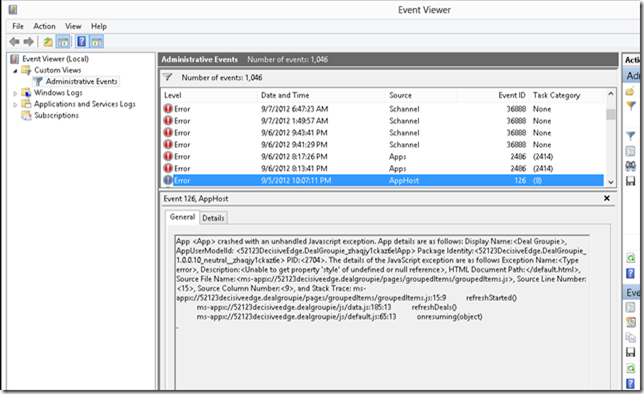
After doing some digging, I found that when a Windows 8 Store App crashes, an error is logged in Windows Administrative Events. You can view the details of any app crash by launching the Event Viewer and selecting Administrative Events under Custom Views. The Source of the error will be listed as AppHost. AppHost is the process that runs your Windows 8 Store App. The error details contain all the information you would expect to find, including a stack trace and line numbers.
Windows 8 Tip: A shortcut for launching the Event Viewer in Windows 8. Right click on the bottom left corner of your desktop (where you normally click to go to the Start Screen). A menu will appear with shortcuts to a number of common system tasks such as Event Viewer, Task Manager, Command Prompt, and Device Manager.