
The Tech
- c#.net 3.5
- winforms
Background
So, I thought I'd be crafty and jig my UI to save users one button click. However, my lust for savyness was soon thwarted by a textbox controls' focus event.
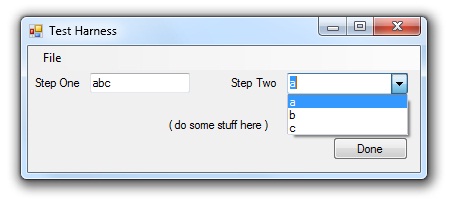 | As per my mock up to the left, my best case scenario was to start users in the TextBox control and have them to type in a value and tab to the ComboBox control. When the TextBox loses its focus the value would be validated and the ComboBox would be populate the appropriate values retrieved from the database. |
Of course, there was lots of more cool features involved but for the sake of this post I'll keep it simple. The code I chose to implement the above scenario involved the Validating & Validated events:
 MyTextBox.Validating += new CancelEventHandler(MyTextBox\_Validating);
 MyTextBox.Validated += new EventHandler(MyTextBox\_Validated);
All was good until I entered a partial value in the TextBox and tried to close the form from three exit points: file->exit, exit button, and the infamous Mr. 'x'. That is when I discovered the following problems:
- When a user closed the form via the Exit button, the validation logic would fire.
- When a user closed the form via the 'x' button within the ControlBox, the validation logic would fire.
- And in both the above instances the form would either prompt the user to resolve the issue and remain open or the control would continue to process the logic, then eventually close.
What You Need to Know
It is easy enough to understand what the underlying problem is:
- when the TextBox loses focus it fires the Validating event.
- If the value is invalid, it prevents you from moving on (as per e.Cancel = True).
- However, if the value is valid the code continues to fire off the logic and make its round trip to the database, and finally exit the form.
However, all I wanted to do was exit the form in the first place and not spend the extra cycles querying the database or making things happen on the form before closing.
What was making it tough was the validating event was firing before any other event. I searched google for some ideas and I came across the following snippet of code where someone had suggested it would fire before the Validating event. However, it did not...
10-Sept-2009: Update: The following code works as well...courtesy of areB's comment below...
    const int SC\_CLOSE = 0xF060;
    const int WM\_SYSCOMMAND = 0x112;
    private bool isFormClosing = false;

    protected override void WndProc(ref Message m)
    {
        // wrong placement of base call, lesson: don't assume cut'n'paste code is correct!
        //base.WndProc(ref m);
if (m.Msg == WM_SYSCOMMAND && m.WParam.ToInt32() == SC_CLOSE)
{
this.isFormClosing = true; // check for this flag in your validating events
//Application.Exit();
}
base.WndProc(ref m);
}
So, at my wits end, the only concievable way I could think of getting around this problem was knowing when the close event was coming up in the near future and then...*BAM!*...it hit me. Stack Trace! *giggle*
So I jigged up the following code:
    private const string WMCLOSE = "WmClose";
    public bool IsFormClosing()
    {
        System.Diagnostics.StackTrace stackTrace = new System.Diagnostics.StackTrace();
       foreach (System.Diagnostics.StackFrame sf in stackTrace.GetFrames())
            {
                if (sf.GetMethod().Name == WMCLOSE)
                {
                    return true;
                }
            }
        return false;
    }
I tossed the above code at the beggining of my Validating event, typed a couple letters in the box, click the infamous (more famous than famous) Mr. 'x', and the form closed (insert best Arny voice) IMMEDIATELY.