
Updated 12/18/2006 - fixed issue with not listening for Microsoft.Win32.SystemEvents.SessionEnded event - can't logoff/shutdown issue
Updated 11/24/2006 - added check if system implements the required WMI objects.
Updated 11/30/2006 - fixed GDI memory leak
Given the issues with Toshiba laptops running very hot with Vista Glass Aero enabled, and just in general with XP as well ( Hot enough to burnout motherboards that require replacements from the manufacturer) I wrote this utility to give me system tray status on the current CPU temperature. I'm currently adding GPU temperature but that requires distribution of licensed components (dynamic libraries).
Installation Files - a self extracting Exe file that contains the MSI installer - built with WinRar.
Solution Files - only contains projects with no private certificates - you'll need to change some things to get it working.
Basically, it just sits in your system tray showing the current CPU temperature with the following color schemes:
- Green - Running at below 50% of critical temperature
- Yellow - Running at > 50% but < 75% of critical temperature
- Red - Running >= 75% of critical temperature.
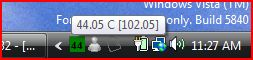
These settings are configurable if you modify the TemperatureMonitor.exe.config file, along with the maximum readings.
The first reading shown is the current CPU temperature; the second is the Critical Temperature as reported by WMI.
The WMI namespace and object is root\WMI, MSAcpi_ThermalZoneTemperature
WMI unfortunately requires elevated permissions on Vista.
The task bar icon has 2 menu options;
- Restore - restores the window as shown below
- Exits the application
The main window is show below:
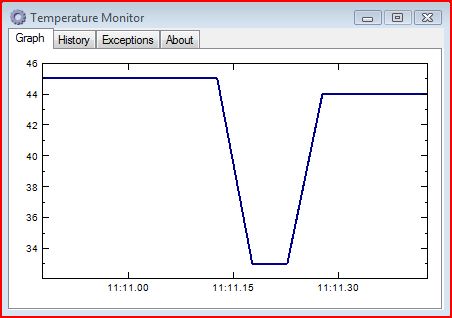
- The first tab just shows a Line Plot of the history of readings
- Second tab is a list of those readings
- Third tab is used for diagnostics and has a list of any exceptions. There's also a file written to the application directory but it only has the last exception
- The last tab is the about box that also has the "Install Public Certification" action button on it.
The assembly is signed with my sample signing certificate. If you click on the about box you can install the public certificate but it still requires user action to launch in Vista given UAC restrictions and Windows Defender doesn't recognize the program.
Use at your own risk!!!
Some users are reporting issues. This is dependant upon specific WMI obects being present and implemented on your system.
To Test, put the following into a VBS file, then run the following script from an elevated command prompt as follows:
cscript CpuTemp.vbs
============
''''On Error Resume Next
strComputer = "."
Set objWMIService = GetObject("winmgmts:\\" & strComputer & "\root\WMI")
Set colItems = objWMIService.ExecQuery( _
"SELECT * FROM MSAcpi_ThermalZoneTemperature",,48)
For Each objItem in colItems
Wscript.Echo "-----------------------------------"
Wscript.Echo "MSAcpi_ThermalZoneTemperature instance"
Wscript.Echo "-----------------------------------"
Wscript.Echo "CurrentTemperature: " & objItem.CurrentTemperature
Wscript.Echo "CurrentTemperature: " & objItem.CriticalTripPoint
Wscript.Echo "CurrentTemperature: " & objItem.ThermalStamp
Next